.png)

.jpeg)


If you're looking for a free truck driver settlement sheet template, you're likely trying to make your payroll process more efficient.
In this guide, we share two free truck driver settlement templates—one for owner-operators and one for company drivers:
- Owner-operator settlement sheet template: Built for 1099 contractors paid as a percentage of the load, with common deductions like escrow, fuel card advances, truck lease payments, occupational accident insurance, IFTA, and more.
- Company driver settlement sheet template: Built for W-2 employees paid per mile or per load, with standard payroll deductions like taxes, FICA, benefits, and other withholdings.
Both are ready to use in Excel or Google Sheets, and both automatically calculate gross pay, deductions, reimbursements, and net pay as you fill them in, to help you save time on data entry.
But it’s worth being aware from the top that even the best template won’t be the most efficient solution for your payroll management.
Templates work when you have a few drivers. But as your operation grows, spreadsheets become harder to maintain, especially when you’re pulling data from multiple sources and trying to keep accurate records.
That’s why we’ll also show you how you can automate the process of creating driver settlements completely, using Toro TMS.
Toro is a trucking management software (TMS) that centralizes all your load data into one system and saves you up to 70% of time on back-office tasks. It works by using the load data entered into the system at dispatch to automatically generate driver settlements.
Book a demo to see how Toro TMS automates driver settlements as your operation grows.
Free truck driver settlement sheet template
You can download and make copies of both versions of our truck driver settlement sheet template below.
Each template is built for a different driver type and includes pre-built formulas to calculate pay automatically.
1. Owner-Operator Settlement Sheet Template (1099)
Best for drivers who are independent contractors and are paid as a percentage of the load.
This template tracks:
- Load revenue/driver percentage
- Fuel advances and card transactions
- Escrow contributions
- Chargebacks and deductions
- Reimbursements
- Net settlement
2. Company Driver Settlement Sheet Template (W-2)
Best for employees paid per mile, per load, or hourly.
This template tracks:
- Miles or load-based pay
- Bonuses (detention, layover, etc.)
- Payroll deductions (taxes, benefits, withholdings)
- Reimbursements
- Net pay
Not sure how to fill out the template? We've included a step-by-step walkthrough at the bottom of this article.
Why even the best template has its limitations when managing payroll
For an owner-operator settling his own pay or a small carrier with a few drivers, a weekly spreadsheet is a reasonable system.
The issue is that every number comes from a different source: dispatch, fuel cards, cash advances, expense receipts, and separate ledgers for escrow, insurance, and IFTA. When you’re managing multiple drivers running high volumes of loads each day, it becomes extremely difficult to organize all this information manually.
At a certain point, the limitations become hard to ignore:
- Settlement processing turns into tedious admin work. Creating settlements each week requires pulling data from multiple systems, re-entering it, and checking it by hand. As volume grows, so does the time it takes to produce each trucking settlement.
- Accuracy becomes harder to maintain. When data is spread across systems and entered manually, small errors and omissions are easy to overlook, and they directly affect what drivers are paid.
- Recordkeeping is harder to manage and rely on. In a growing operation, if your past settlements live across spreadsheets, they risk becoming a chaotic, disorganized system. When questions come up later—like a driver dispute or a 1099 audit—it takes time to track down and piece together what was paid and why.
- Real-time visibility isn't possible. A spreadsheet only reflects what was entered the last time someone updated it. If dispatch changes a rate, a driver asks what they've earned so far, or an accessorial gets added mid-load, nothing updates on its own—someone has to chase down the change and re-enter it across every file it touches.
These are the problems a trucking management software, like Toro TMS, solves. Toro TMS brings dispatch, settlements, expenses, and supporting documents into one system, so driver pay is generated from your actual operations—not rebuilt manually each week.
How Toro TMS eliminates repeat data entry and saves your back office 70% of time
Toro captures every piece of settlement data at the moment it's created—at dispatch, on the truck, at the scale, at the fuel pump—so the settlement is already built by the time payday comes around.
Typically, trucking companies find themselves having to enter the same data into their system as many as six or seven times, such as at dispatch, driver comms, billing, and payroll. With Toro TMS, this repeat data entry is eliminated entirely—and driver settlements can be generated automatically, using data that’s already in your system.
In the rest of this section, we demonstrate how Toro automates your entire workflow by:
- Capturing rate and pay data at dispatch so the numbers behind a driver's settlement are already in the system the moment a load goes out.
- Collecting BOLs, scale tickets, and receipts through a text link—no driver app required—so every document is tied to the right load automatically.
- Applying each driver's profile to every load to automatically generate a ready-to-send settlement PDF at the end of the pay period, with load-level detail that makes complex pay structures, deductions, and reimbursements easy to verify.
- Keeping every settlement as a permanent, searchable record and syncing pay data to QuickBooks or third-party payroll providers for taxes and benefits.
Capture every load's pay details once at dispatch for accurate, ready-to-send settlements
Every load a dispatcher builds produces data someone else will need later for invoicing, settlements, IFTA, and reporting. Often, that information gets scattered across emails, text threads, and loose papers, so the back office ends up re-gathering and re-entering the same details multiple times just to keep records straight.
Toro TMS removes that repetitive work by capturing every load detail once, giving dispatchers everything they need to build and send a load without jumping between tools.

Here's what that looks like in practice:
- A single-screen dispatch dashboard brings trucks, drivers, schedules, and orders together. Dispatchers can see driver availability, upcoming jobs, and real-time truck locations through ELD tracking, all in one view.
- Load details are recorded in full the first time a dispatcher builds the load. Customer, rate, origin and destination, commodity, accessorials, driver, and equipment are all captured up front and stay tied to the load from there on out. That way, nobody has to go looking for them later.
- Reusable load templates cut down on repeat data entry. For recurring routes and customers, dispatchers can select a saved template where rates, locations, commodity type, and delivery instructions are already filled in.
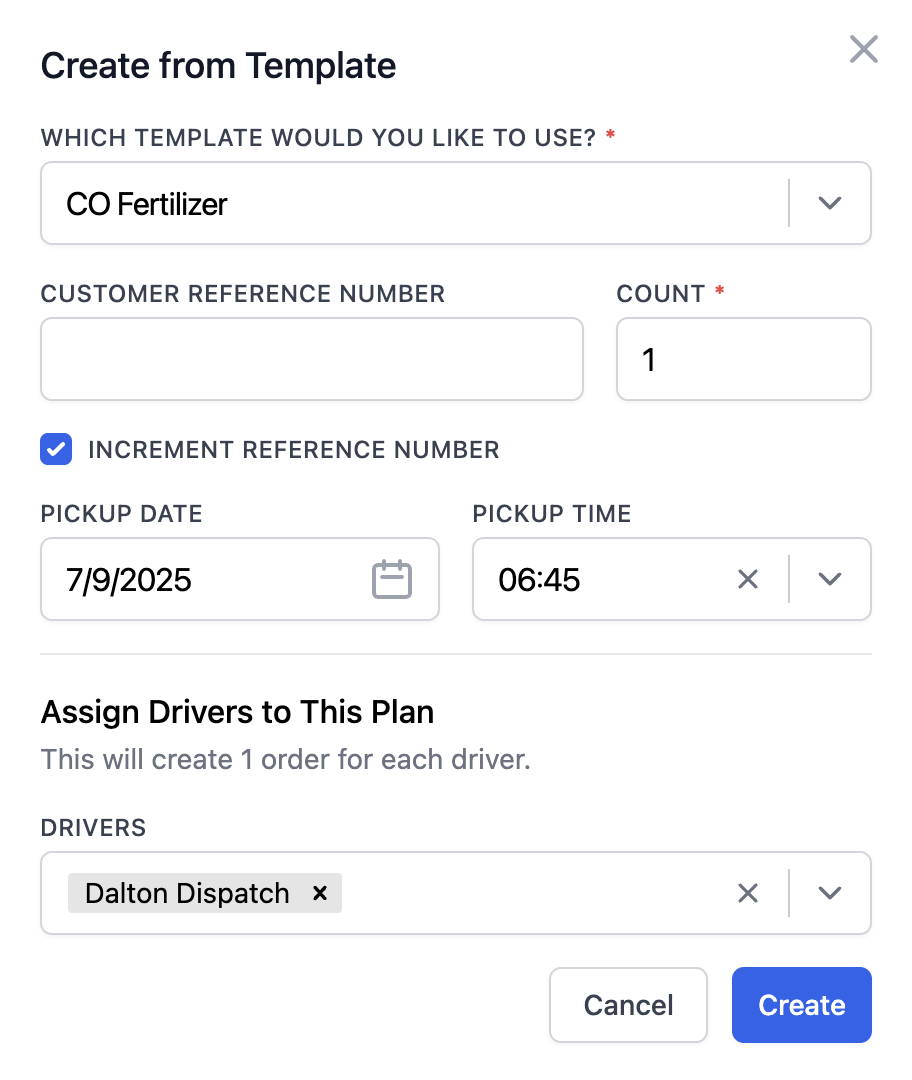
- ELD integration pulls total miles, hours, and arrival and departure times directly from the truck, feeding that data back into the load record automatically rather than relying on a driver's logbook or an after-the-fact report.
Once the load is created, the system keeps everything in sync. If a dispatcher makes a change—like a rate correction or an added stop—it updates in real time everywhere that information is needed downstream, including to the driver's settlement. Every back-office task that depends on the load is pulling from the same source of truth.
Read more: How to choose a dispatch software for trucking your teams will actually use
Collect BOLs and scale tickets digitally so every document ties to the right load
Every settlement depends on paperwork that doesn’t originate in the office. Bills of lading (BOLs) and proof of delivery documents confirm that a load was delivered. Scale tickets support weight-based pay. If any of it is missing, lost, or illegible when the pay period closes, the settlement either has to wait or go out incomplete.
Without a TMS, that paperwork often still comes back to the office manually. For local and regional carriers with drivers running four to eight loads a day, that's a stack of paper and a scattered inbox someone has to sort, scan, and enter into a spreadsheet before payroll can even begin.
Toro TMS replaces that workflow entirely by letting drivers submit every document digitally the moment it's in their hands. Here's how it works:
- Drivers upload BOLs and scale tickets through a link they receive from dispatch via text. They don’t need to download an app or learn a new system—they just tap the link, snap a photo, and submit.
- Each document attaches to the correct load automatically, so paperwork is filed with the job from the moment it’s submitted. The back office doesn’t have to match tickets to loads by hand.
- Toro extracts key data—reference number, weight, and commodity—directly from uploaded documents. Weights are automatically converted to the units used in your pay structure (tons, pounds, etc.), so settlement calculations reflect the actual values recorded at the scale.

With paperwork captured and filed in real time, the back office doesn't have to wait on end-of-week drop-offs or chase down missing tickets. Every document is already where it needs to be—attached to the correct load and driver—when it’s time to bill or settle.
Read more: Trucking ticket management software to better manage your paper tickets
Apply each driver's profile to every load to automatically calculate pay, deductions, and reimbursements
Driver pay is one of the more complicated parts of a trucking business. One driver might be paid 72% of linehaul. Another might be paid hourly with a weekly truck lease deduction and a one-off chargeback from a damaged load last week. When the pay period closes, all of that has to land on a single settlement—per driver, correctly, every time.
Toro TMS handles all of that through a driver profile—a one-time configuration, set per driver, that the system applies to every load. Driver pay is then auto-calculated as loads are dispatched and delivered.

A driver profile can include:
- Pay structure: Percentage of linehaul, per-mile, per-ton, hourly, or a combination for drivers whose loads are paid differently
- Recurring deductions: Truck lease, trailer rent, escrow, insurance, permits
- One-off deductions: Chargebacks, damage claims, fuel card advances
- Reimbursements: Tolls, lumper fees, out-of-pocket expenses
- Accessorials: Detention, layover, tarp pay, stop pay
- HR details: CDL and medical card expirations, direct deposit info, etc.
Because the profile is applied as loads are completed (not at the end of the week), driver pay calculations aren’t a separate task at the close of the period—they’re already complete.
Toro uses that data to generate a PDF settlement automatically for every driver. Each statement consolidates all pay components and calculates the final net amount, ready to send to the driver. This way, Toro turns payroll from a full-day end-of-week project into something that runs itself in the background.

Read more: Driver settlement software: How to automate your payroll process
Keep every settlement as a searchable record and easily sync pay data to QuickBooks
After a settlement goes out, the data behind it still needs to reach accounting for your books. The settlement itself also needs to remain accessible for things like driver disputes or audits.
In a spreadsheet-based workflow, this typically means saving the file somewhere and then re-entering key figures into your accounting system.
Toro keeps the settlement and its underlying data connected to the rest of the system, so nothing has to be reconstructed or re-entered later:
- Every settlement is stored as a permanent, searchable record. Any driver's pay history can be retrieved weeks or years later, along with the loads, tickets, deductions, and source documents tied to each one.
- Records are searchable across filters such as driver, date, load, customer, or commodity, reducing the time spent locating a specific pay history from minutes to seconds.
- Settlement data exports to QuickBooks or other accounting systems, mapping each transaction to the correct accounts without duplicate entry.
- For W-2 drivers, the same data can be handed off to payroll providers like ADP or Paychex to process taxes, benefits, and direct deposits.

This approach replaces an unreliable paper trail with a complete audit record.
Read more: QuickBooks trucking software: How to save 70% of time on back-office tasks
See where your operation is profitable with advanced reporting tools
As driver settlements are built from the same data that runs your operation, that data can be used for more than just payroll. It becomes the foundation for understanding performance across your business.
Toro TMS provides built-in reporting that turns that data into clear, actionable insights.
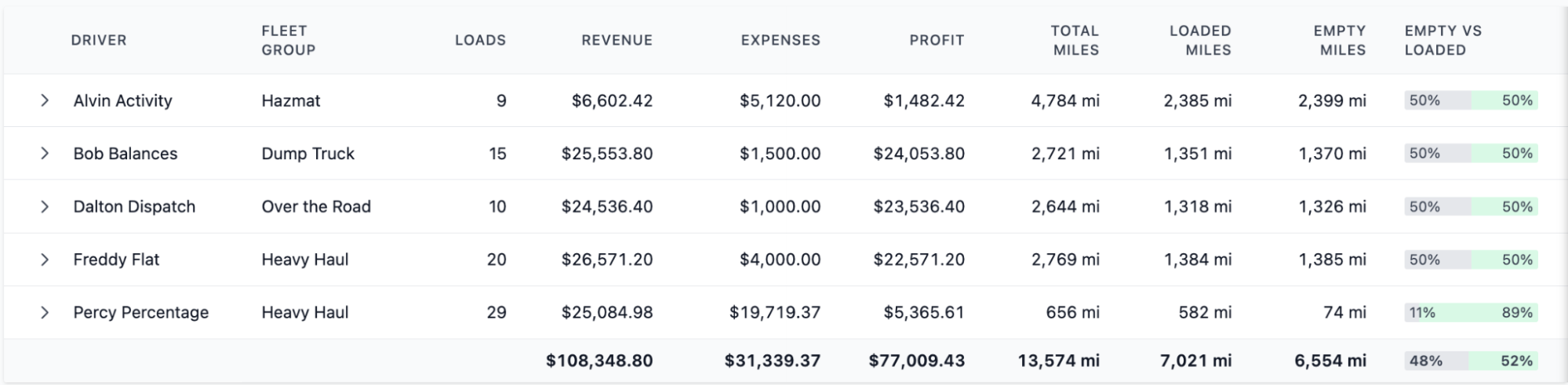
Reports in Toro include:
- Profitability by driver, truck, customer, and load
- Cost-per-mile and revenue-per-mile trends
- Detention and accessorial tracking
- Driver utilization over time
- Empty-mile reporting to identify inefficient routes
These insights help you understand what’s driving profit, what’s reducing it, and where to make adjustments. They show how each week's settlements fit into the bigger picture of which drivers and routes are profitable, and where adjustments will have the biggest impact.
Read more: Profit & loss statement for a trucking company: Free template (+ an alternative)
Toro TMS: Automating driver settlements and eliminating manual work
A spreadsheet can handle driver settlements when the operation is small and pay is simple. But as volume increases, settlement day turns into hours of manual work—and the numbers become harder to trust. What looks like a simple process quickly turns into repeated data entry and time spent tracking down missing or inconsistent information.
Toro TMS captures every piece of settlement data at the moment it's created, so the settlement is automatically built by the time the pay period closes.
With Toro, you can:
- Attach rate and pay information to every load at dispatch, so the revenue feeding each settlement is already in place before the truck rolls.
- Collect BOLs and scale tickets digitally in real time, so every reimbursement and deduction ties back to a document on the load it came from.
- Apply each driver’s pay terms automatically, so variations in pay structure don’t require manual setup or separate calculations.
- Generate itemized PDF settlements at the close of every pay period, with a permanent, searchable record behind every line item.
Book a demo today to see how Toro TMS turns tedious weekly settlement work into a fully automated process.
How to fill out the template
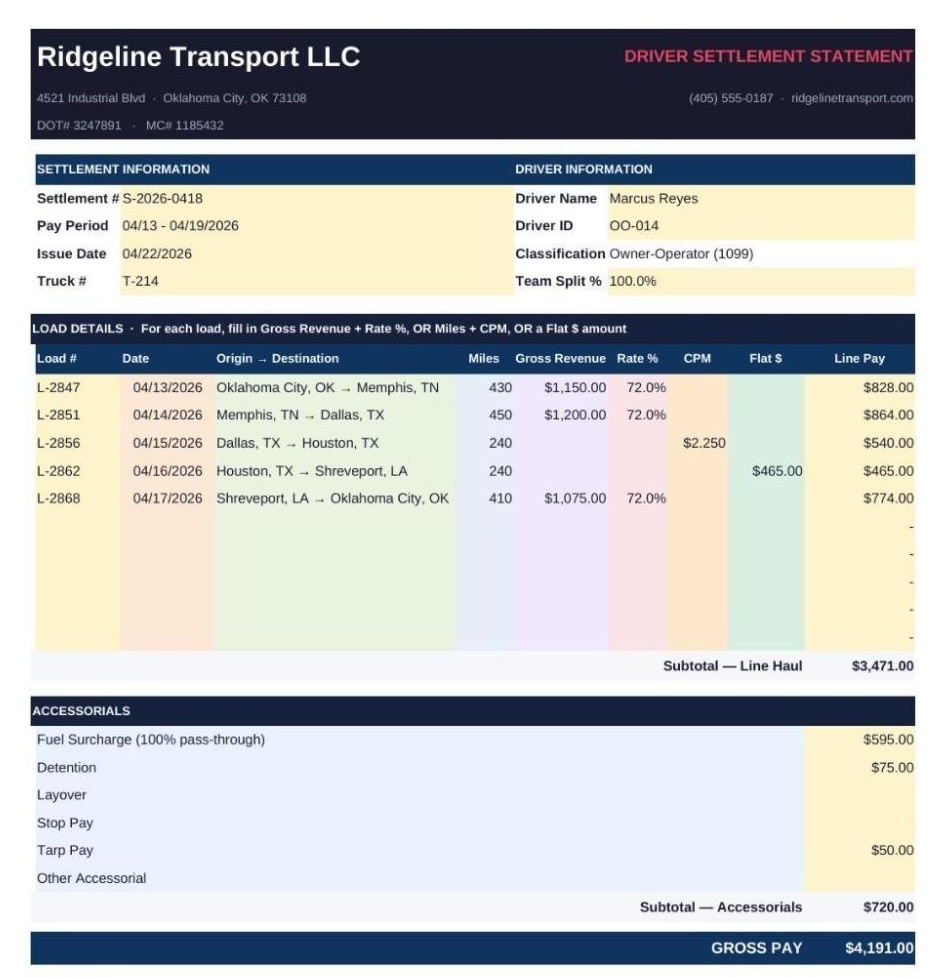
To show how our truck driver settlement sheet works, we've filled in the Owner-Operator version with a realistic example.
The scenario: Ridgeline Transport LLC, a small Oklahoma-based flatbed carrier, is settling a week's pay with Marcus Reyes, a leased owner-operator paid 72% of the linehaul.
The tutorial below covers each section of the template, what goes in it, and why it matters.
Carrier header
The dark bar at the top is where your company information goes: company name, business address, phone, website, and DOT/MC numbers.
Settlement and driver information
Settlement Information identifies the pay statement itself. The settlement number should be unique for every statement you issue. The pay period is the date range the loads were covered, not the date you're paying. The issue date is when the settlement is produced and sent.
Driver Information identifies who's getting paid. For this template, classification is always Owner-Operator (1099).
The fourth row handles two optional fields:
- Truck # is an asset tag for carriers that track settlements by unit.
- Team Split % defaults to 100% for solo drivers. Only change it if two drivers are splitting the load (usually 50/50). The split applies to Line Pay automatically, so the rest of the settlement (accessorials, deductions, reimbursements) still gets entered per driver.
Load details
This is where you enter every load the driver ran during the pay period. For each row:
- Load #: Internal load number the run was dispatched under.
- Date: Delivery or dispatch date (pick one convention and stick with it).
- Origin → Destination: Pickup city to delivery city.
- Miles: Loaded miles on that run.
- Gross Revenue: The linehaul the carrier billed the customer, not including fuel surcharge or accessorials (those get broken out separately in the next section).
- Then, for the pay structure, you fill in one:
- Gross Revenue + Rate %: If the load was paid as a percentage of the linehaul rate
- CPM: If the load was paid per mile
- Flat $: If the load was paid as a fixed amount
For each load, you fill in the columns that match how that load was paid, and the Line Pay column auto-calculates based on whichever pay input you used. The template is structured this way to accommodate carriers that use more than one pay structure.
Marcus's week shows all three in action:
- Rows 1, 2, and 5 (OKC → Memphis, Memphis → Dallas, Shreveport → OKC) are his typical flatbed percentage loads. He enters Gross Revenue and his 72% rate. Line Pay = Gross × 72%.
- Row 3 (Dallas → Houston) was a short spot-booked load that Ridgeline dispatched on a flat CPM rate. Marcus enters Miles and CPM. Line Pay = Miles × CPM. Gross Revenue and Rate % stay blank.
- Row 4 (Houston → Shreveport) was a short regional run with a dedicated customer paying a flat $465 regardless of miles. Marcus enters $465 in the Flat $ column. Line Pay pulls it directly.
The Subtotal — Line Haul row at the bottom totals all five loads.
Accessorials
Accessorials are anything the driver earns on top of the linehaul—extras that come up on real freight. Each line has a label and an amount column. In this example:
- Fuel Surcharge (100% pass-through): Ridgeline bills its shippers a fuel surcharge of roughly $0.35 per mile on top of the linehaul and passes all of it to the OO. This is standard in most leased-OO agreements, since the OO is the one paying at the pump.
- Detention: Marcus sat at the Dallas shipper for two hours past his scheduled appointment. Ridgeline's contract with that customer bills detention to the shipper and passes it through to the driver.
- Tarp Pay: The Memphis → Dallas load was steel coil, which required tarping.
- Layover, Stop Pay, and Other Accessorial are left blank this week.
Subtotal — Accessorials and Gross Pay are totaled automatically. These are Marcus's total earnings before deductions.
Deductions
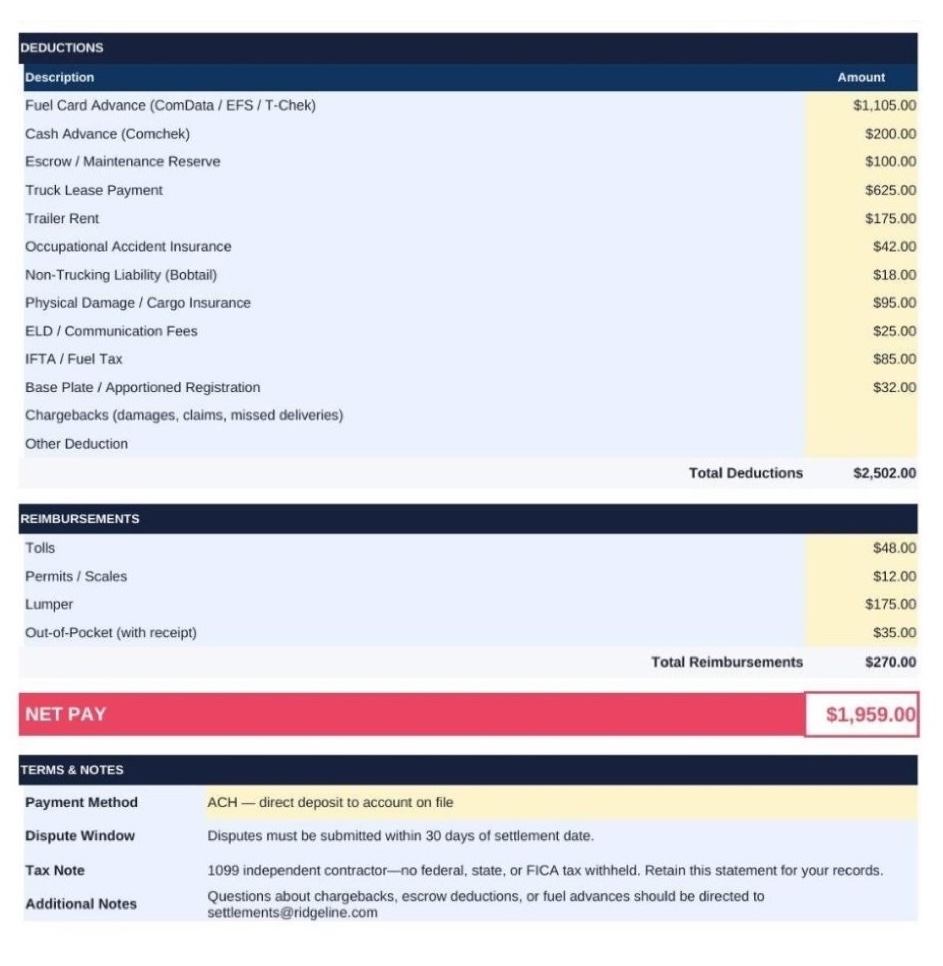
This is usually the most complex part of an owner-operator settlement, and it's where pay disputes tend to start. Every deduction should be a pre-agreed item in the driver's lease or contractor agreement. Nothing here should surprise them on settlement day.
- Fuel Card Advance: Fuel pumped on Ridgeline's fuel card during the week.
- Truck Lease Payment: Marcus is in a lease-purchase program on a 3-year-old truck.
- Escrow / Maintenance Reserve: Weekly contribution to Marcus's reserve fund—not a charge. It's money held for future maintenance, damages, or any end-of-lease balance, and refundable when the OO leaves (minus anything owed).
- Trailer Rent: Ridgeline owns the flatbed trailer—Marcus rents it.
- Insurance stack: This could include occupational accident, non-trucking liability, and physical damage/cargo, a fairly standard bundle for leased flatbed OOs.
- Chargebacks and Other Deduction are blank this week.
Reimbursements
Reimbursements are the opposite of deductions—things the driver paid out of pocket that the carrier owes back. They get added to pay, not subtracted.
Most carriers require a receipt before reimbursing. It's worth stating that policy on the settlement itself.
Net pay
The net pay—the amount the driver actually gets paid—auto-calculates. In this case, he receives it via ACH direct deposit.
Terms and notes
This section outlines how payments are issued, how to report errors, and other related details.
- Payment Method: ACH, check, or fuel card credit.
- Dispute Window: How long the driver has to flag an error. Thirty days is a reasonable default.
- Tax Note: A one-line reminder that no federal, state, or FICA tax was withheld (since OOs are 1099 contractors). For the company driver template, this note changes to reflect W-2 withholding.
- Additional Notes: The settlements contact email, so truckers know where to send questions.