.png)




If you’re looking for a profit and loss (P&L) statement for a trucking company, you’re probably trying to get a clearer picture of how much you’re spending to keep your trucks running and whether your operation is actually profitable. You may also be looking for places where you can cut costs or improve your margins.
To help with that, we created a free P&L statement template designed specifically for trucking companies, plus a straightforward breakdown of how to complete it.
A P&L statement shows your revenue, expenses, and gross and net profit over a specific period. For trucking companies, it’s especially important because it helps you:
- Understand cash flow
- See how things like fuel, driver pay, maintenance, and insurance impact your bottom line
- Make smarter pricing and rate decisions
- Prepare for tax filing
Although, even if you have a template to work from, keeping it updated can be a time-consuming task for your back-office team. They’ll need to collate data from multiple sources, including load details, mileage, fuel, driver pay, scale tickets, and maintenance, and add it to the statement themselves.
With a few trucks, it’s manageable to add this information manually. But for a fleet with more than a handful of trucks, manually filling out a spreadsheet becomes slow, labor-intensive, and prone to errors.
That’s why this guide doesn’t just give you a template. We also show you a smarter long-term solution.
Toro TMS is trucking software built to automate the data that feeds your P&L statement and other back-office tasks—so your numbers stay accurate and your team isn’t stuck re-entering the same information in multiple places.
In this article, we walk you through how to build a profit and loss statement for your trucking company using our free template. Then, we explain how Toro TMS automates the operational data behind your P&L statement, to give you clearer insights into your finances and cut your data entry by 70%.
Interested in how Toro TMS automates the data behind your P&L statement and makes your operation more profitable? Book a demo to learn more.
Profit and Loss Statement Template for Trucking Companies
You can download our free trucking P&L statement template here.
This template is built specifically for truckers. It includes the revenue and expense categories most fleets rely on, such as freight revenue, payroll, fuel, repairs, insurance, and other operating and overhead costs.
How to use the template (and what each section means)
Our template is organized into five parts: income, direct operating costs, gross profit, overhead/admin expenses, and net profit.
To make it as easy as possible to use, all input cells—the ones where you type in your numbers—are shaded light green. Anything that’s auto-calculated is shaded light blue, so you can instantly see what updates on its own as you enter your revenue and expenses.
Here’s what goes into each section and how to fill it out:
1. Income (your total revenue)
This section captures every dollar your business earns from hauling loads.
How to fill it out: Choose the period of time you want the P&L to reflect—such as a specific week, month, quarter, or year—and enter the revenue earned during that timeframe. The template will calculate total income automatically.
2. Direct operating costs
These are the business expenses directly tied to hauling freight. Note that we separate expenses into direct operating costs and overhead because each one affects your profit differently.
Direct operating costs rise and fall with the loads you haul—fuel, driver pay, maintenance—while overhead (like insurance or office wages) stays relatively steady. Separating these helps you see:
- How much it actually costs to run your trucks
- Whether your day-to-day operations are profitable before overheads
- Which part of the business is driving up expenses
This makes it much easier to understand where your money is going, see what’s impacting your bottom line, and understand your financial health.
How to fill it out: Add the overhead expenses for the week, month, or quarter you’re tracking. The template will calculate the total for you.
3. Gross profit
This is your total income minus your direct operating costs. It gives you a quick snapshot of how efficiently your fleet generates revenue before overhead.
Our template calculates this automatically.
4. Overhead/administrative expenses
These are the background expenses that keep the company operating. We separated these expenses from direct operating costs because overhead doesn’t change load by load—it’s spread across your entire operation. Separating it helps you understand your true operating margin and what it takes to keep the business running.
How to fill it out: Add the overhead expenses for the week, month, or quarter you’re tracking. The template will calculate the total for you.
5. Net profit
The template calculates your net profit, which is your gross profit minus overhead expenses.
This final number is calculated automatically and reflects whether your business generated a profit for the period or operated at a loss, giving you a snapshot of your financial performance. The cell turns green for profit and red for loss.
The Limitations of Spreadsheet P&Ls: Too Much Data to Manage, Too Much Manual Work, Too Many Errors
A spreadsheet P&L statement is essential for business owners in the trucking industry. But there are some serious limitations to what templates can do for you, as they don’t provide the actual operational data your financial statement depends on.
With a template, every number on your P&L statement has to be pulled manually—from dispatch, truck drivers, fuel receipts, scale tickets, emails, and maintenance logs. This might not be a ton of work for an individual driver or an owner-operator with a few trucks. However, in larger businesses, three main issues arise:
- It’s much harder to keep the spreadsheet accurate. When information is scattered across dispatch, drivers, paper tickets, texts, and emails, small mistakes and missing documents compound quickly. Even minor errors can throw off your profit numbers.
- Updating a spreadsheet turns into hours of administrative work each week. Every load creates more data to collect—more miles, more fuel receipts, more driver pay calculations, and more documents that need to be tracked. All of that information then has to be entered manually, often more than once, across different spreadsheets and systems.
- These P&L statement spreadsheets don’t offer clear insights into what’s working and where to improve. That means it's harder to identify things like which loads drag down margins, which routes waste fuel, or where driver or equipment-level costs are creeping up.
However, spreadsheet templates are not the only way to create P&L statements. Increasingly, trucking companies are turning to software to automate this data management—and get deeper insights into their business performance.
The best tool for this job is trucking management software (TMS) such as Toro TMS. It keeps everything in one place—dispatch, load details, driver activity, documents, and billing—so you’re not chasing information across texts, paper tickets, and spreadsheets. With all your workflows connected, you get a clear view of what’s happening in your operation, and the software handles the tasks that normally take hours to do by hand.
That's where Toro TMS comes in.
Toro TMS: Trucking Software That Eliminates Repetitive Data Entry and Keeps Your P&L Statement Accurate
TMS software can make it much easier for trucking companies to access the revenue and profitability data they need to grow their business. However, even when they’re using software, many trucking companies are still entering the same load information six or seven different times—at dispatch, in driver messages, in spreadsheets, in billing, and again in accounting.
Toro TMS is built to overcome this problem of repeat data entry. Load details only need to be captured once at dispatch and then they flow automatically through the rest of your operation. Everything downstream—documents, settlements, invoices, IFTA, and eventually your P&L—updates from that single source of truth.
In the rest of this article, we share how Toro automates each step in the workflow that feeds your P&L statement, giving you accurate numbers without all the manual data entry.
We break down how Toro streamlines the work behind your P&L statement by:
- Capturing load details once, to cut repeat data entry throughout your back-office, including your accounting and reporting.
- Digitally capturing BOLs and scale tickets for reduced data entry and more accurate numbers.
- Automating invoices, settlements, and IFTA so financial and compliance data update automatically without manual work.
- Giving you profit visibility by truck, driver, and customer so you know exactly what’s driving—or dragging down—your margins.
Capture all load details once at dispatch for accurate, up-to-date P&L data
One of the biggest issues with a spreadsheet P&L statement is the amount of repetitive data entry it creates. Every load produces information that has to be gathered from different places. Because that information lives across dispatch, drivers, paper tickets, texts, and emails, your team often re-enters the same details in multiple places just to keep records up to date. It’s slow, tedious, and easy to get wrong.
Toro removes all of that manual work by capturing every load detail directly at dispatch—and giving dispatchers the tools to do it quickly.
Here’s what that looks like in practice:
- A single-screen dispatch dashboard brings trucks, drivers, schedules, and orders together. Dispatchers can see upcoming jobs, each driver’s schedule and availability, and real-time truck locations through ELD tracking, all on the same screen. This means they no longer have to endlessly cross-reference documents to assign a load.

- Reusable load templates drastically cut down data entry. For repeat routes and customers, dispatchers can select a saved template where all the relevant information—including rates, locations, commodity type, and delivery instructions—is already stored.
One of the reasons why Toro successfully reduces data entry for our clients is that dispatchers actively want to use the software precisely because it is so easy to use. This means dispatchers don’t save relevant information across spreadsheets or notepads instead.
- Each load becomes a unified record the entire operation uses. What gets entered here flows automatically to billing, settlements, IFTA, documents, reporting, and eventually your P&L statement.
Once the load is created, Toro keeps everything accurate and up to date. Any change a dispatcher makes updates in real time everywhere else it’s needed. Plus, important internal records—like permits, contracts, and certificates—are stored and organized digitally for easy access.
When all load data lives in one system, your back office isn’t piecing together information or typing the same numbers repeatedly. They get accurate, consistent data without hours of administrative work, and your P&L stays up to date with minimal effort.
Read more: Dispatch management software: 3 questions to ask to choose the right tool
Let drivers upload BOLs and scale tickets digitally, for easier ticket management
Once load details are entered at dispatch, your back office needs to see scale tickets and other documentation to confirm delivery and verify material quantities. Most trucking companies rely on drives to return these to the office physically—but this can cause delays.
For example, if the back office has to wait for BOLs or scale tickets, the revenue or cost for that load can’t be added to your books right away. That delay then pushes back invoicing and leaves your P&L statement out of date until all documents are submitted.

Toro eliminates this issue by letting drivers submit documents digitally, even while they’re still out on the road. Here's how it works:
- Dispatch sends load details to drivers via text message. Drivers don’t need to download an app, remember a login, or learn new software. In our experience, this makes adoption much higher—and consolidates all load information in the one system.
- Drivers upload BOLs, scale tickets, and delivery confirmations through a simple mobile link. They tap the link, take a photo, and submit it instantly.
- Toro automatically extracts key information—such as weight, mileage, and ticket numbers—from uploaded documents, so that you don’t have to manually enter the data into your system yourself.
- All documents attach to the load record in real time, giving your back office staff instant access without waiting for drivers to return.
- Paperwork stays organized and searchable, stored digitally with each load for billing, settlements, and compliance.
With documents captured immediately and stored in the correct load record, the office team doesn’t have to wait or track anything down. They get the information they need on time, and the P&L statement reflects the full revenue and cost of each job.
Read more: Trucking ticket management software: how to better manage your paper tickets
Automate invoicing, payroll, and IFTA reporting—saving your back-office team 70% of their time
Even if your operational data is organized, a spreadsheet still can’t automate the office tasks behind your P&L statement.
Someone still has to create invoices, calculate driver pay, and track miles by state for IFTA reporting. These are processes that take time—and as your trucking business grows, you may need to hire more hands to do this work.
With Toro, no one has to create invoices, calculate driver pay, or tally IFTA miles by hand—the software handles all of it using the data entered at dispatch and from drivers.
Specifically, our TMS:
- Pre-populates invoices using load details and driver-uploaded documents.
- Calculates driver settlements automatically, based on each driver’s pay structure.
- Generates accurate IFTA data by tracking miles per state without manual logs.
- Maps revenue and expenses to the correct accounts for consistent bookkeeping.
- Syncs all billing, payroll, and mileage data directly to QuickBooks—no duplicate entry.
QuickBooks still creates your P&L statement, but Toro ensures the revenue, payroll, and tax numbers feeding it are complete and accurate. This automation reduces the time it takes to complete back-office work by up to 70%.
Read more: QuickBooks trucking software: how to save 70% of time on back-office tasks
See exactly where your operation is profitable with advanced reporting tools
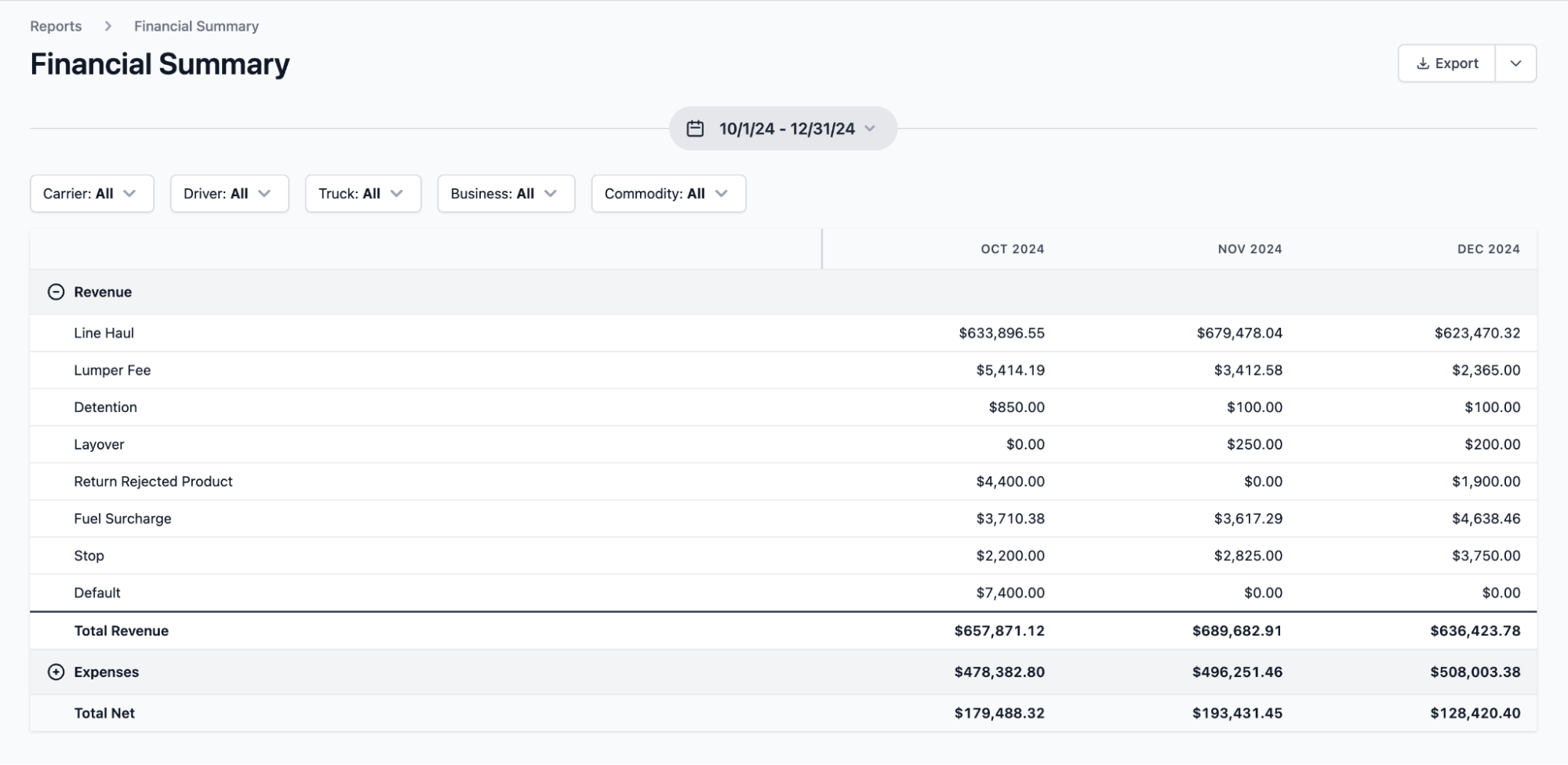
A spreadsheet P&L tells you whether you made money. Toro TMS's advanced reporting tools show you why—and where your operation is performing well or losing margin.
Instead of giving you a single profit number for the whole fleet, Toro breaks your data into meaningful operational insights, including:
- Profitability by truck, driver, customer, and individual load.
- Cost-per-mile and revenue-per-mile trends.
- Empty-mile tracking that highlights inefficient routes.
- Maintenance and service alerts that reduce unexpected downtime.
These insights give context to the numbers in your P&L statement, helping you understand what’s driving your profit, what’s dragging it down, and where to make changes to improve your margins.
Read more: Trucking accounting software: 5 best options to streamline back-office tasks
Toro TMS: A Smarter Way to Track Profit and Loss for Your Trucking Company
A P&L statement template works fine when you’re running one truck—or even a small fleet with a simple operation. But as soon as load volume increases, spreadsheets turn into extra work and the numbers become harder to keep accurate.
In this way, templates may feel “free,” but the hidden cost is hours of manual entry, chasing paperwork, and small errors that add up over time.
Toro TMS automates all the relevant tasks in the background, giving you cleaner financial reports, faster billing, and a P&L statement that reflects what’s actually happening in your business.
With our software, you can:
- Pull all load data into one system, so the revenue and cost information behind your P&L statement stays consistent and doesn’t need to be entered multiple times.
- Collect BOLs and scale tickets digitally, ensuring the income and operating costs for each load are captured accurately and on time.
- Automate invoices, settlements, and IFTA, reducing the hours your back office spends preparing the financial details that roll into your P&L report.
- See insights like cost per mile, profitability by customer, and empty-mile impact, giving you more context behind your P&L statements.
Ready to cut manual work and get a clearer view of your company’s profitability? Book a demo to see how Toro TMS automates the data behind your P&L statement and streamlines the rest of your operation.