.png)
.svg)
Billing Workflows that Save Your Back Office Time
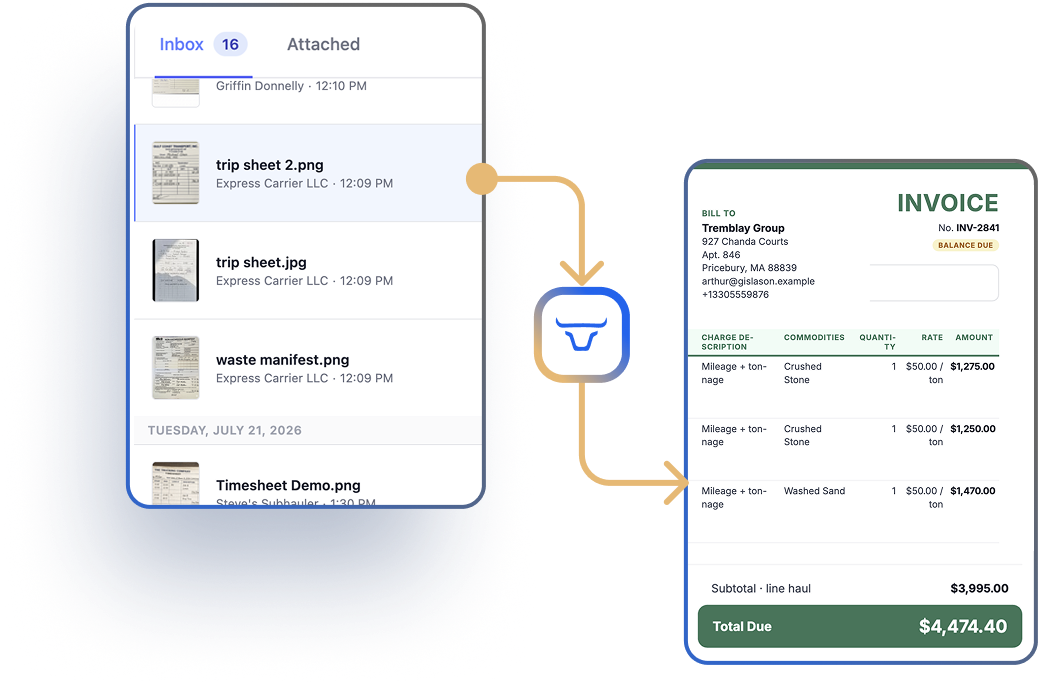
Toro automatically turns completed work into invoices, so invoicing happens faster, with fewer errors and less manual work.


The Problem
Getting paid shouldn't take weeks of cleanup.
Invoices depend on paperwork that arrives late, incomplete, or not at all.
Small errors turn into payment delays and strained customer relationships.
Your team spends too much time chasing paperworks instead of closing the books.
The Problem
Getting paid shouldn't take weeks of cleanup.
Invoices depend on paperwork that arrives late, incomplete, or not at all.
Small errors turn into payment delays and strained customer relationships.
Your team spends too much time chasing paperworks instead of closing the books.
Back Office Tools that Keep Up with your Fleet
Driver Documents Instantly Flow to Invoice Prep
- Capture BOLs, scale tickets, and other documents digitally from drivers when they're on the road, so your invoices are ready to prepare in real-time.
- The Order Audit View allows your team to review and edit delivered orders side by side to ensure all the details are right before shipping invoices.
- No more waiting on a driver to hand-deliver a stack of paperwork before you can even start the billing process.
.png)
Unique Billing Rules? No Problem.
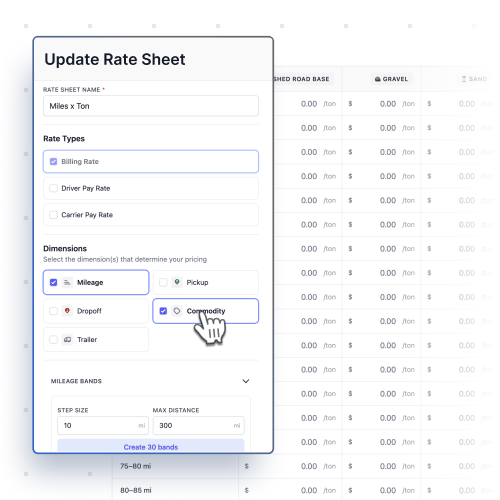
- Build a Rate Sheet once: by trailer type, commodity, or mileage band — and Toro pulls the correct rates in automatically on every order that matches.
- Toro's Detention Capture flags loads that are likely to incur detention and turns that flag into a billable charge tied to your accessorial rates.
Invoices Built Your Way & Synced to Accounting
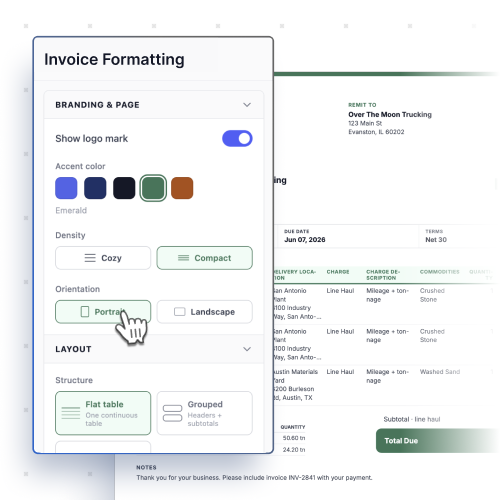
- Toro's Configurable Invoices allow you to customize exactly what's important to you, your customers, and your brand.
- When you're ready, Toro generates professional invoices in seconds. Email ready-to-bill invoices to customers individually, or all at once.
- Push invoices and payments straight to QuickBooks with one click, so your books stay current without double entry.
70%
reduction in manual data entry
“I’m so glad we made the change to Toro. It's made our lives so much easier. Billing’s faster, Payroll’s faster, it’s all faster!”
Invoices Built Your Way & Synced to Accounting
Works with your existing tech stack












FAQs
Frequent questions, and answers.
Does Toro work with QuickBooks Desktop?
Yes, including overpayment handling for QBD.
Do I have to re-enter driver pay separately from billing?
No - the Order Audit lets you review billing and driver pay together on one screen.
See Toro in action
Schedule a 15 minute demo with one of our product experts to see how Toro can streamline your operations.

"We've tried other avenues, and no one can handle what we do except for Toro."
- C&W Global
Read their story
.svg)