.png)



If you're a trucking company managing a high volume of loads every day, the right document management system (DMS) can reduce the time your team spends managing physical documentation. It can also ensure every submitted document is tied to the right load and help your team get invoices out the door faster than your current process allows.
But for a document management system to actually fit into how trucking operations run, it should be able to:
- Capture documents at the point of delivery. Systems that rely on drivers submitting paperwork on their own timeline can directly impact your operation by slowing down invoicing, payroll, and your ability to dispute detention charges accurately. The right tool lets drivers upload documents digitally while on the road.
- Centralize dispatch and document management in one system. Dispatch and back-office teams should be able to access load documents, order details, and customer information in the same place without searching across tools.
- Automatically attach every document to the correct load record. Every submitted document should be linked directly to the job it belongs to, so billing teams don't have to manually match paperwork to deliveries before they can invoice.
- Handle the high volume of documents that comes with bulk hauling. Trucks running dozens of loads per day generate a high volume of bills of lading (BOLs), scale tickets, and proof of delivery (PODs) every single shift. Make sure the system you choose can keep submitted documents organized, attached to the correct load, and ready for billing without creating a back-office backlog at the end of the day.
In this guide, we'll break down the five best document management systems for trucking companies and what each one does best.
We'll start with Toro TMS, our own trucking management software. We'll explain how it helps trucking companies:
- Capture trucking documentation like BOLs, PODs, and scale tickets at the point of delivery
- Connect submitted documents directly to invoicing and driver pay without manual reentry
- Get real-time visibility into which loads are documented, invoiced, and paid
Schedule a free demo to see how Toro TMS handles document management for high-volume trucking operations.
1. Toro TMS: Best all-in-one document management system for trucking companies

Toro TMS was built specifically for bulk haulers who manage a high volume of loads every day and need essential documents captured at delivery.
For most trucking companies, effective document management involves solving multiple challenges, including:
- Allowing paperwork to make it back to the office quickly after delivery
- Ensuring every submitted document is matched to the correct load
- Keeping up with the high volume of BOLs, PODs, and scale tickets generated during a full day of hauling
A standalone document management system can help collect and store files, but it still leaves your trucking operation running across separate tools. That means using one system for documents, another for dispatch, and yet another for billing.
Toro functions as a more complete trucking management software (TMS), combining document management with the core workflows your operation already runs on. This ensures dispatch, driver communication, document capture, invoicing, and payroll all live in one system.
Below, we'll show you how Toro TMS handles document management from dispatch to payment.
Read more: Trucking ticket management software: How to better manage your paper tickets
Create repeat loads from reusable templates and manage every dispatch from one centralized dashboard
Trucking companies need to prioritize their operations around dispatch, especially bulk haulers who manage dozens of loads per truck every single day.
But when loads are created manually, tracked across separate tools, or managed outside the system entirely, there's no central record where your documents can be stored. This also makes things more difficult for back-office staff who need to chase paperwork later to process downstream tasks such as invoicing and payroll.
Toro centralizes the entire dispatch process into a single dispatch screen, where dispatchers can easily create new orders, assign loads to drivers, update schedules, and track driver availability in real time without switching between systems.

With Toro’s dispatch dashboard, you can:
- Create new loads from reusable templates to eliminate repetitive data entry. If you run recurring orders for the same customers or routes, you can create the load once and save it as a template. Every detail, including delivery location, material type, rate structure, and custom job notes, is pre-filled the next time that order comes in, so dispatchers aren't re-entering the same information multiple times a day.

- Assign loads to available drivers using a drag-and-drop board. Driver availability updates automatically based on active jobs and current schedules, so dispatchers can see at a glance who is free and who’s available next.
- Update load details if anything changes mid-day. A delivery location change or a last-minute customer update shouldn't require a manual update from the dispatcher to the driver. When a load is edited in Toro, the driver gets the updated details by text immediately, and the correct information flows automatically to billing and payroll.
- Monitor driver detention in real-time. Most carriers don't find out a driver was held at a site for two hours until the ticket comes in the next day. With Toro, you can identify on-site wait time as it's happening, so dispatchers can see which drivers are running behind, adjust the rest of the day's schedule accordingly, and ensure driver detention charges are captured before the job closes.
Toro is built so each load created at dispatch becomes the foundation for everything that follows. This includes the documents drivers submit, the invoices billing teams generate, and the pay calculations payroll runs.
When document capture is built into the dispatch workflow rather than treated as a separate task, nothing gets lost, there's no need for manual matching, and back-office teams spend less time manually re-entering information into the system.
Read more: How to choose a dispatch software for trucking your teams will actually use
Streamline driver communication and collect BOLs, PODs, scale tickets, and other documentation at the point of delivery
Document management software only works if your team is actually using it. And for many trucking companies, this is exactly where things tend to break down.
With a lot of software, drivers struggle to adopt the system, as most tools require drivers to download an app, create a login, and navigate a system that's too complex for them to learn.
Toro solves this by allowing drivers to receive all load details via text message. Once a load is assigned, a text message is sent out with key details and a secure link to submit documentation the moment delivery is done.

That text then gives drivers everything they need to complete the job, including:
- Customer name, pickup information, and delivery addresses
- Load-specific details like material type, weight, quantities, or special handling requirements
- Additional notes, such as how to access the site, who to check in with, and how the load needs to be unloaded
Once the delivery is complete, the driver clicks the link, uploads a photo of the BOL, POD, scale ticket, or any other required document, and hits submit.

The moment a document is submitted, Toro automatically attaches it to the correct load record. Dispatchers can see it immediately, and back-office teams have everything they need to move straight to invoicing. There's no need to wait for drivers to return to the yard or manually deliver a stack of paper tickets at the end of the week.
Automate back-office tasks like invoicing and payroll to reduce time spent by up to 70%
Toro TMS is able to capture documents at the point of delivery and tie them directly to the load record, meaning back-office staff never have to wait for paperwork to start processing. The moment a job closes, everything needed to invoice and pay drivers is already in the system.

With Toro, trucking companies can:
- Send invoices as soon as a job closes. Load details, quantities, rates, and submitted documents are already attached to the load record by the time the delivery is confirmed. Billing teams can generate and send an invoice in just a few clicks without rebuilding context from scattered paperwork.
- Calculate driver pay automatically based on actual completed work. Toro pulls pay directly from load data tied to each driver while accounting for load counts, hours, wait time, and mileage. This ensures payroll reflects what actually happened during the shift without anyone manually piecing it together.
- Track mileage and hours automatically using GPS and ELD data. Instead of relying on drivers to self-report hours or manually log miles at the end of a shift, Toro pulls this data directly from GPS and ELD integrations. This allows you to quickly generate accurate, PDF-ready IFTA reports that are ready when you need them.
- Sync all financial data with QuickBooks. Invoices and payroll records are pushed directly to QuickBooks, so accounting teams don't have to re-enter information to reconcile at the end of the month.
Read more: Trucking accounting software: 5 best options to streamline back-office tasks
Uncover real-time insights into financial & operational performance through automated document capture
Toro's ability to capture documents at the point of delivery speeds up back-office processing, while also feeding real-time data directly into your reporting. This gives you greater visibility into the financial and operational performance of your entire operation.
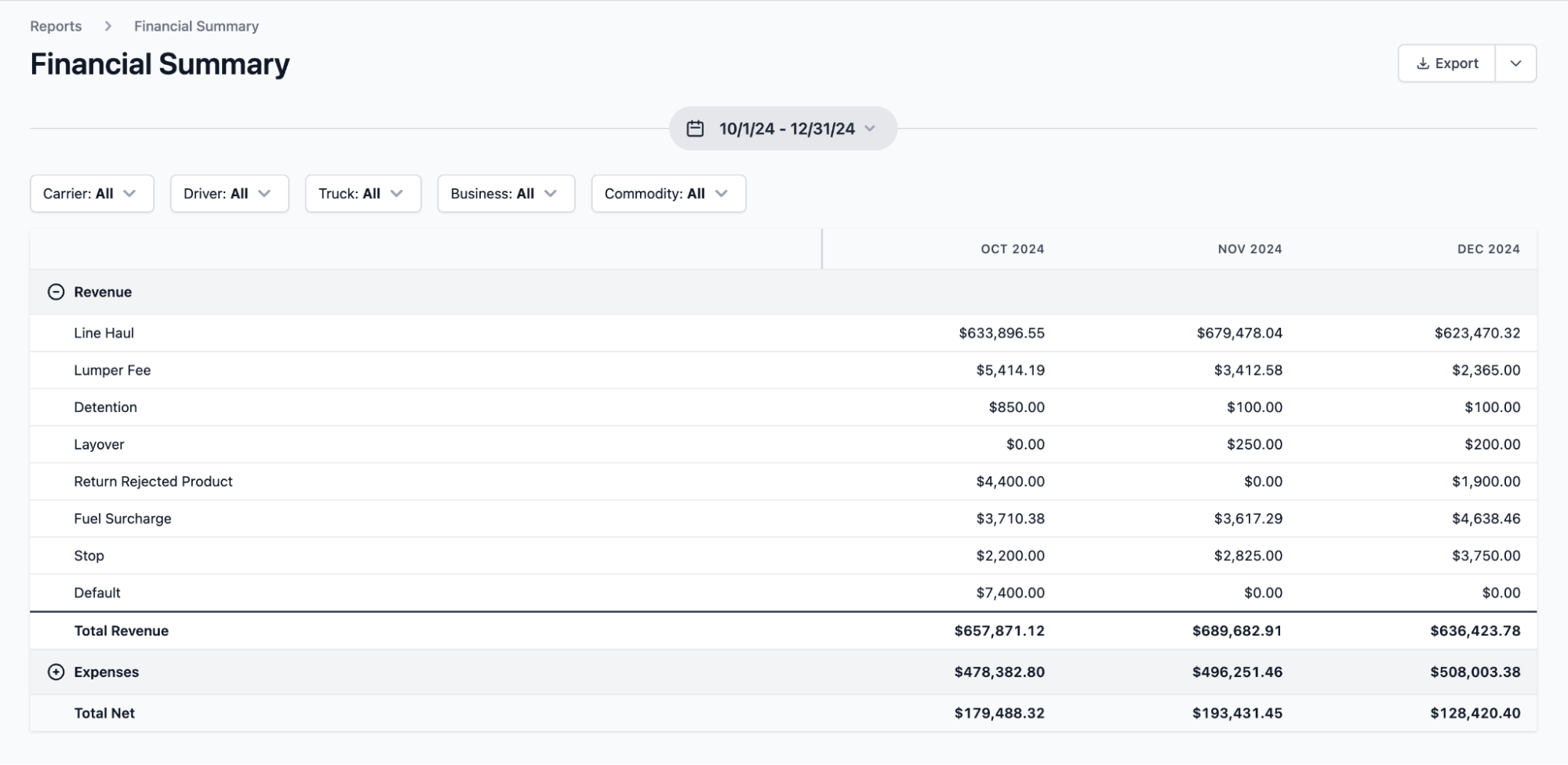
With Toro, trucking companies can:
- View profitability by customer, job, material, and route. Break down performance by haul type, delivery location, or carrier account to see which work is producing healthy margins and which jobs are increasing operating costs.
- Track which loads are missing documentation before invoicing begins. Filter open loads by document status to see which jobs are still waiting on a POD or BOL, so billing can avoid delays by requesting documentation before it's time to submit an invoice to a broker or shipper.
- Review detention and wait time for different customers and job sites. Quickly see which stops are consistently running long, how often detention charges are being triggered, and whether those charges are actually making it onto invoices. All of this information is backed by timestamped records from Toro's automated wait-time tracking.
- Generate accurate financial summaries with up-to-date data. Create detailed audit-ready reports of revenue, expenses, and net profitability at any point in the billing cycle to support faster decision-making without waiting for end-of-month reconciliations.
Get up and running quickly with in-person onboarding and fast customer support
A common struggle for trucking companies that switch software is fully adopting the new system. Most providers don't make it any easier, offering only quick tutorial videos or help center FAQs.
This is especially problematic for carriers managing a high volume of loads every day. If dispatchers and drivers can't figure out the system quickly, even just a few days of delayed document processing can lead to a backlog of unmatched BOLs, PODs that never get submitted, and invoices that can't go out until someone manually tracks everything down.
Toro takes a more hands-on approach with in-person onboarding. Our team shows up on-site to help your team configure the system around your specific operation. We'll also train each role—dispatchers, drivers, managers, and back-office staff—on the workflows they actually use day to day.
The goal of our entire onboarding process is that by the time you're live, document capture is already built into how your team works, rather than something that has to be remembered to be done separately.
Our support team is also available from 9 a.m. to 9 p.m ET. All new requests or inquiries are answered within 30 minutes.
Ready to fix how your operation handles load documents? Schedule a demo of Toro TMS.
4 alternative document management systems for trucking businesses
Every trucking company manages documents differently. To round out this guide, we cover four alternative document management systems for trucking so you can find the option that best fits your operation.
1. TruckLogics

TruckLogics is a cloud-based TMS built for small to mid-size carriers, owner-operators, and fleet managers. It includes dispatch, invoicing, IFTA reporting, and document management features, allowing companies to digitize and organize load documents.
The platform allows drivers to capture and upload shipping documents directly from their mobile device by snapping a photo and submitting it through the app. It’s a useful tool for centralizing documentation, but some of the reporting capabilities are limited.
Key TruckLogics features include:
- Document storage for BOLs, PODs, invoices, and trip summaries
- Mobile document capture via photo upload through the driver app
- Dispatch management with load creation and driver assignments
- One-click invoice generation from completed load data
- Driver settlements with configurable pay structures
Read more: Dump truck software: 5 top choices for specialist software
2. Trucking Hub

Trucking Hub is a TMS built for carriers who need end-to-end fleet management, compliance tracking, and document organization.
The tool's Cloud Drive feature stores and categorizes logistics documents, driver files, vehicle documentation, and roadside inspection paperwork, with real-time syncing with the Trucking Hub mobile app.
Key Trucking Hub features include:
- Cloud Drive document storage for carrier, driver, and vehicle files
- Built-in document scanner for mobile POD and BOL capture
- Geofencing-based detention and dwell time tracking
- ELD compliance and hours of service monitoring
- Driver qualification file management with compliance alerts
3. DocuWare

DocuWare is a general-purpose document management system that serves trucking, logistics, and transportation companies. It integrates with over 1,000 applications, including TMS platforms, ERP systems, and accounting software.
While it cannot be used as a standalone system for managing loads or dispatching drivers, it does offer robust document capture, archiving, and workflow automation capabilities.
Key DocuWare features include:
- Document capture, archiving, and full-text search retrieval
- Mobile scanning and upload for delivery documents
- Automated workflow routing for invoicing and approvals
- Contract and compliance document management
4. McLeod Software (DocumentPower)

McLeod Software is an enterprise TMS with a built-in DocumentPower module that handles document capture, storage, retrieval, and delivery.
It integrates directly with McLeod's LoadMaster system and uses automated forms recognition technology to classify and index documents as they come in. However, smaller bulk haulers or carriers will likely be overwhelmed by the platform's cost and complexity.
Key McLeod Software features include:
- Automated document capture, classification, and indexing
- Customer-specific billing document rules and delivery preferences
- Business process automation via the FlowLogix
- Document delivery via email, fax, print, or FTP
Read more: McLeod Software competitors: 7 alternatives for trucking companies
Manage your trucking documents more efficiently with Toro TMS
For trucking companies running a high volume of loads every day, document management can become an overly time-consuming task that slows down your team and delays payments. Every day that passes without a POD or BOL being submitted is another day an invoice doesn't go out.
Toro TMS solves this by building document capture directly into the delivery workflow, so every document from every load is accounted for the moment a job closes.
With Toro TMS, you can:
- Capture BOLs, PODs, and scale tickets at the point of delivery without requiring drivers to download an app
- Manage dispatch and document collection from one centralized dashboard so every submitted document is tied to the correct load
- Generate invoices and calculate driver pay automatically from completed load data without manual reentry or chasing paperwork
- Get real-time visibility into financial and operational performance as loads are delivered and documents come in throughout the day
Book a demo to see how Toro TMS handles digital document management for trucking.