.png)




Dump truck load tickets are the standard record that bulk haulers use to document each load hauled. They’re used to track and verify loads across dispatch, drivers, and billing.
Below, we share a free dump truck load ticket template designed specifically for bulk material hauling. Unlike general load tickets used for freight or deliveries, dump truck load tickets include dedicated fields to track bulk material movement, often measured by weight or volume rather than by individual items.
For hauling companies, paper load tickets work well when you’re handling only low volumes of loads. But as operations grow, each additional load creates another handwritten ticket that has to be reviewed, matched to dispatch and the job, and entered into your software system.
In practice, that means:
- More repeated data entry
- More time spent reconciling tickets
- A higher chance of small mistakes that affect invoicing and reporting
- No visibility into load activity as it’s happening
It’s for this reason that many trucking companies move away from paper tickets altogether.
Toro TMS is a software made specifically for the bulk hauling industry. With our system, you can do away with load tickets altogether. Instead, load details can be captured digitally and automatically shared between dispatch, drivers, and your back office, eliminating the need to re-enter or match paper tickets later.
In this article, we show how this paperless approach improves bulk hauling workflows by reducing manual work and improving accuracy across the operation.
Book a demo to learn how Toro TMS streamlines dump truck load tickets across your operations.
Free dump truck load ticket template
We created this downloadable dump truck load ticket template specifically for bulk material hauling. It captures the details needed to track loads accurately and support billing and payroll processes. It also includes space for your company name and logo, allowing you to customize it for your operation.
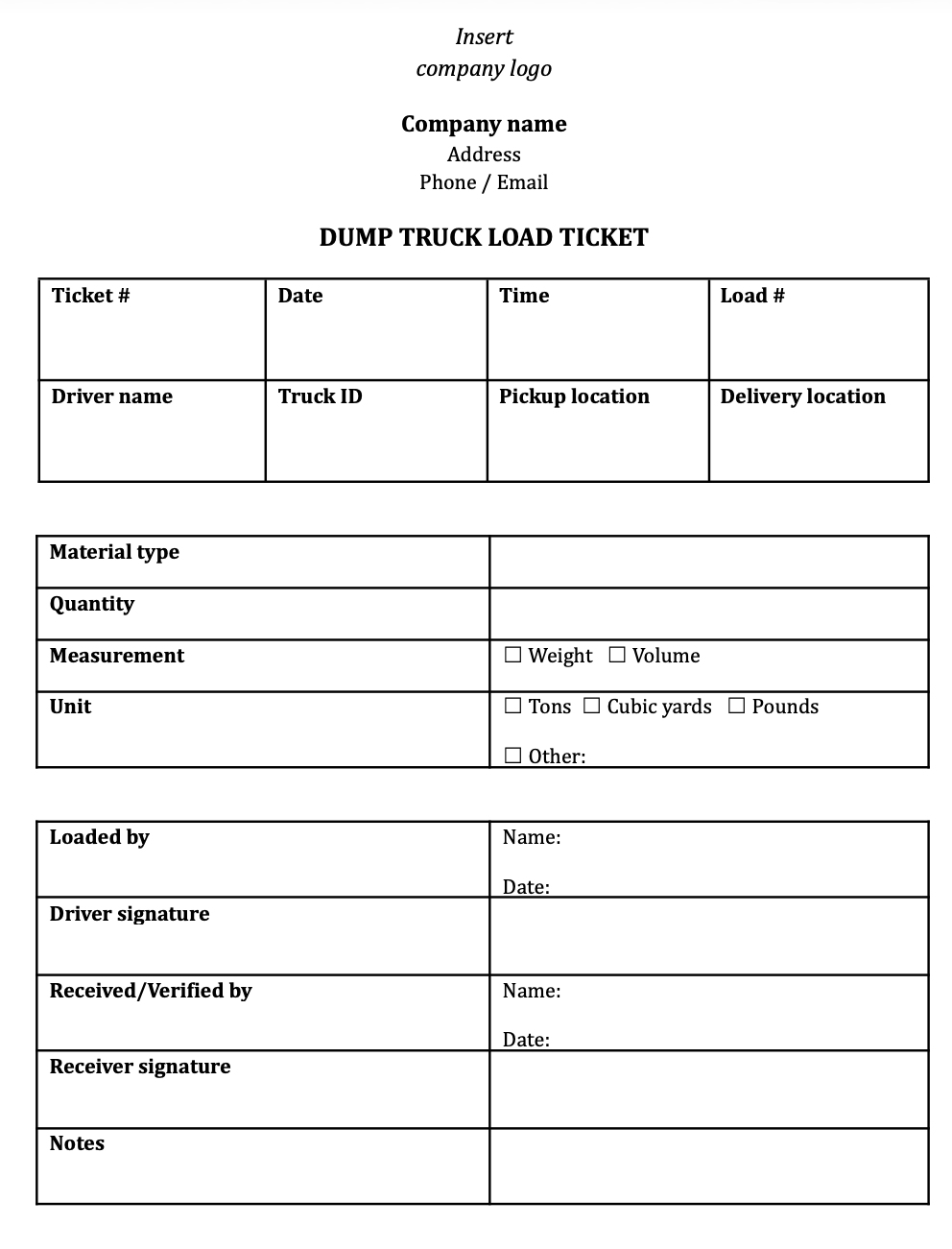
Beyond basics like the driver’s name, truck number, and load weight, bulk load tickets need clear fields for material type and unit of measurement, so quantities are interpreted consistently from dispatch through billing.
This way, the bulk load tickets are both easy for drivers to fill out correctly and easy for back-office staff to understand. They also help prevent billing errors and disputes later on.
To make your own copy, click "File" → "Make a copy" from the document menu.
Printing note: The downloadable template is designed to print two vertical tickets per page on standard letter paper.
Where paper load tickets fall short: Managing load information manually is tedious and error-prone
A paper load ticket captures all the necessary load information, but that information is hard to access for everyone who needs it—including dispatchers, drivers, and the back office.
Typically, using paper tickets means that you need to:
- Enter the same load data multiple times, from dispatch to driver pay. Load details are written down, reviewed, and re-entered across dispatch, drivers, and billing—increasing the chance of errors along the way.
- Wait until the end of the day to get visibility on delivery statuses. When you’re relying on paper tickets, the progress of loads isn’t fully visible to your back-office team. Instead, load verification happens only once tickets and paperwork are turned in and processed.
- Manually match tickets to jobs, schedules, and customers. Each ticket has to be reconciled before billing, payroll, or reporting can begin. This delays invoicing and reporting further.
- Store hundreds of physical tickets to maintain a paper trail of completed work. When bulk haulers are carrying high volumes of loads each day, the number of tickets adds up. The problem is that these can get lost or damaged without a robust system to store them.
This is why many hauling companies are looking for a better way to manage load information with a more efficient digital system, such as Toro TMS.
Read more: Trucking ticket management software: How to better manage your paper tickets
Toro TMS: Easy-to-use trucking software that reduces manual work and saves your back office 70% of time
With Toro TMS, paper dump truck load tickets are replaced with a digital load-tracking workflow that seamlessly connects dispatch, truck drivers, and the back office.
Toro TMS is a trucking management software that brings all load information into one centralized system, rather than spreading it across paper tickets, spreadsheets, and other disconnected tools.
This creates several practical advantages for dump truck hauling operations:
- Load details are captured once and used throughout the operation, eliminating repeated data entry. What's more, dispatch, drivers, and the back office all work from the same load record, reducing errors and discrepancies.
- Load tickets and supporting documents are submitted digitally and available as soon as a load is completed.
- Billing and driver pay are generated automatically from the same consistent, structured load data.
- All load tickets and documentation stay organized and searchable in a single system as volume increases.
Digital load tickets help bring order to daily truck operations, making the day-to-day work easier, quicker, and less stressful. And unlike standalone digital ticketing tools, Toro TMS is built around the load ticket itself—connecting dispatch, drivers, documentation, billing, and reporting so the same load data is created once and reused across the entire workflow.
Below, we walk through how Toro TMS's features help streamline your trucking operations and cut data entry by 70% for your back-office team.
Digitally capture dump truck load details to eliminate repeated data entry
Using paper load tickets means the same load information is re-entered as many as seven times for each job. Dispatch first records load details to schedule and assign the job, drivers then write those same details down again in the field, and the back office later has to re-enter that information for billing, payroll, and reporting.
This creates unnecessary administrative work just to move the same data from dispatch to drivers to the back office. And when drivers are hauling multiple loads across different jobs in a day, that extra data entry really adds up. It also makes mistakes much more likely.
Toro TMS removes that manual process entirely by capturing load details digitally at dispatch. That means:
- Dispatch enters all load details upfront, creating a single source of truth for each load that can be used through the entire operation—from dispatch to drivers to billing and reporting.
This way, drivers don’t have to fill out paper tickets in the field, and the back office doesn't have to interpret, match, and re-enter them. This results in more accurate records and reduces the chance of errors.
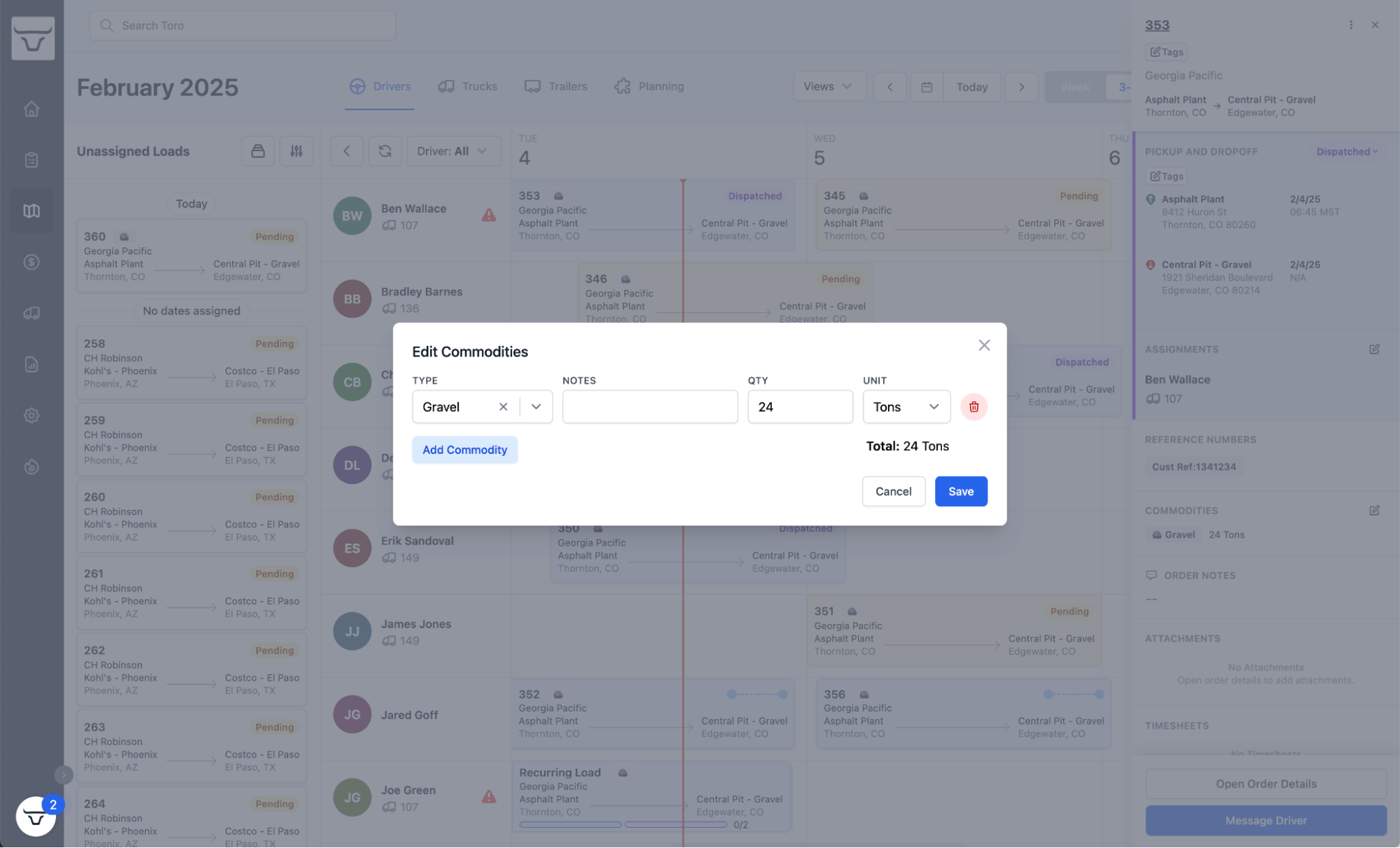
- Trucks, drivers, schedules, and job details are visible on one easy-to-use screen, allowing dispatchers to create load tickets without having to piece together information from multiple sources—like spreadsheets, notes, and separate systems. This helps ensure hauling tickets match what was actually scheduled and dispatched, reducing gaps, corrections, and back-and-forth as load information moves downstream.
- Reusable load templates reduce repeated entry for similar loads. For repeat jobs, routes, or customers, dispatch can apply saved load details—such as material type and locations—instead of rewriting the same information for each ticket. This avoids the repeated setup that paper load tickets require for every load, even when the details don’t change.
- All load tickets and supporting documents are kept in one centralized digital system. Load records can be searched and reviewed by job, date, driver, truck, or status, making it easier to track completed loads, spot open items, and retrieve old tickets without sorting through paperwork.
Toro also provides real-time load status visibility via GPS tracking, so dispatch can quickly and easily see load progress, adjust schedules on the spot, and keep customers informed of any timing changes.
Read more: Aggregate dispatch software: 5 top options for bulk haulers
Enable drivers to submit documents digitally to keep records complete, organized, and verified
Once a load ticket is created digitally at dispatch, drivers still need a way to confirm the load and submit any supporting documentation tied to that ticket. With paper workflows, this means drivers hold onto physical tickets and documents until they return to the office before manually handing them in.
Toro TMS replaces that handoff by allowing drivers to submit load confirmations and supporting documents digitally from the field.
- Drivers receive load details from dispatch via text message. It's a simple process, with no app to install, no login to remember, and no new system for drivers to learn.

- Drivers upload delivery confirmations, BOLs, scale tickets, or other documentation directly from their phone. They simply take a photo and submit it via a link, and the document is immediately attached to the correct digital load.

- Toro automatically pulls key details from all uploaded documents, such as verified quantities and ticket numbers, and enters them into the digital load.
- Documents are submitted digitally and tied to the load record in real time, so the back office doesn’t have to wait for drivers to return or track down missing paperwork. And because ticket details are captured automatically, there’s no need to interpret handwritten information or manually type in and reconcile data from paper tickets.
Ultimately, each load moves from planned to confirmed with its documentation attached, resulting in well-organized load records and less manual work.
Read more: Easy trucking software: How to pick a TMS that's genuinely easy to use
Automatically process invoices, driver pay, and tax documents from accurate, up-to-date load ticket data
If you’re still using paper load tickets, your office staff must first rekey the load data manually before they can process billing or driver pay.
Toro TMS removes that manual step by using the same digital load ticket data captured at dispatch—and confirmed by drivers—to automate downstream tasks. Since load tickets already contain structured, verified information, there’s no need to re-check or resolve differences in load details.
Specifically, Toro uses digital load ticket data to:
- Pre-populate customer invoices using confirmed load details and attached documentation.
- Calculate driver pay automatically, based on each driver’s pay structure and completed loads.
- Support tax and compliance reporting, using accurate mileage and load data tied to each haul.
- Apply load-based revenue and costs to the correct accounts automatically, keeping bookkeeping aligned with what was actually hauled.
- Sync invoicing, driver pay, and mileage data directly with QuickBooks, so load ticket data doesn’t have to be entered again in accounting systems.

With all of these tasks automated, it keeps financial and compliance records aligned with actual load activity and reduces the time it takes to complete back-office tasks by up to 70%.
Read more: Trucking accounting software: 5 best options to streamline back-office tasks
Access deep insights into your operation’s loads and profitability
Another challenge with using paper tickets is that they make it hard to see patterns across jobs, drivers, or customers in real time. Profitability and performance aren’t tracked automatically, as they have to be calculated and updated by hand.
Toro TMS includes advanced reporting, built directly from your company's digital load data. This allows you to see how loads are moving through your operation, where work is profitable, and where efficiency can be improved.
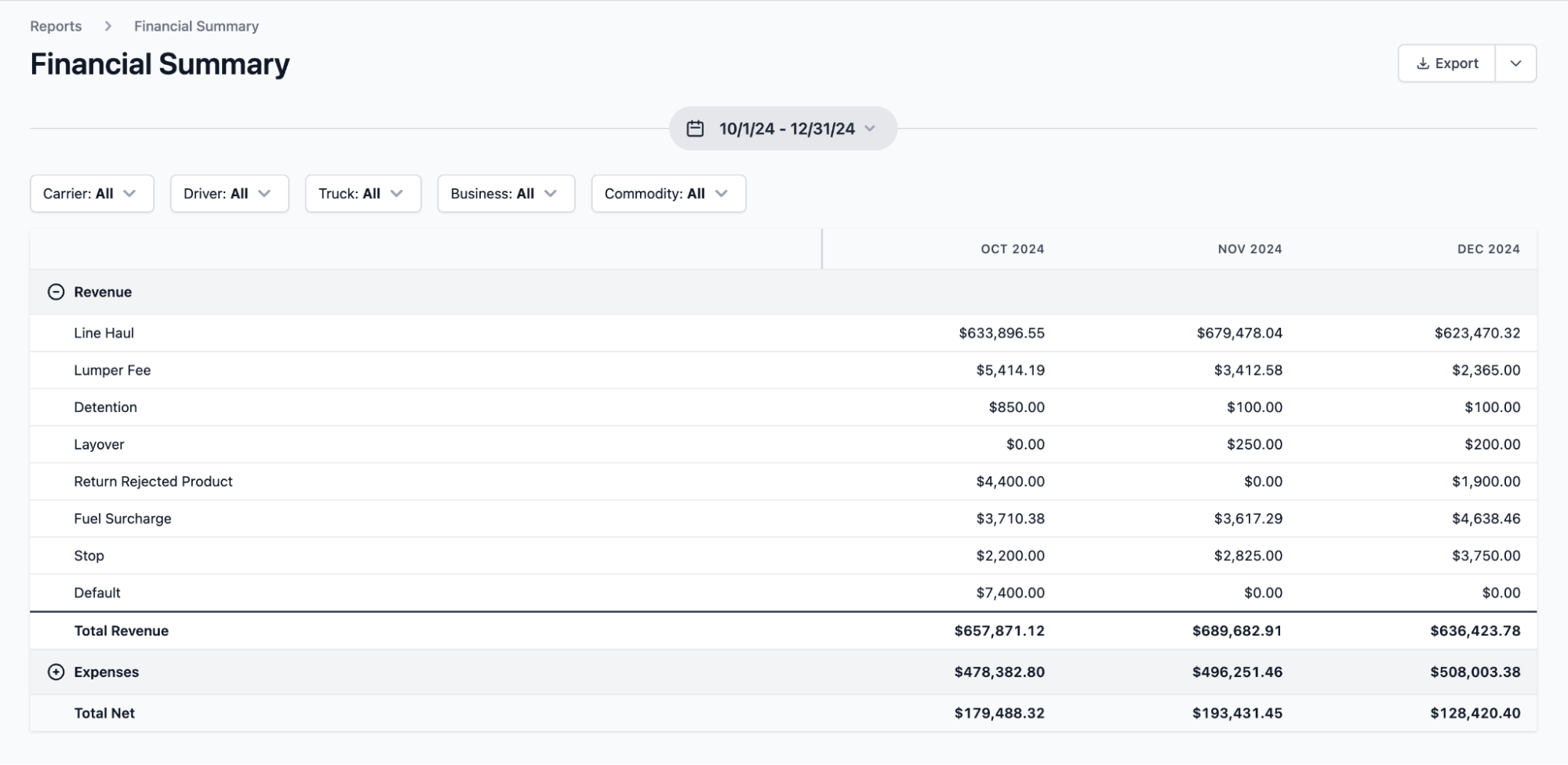
This includes insight into:
- Load counts and revenue by truck, driver, customer, or job.
- Material movement and hauling activity across different job sites.
- Trends in revenue and costs tied to individual loads.
- Which loads and jobs are profitable—and which are not.
- Operational patterns that affect efficiency, such as empty miles or underutilized equipment
With this information tied directly to actual load activity, it’s easier to spot issues earlier, understand how different jobs perform, and make informed adjustments that improve overall profitability.
Read more: Dump truck software: 5 top choices for specialist software
Toro TMS: A smarter way to manage your bulk hauling operations
A dump truck load ticket template is a helpful starting point for bulk and aggregate hauling companies, especially at lower volumes. They create a consistent record for what was hauled, where it went, and how it should be billed or paid. But as you scale, they end up requiring a bunch of extra work.
Toro TMS replaces paper load tickets with a more efficient digital workflow that's built specifically for bulk hauling. With our software, you can:
- Dispatch loads with minimal data entry, speeding up your work and reducing unnecessary errors.
- Allow drivers to upload load documentation digitally from the field, so load details flow straight into your system without manual back-office entry.
- Automatically generate invoices and driver pay from load tickets, removing manual back-office processing.
- Access real-time reporting and profitability insights to reveal trends in revenue, costs, and operational efficiency.
Ready for a better way to handle dump truck load tickets? Book a demo to see how Toro TMS can help you reduce manual work and build a more efficient and profitable bulk hauling operation.