.png)



Together, a TMS (transportation management system) and an ELD (electronic logging device) handle most of what trucking companies need to run day-to-day—from dispatch, load assignment, and billing, to vehicle tracking and engine data.
Most TMS platforms and ELD providers are built and sold as separate tools that don't share data natively. For small fleets, connecting them manually works fine. But as operations and daily load counts grow, that manual work compounds quickly. Every load, every shift, every mile, and every hour of service (HOS) update has to move from one system to the other.
This usually means:
- More duplicate data entry between TMS and ELD systems
- More time spent pulling reports for IFTA, payroll, and compliance
- A higher chance of small errors that affect billing and audits
- No live visibility into truck locations or driver availability
That's why many bulk haulers have moved away from handling this information manually altogether. Instead, they use a TMS with native ELD integration so ELD data flows automatically into dispatch, billing, and compliance.
In this article, we explain exactly how Toro TMS supports TMS-ELD integration by automatically pulling ELD data into dispatch, driver communication, billing, and back-office reporting.
We also review three additional TMS platforms with ELD integrations so you can compare other options available for your fleet.
Book a demo to see how Toro TMS connects ELD data to every part of your operation.
Why it pays to get a TMS with ELD integration
Your TMS and ELD each capture critical pieces of your operation. First, the TMS knows what loads are scheduled, who's assigned to them, and what needs to be billed. Then, the ELD can show you where every truck actually is, how many hours each driver has left, and what the engine is doing in real time.
When those two systems are disconnected, your team has to do the integration work manually. This means dispatchers track vehicles, drivers maintain mileage logs, and back-office staff handle invoice and payroll calculations by hand.
If you're using your TMS and ELD separately, then you usually have to:
- Switch between dispatch boards and GPS maps to know where trucks are. Your TMS shows the load and the assigned driver, while your ELD shows the truck's actual position. To answer a customer asking when their delivery will arrive or predict schedule delays, a dispatcher cross-references both screens and updates one system after checking the other.
- Manually pull mileage and HOS data for payroll, IFTA, and compliance reporting. ELDs record the data you need, but it usually gets stored in the ELD provider's portal. Without an integration, someone on your team needs to export it and enter it into your TMS or accounting system every pay cycle.
- Call drivers for status updates or to confirm deliveries. When a load is running late or a driver is close to running out of hours, your TMS has no way of knowing unless someone checks the ELD and updates dispatch manually. This often leads to back-and-forth calls or scheduling issues when dispatchers assign loads to drivers who are busy.
- Re-enter the same load data across systems to keep dispatch and back-office teams in sync. Load details get entered into the TMS, dispatched to drivers, and then reconciled against ELD records after the fact for billing and proof of delivery. Each step requires additional manual work while increasing the risk of errors that show up later as billing disputes or missing paperwork.
This is why many trucking companies look for a TMS with ELD integration, such as Toro TMS, to centralize daily operations in one system.
Toro TMS: Trucking software for bulk haulers with built-in ELD integrations

Toro TMS is built specifically for dry and liquid bulk haulers that manage a high volume of loads per truck per day and need ELD data connected to every part of their operation.
Instead of pulling reports from your ELD provider's portal and re-entering them into your TMS, ELD-captured mileage, hours, and location data flow automatically into dispatch, billing, and compliance.
With Toro, you can:
- See where every truck is and how many hours each driver has left without leaving the system
- Eliminate the manual exports and reconciliations that back-office teams spend so much time on
- Assign loads based on real-time driver availability and live schedules
- Locate proof of delivery, mileage billing, and compliance documentation digitally
- Generate driver pay and customer invoices from accurate ELD data
- Create IFTA, HOS, and operational reports automatically from connected ELD and load information
Native ELD integration makes dispatch faster, billing more accurate, and compliance reporting nearly automatic. Toro treats ELD data as a central part of load records, so the same data is captured once and automatically flows downstream to drivers, compliance, billing, and reporting.
Below, we'll explain how Toro connects ELD data to your TMS to streamline operations and reduce the time your team spends on back-office tasks by up to 70%.
Track live truck locations, delivery ETAs, driver activity, and load statuses in real time with a dispatching dashboard
Using a TMS without an ELD integration means dispatchers have no live view of where trucks are, how many hours drivers have left, or whether deliveries are running on schedule.
To answer any of those questions, dispatch has to check the TMS for the load assignment, log into the ELD portal for live locations, and then call the driver to confirm they're still on time.
This process creates unnecessary back-and-forth just to move information that the ELD already has into the system that dispatch already uses. And when drivers are running 10 to 15 loads per truck per day, those check-ins add up to hours of additional work.
Toro TMS removes that manual process by integrating ELD data directly into the dispatch dashboard. Toro connects natively with major ELD providers, including:
- Samsara
- Motive
- Omnitracs
- Geotab
Whichever system your fleet already uses, the data flows in automatically.

Toro’s dispatching software allows teams to:
- See truck locations, driver hours, and load progress in real time. Live ELD and GPS data flows directly into the dispatch screen, so dispatchers can see where every truck is, how many hours each driver has left, and how each load is progressing without opening a separate ELD portal or calling drivers for updates.
- Build recurring loads with a few clicks using reusable templates. For repeat customers, routes, or job types, dispatchers can save load details once and apply them to new jobs whenever that work comes in again. Once a templated load is scheduled, the assigned truck, driver ETA, and live progress are tracked through the ELD integration without re-entering the same information.
- Assign loads based on real-time driver availability and remaining HOS. Loads only get matched to drivers who legally have the hours to complete them, which prevents compliance violations and avoids unexpected changes during the day.
- Capture driver detention and on-site time as it happens. The ELD logs when a truck arrives and leaves each stop, and Toro tracks the duration against your detention thresholds. This ensures wait time gets billed accurately without anyone reconstructing it from driver-reported numbers at the end of the shift.
Toro's dashboard is built to be genuinely easy to use and match how dispatchers work. ELD data flows in automatically; load details are entered once and move downstream to drivers and back-office teams; and full visibility into truck locations, driver availability, and load status sits in a single view.
Read more: Trucking tracking software: 7 best tools for improved fleet visibility
Eliminate manual status updates and driver check-ins by sending load assignments and collecting driver documents digitally via text message
When dispatch and drivers aren't connected through the same system, it's common for status updates to happen manually by phone. This might include drivers calling in to confirm pickups, ask for directions, or report a completed delivery, or dispatchers calling drivers to get status updates for customers.
Toro TMS aims to make dispatcher-driver communication as simple as possible by handling all communication via text messages. Our system also allows drivers to upload documents on the road using their phones.

Here's how it works:
- Dispatchers send load assignments to drivers via text, including pickup and delivery locations, load details, equipment instructions, time windows, and any customer-specific notes.
- Drivers upload scale tickets, BOLs, and delivery confirmations from their phone using a secure link inside the same text message. They snap a photo, submit it, and the document is instantly attached to the correct load.
- Toro extracts key details from each uploaded document automatically, including verified quantities, ticket numbers, and timestamps, and writes them back to the digital load record.
- Documents arrive as work is completed, so dispatchers see real-time progress, and the back office has everything it needs for invoicing, payroll, and IFTA reporting without waiting until the end of driver shifts.

Toro automatically attaches documents to the correct load, so dispatchers can see updates in real time and back-office teams have access to everything they need for accounting and reporting.
Read more: What's the best document management system for trucking? 5 options for carriers
Automate invoicing, driver pay, IFTA reporting, and mileage calculations with ELD data
If your TMS and ELD aren't connected, your office staff has to pull mileage and hours from the ELD portal manually before they can process billing, payroll, or fuel tax filings.
Toro TMS removes that step by using ELD-captured data (such as mileage, driver hours, and duty status changes) to automate downstream back-office work. Since the data flows directly from the ELD and is tied to each load, there's no need to export reports, match them to jobs, or manually reconcile numbers.

Toro uses ELD data to:
- Bill customers directly from completed loads using auto-generated invoices that pull mileage, delivery timestamps, and load details from ELDs
- Pay drivers without manual calculations through automated driver settlements that account for completed loads, on-duty hours, detention time, and individual compensation structures
- File quarterly fuel taxes with confidence using IFTA-ready reports built from job-level mileage already broken down by jurisdiction
- Move invoices, settlements, and mileage data into QuickBooks in one click, eliminating duplicate entry across accounting systems
With these tasks automated, financial and compliance records stay in sync with fleet activity, cutting back-office work by up to 70%.
Further reading: Trucking payroll software: 5 options for effortless driver pay
Analyze fleet utilization and driver productivity over time with built-in reporting
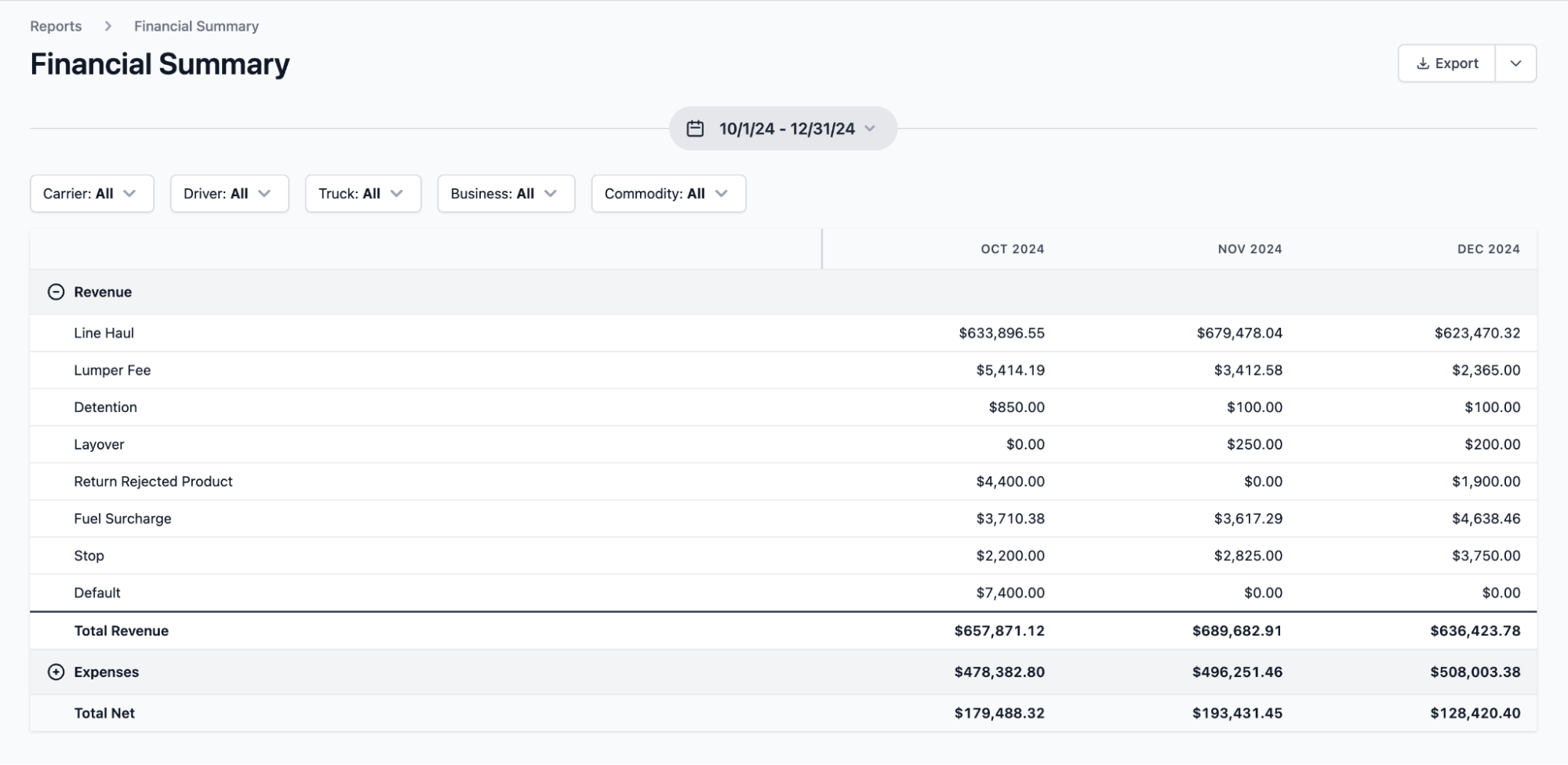
As Toro integrates directly with your ELD, you can pull advanced reports from a single system instead of manually piecing together data from multiple portals and spreadsheets at the end of every month.
This is important because the numbers that drive bulk hauling profitability, like loaded miles per truck, time spent on site versus on the road, and revenue per load by customer, only make sense when you have access to both TMS and ELD data.
With Toro, you can:
- Break down profitability by lane, customer, or commodity. All costs are tied to actual miles driven using ELD data, so margin calculations reflect what the trucks really did rather than estimates or what was planned.

- Compare driver productivity using completed loads, on-duty hours, and time on site. See drivers who consistently run more loads per shift, and spot customers or job sites where wait times are decreasing your profitability.
- Identify empty miles automatically from ELD data. Every loaded and deadhead mile is captured by the ELD and tagged to the load record, making it easy to find trucks that regularly run empty between jobs.
- Generate financial summaries to view revenue, cost, and margin numbers. Financial reporting refreshes as loads finish and ELD data syncs, so managers can see how the operation is performing instantly at a glance.
Get your team set up quickly with in-person onboarding and dedicated support
Connecting a TMS to an ELD can be confusing for non-technical teams. Even with integrations, fleets often have to map data fields, configure which ELD events trigger which TMS workflows, and train dispatchers, drivers, and back-office staff on how the system works.
Toro takes a hands-on approach to make sure your team is up and running quickly with a seamless integration. Our team works directly with customers during onboarding to configure the ELD integration to align with your existing dispatch and back-office processes.
Toro specialists work with dispatchers, drivers, accounting teams, and managers to walk through real operational scenarios using your actual ELD data.
This includes assigning loads based on driver hours, capturing delivery documentation, generating invoices from ELD-confirmed mileage, and pulling IFTA reports. Each team member is trained on the tasks they perform every day so they can begin using the platform confidently and optimize their daily workflows from day one.
We also offer ongoing support whenever you run into any issues. Our support team is available from 9 a.m. to 9 p.m. ET, and responds to new inquiries within 30 minutes.
Ready to see live truck locations, driver hours, and load progress in a single dispatch view? Book a Toro TMS demo today.
3 additional TMS with ELD integration options
Every trucking company uses ELD integrations differently. Below, we cover three alternative TMS platforms with ELD integration so you can find the option that best fits your operation.
1. TruckingOffice

TruckingOffice is a TMS designed for owner-operators and small fleets, typically those running fewer than 10 trucks. It offers dispatch, route planning, IFTA reporting, invoicing, and basic driver management in a single platform.
On top of those features, TruckingOffice includes its own ELD product (PerDiem Plus) for compliance and HOS tracking.
Key features include:
- Dispatch and load management designed for small fleets and owner-operators
- IFTA reporting pulled from ELD-tracked mileage and fuel data
- Built-in invoicing and customer billing tied to load records
- Native PerDiem Plus TMS integration for HOS, mileage, and real-time tracking
2. BeyondTrucks

BeyondTrucks is a cloud-based TMS built for mid-sized carriers, typically those running 10 to 100 trucks. It includes dispatch, customer portals, billing, and ELD integrations with major providers like Samsara, Motive, and Geotab.
The platform offers a simplified interface and drag-and-drop dispatch dashboard, which feels more user-friendly than older enterprise TMS systems. But some workflows specific to bulk hauling, like per-jurisdiction IFTA tracking or multi-compartment load handling, aren't built in and require workarounds.
Key features include:
- Dispatch dashboard with drag-and-drop load assignment
- Customer-facing portal for shipment visibility and document sharing
- Automated mileage and HOS tracking pulled from ELD-reported vehicle locations
- Built-in invoicing and driver settlements
- Real-time visibility into fleet activity and GPS tracking
3. McLeod Software
McLeod Software is an enterprise TMS for large carriers running 100+ trucks. As an integrated TMS, it supports ELD integrations from most major providers, including Samsara, Motive, Omnitracs, Geotab, and PeopleNet.
The platform handles multi-modal operations, complex billing structures, and large compliance teams better than most TMS providers, but it requires significant implementation work and a large budget that most small and mid-sized fleets don't have.
Key features include:
- Dispatching for multi-modal and large-scale fleet management operations
- Complex billing and settlement workflows tied to load and ELD data
- Compliance and safety modules with hours of service, IFTA, and FMCSA reporting built on real-time data
- Integrations with Samsara, Motive, Omnitracs, Geotab, PeopleNet, and other ELD providers
Read more: McLeod Software competitors: 7 alternatives for trucking companies
Toro TMS: The best TMS with ELD integration for your trucking business
The best TMS with ELD integration connects ELD-captured mileage, hours, and location data directly to dispatch, driver communication, billing, and compliance. This ensures your operation runs from a single source of truth.
Toro TMS integrates ELDs, load management, driver communication, and back-office reporting into a single connected system.
With Toro, you can:
- See live truck locations, driver hours, and load progress directly from the dispatch screen
- Assign loads based on real-time driver availability and remaining HOS
- Send load details to drivers by text and collect documentation digitally
- Automatically calculate driver pay, generate customer invoices, and track mileage for IFTA reporting using ELD data
- Generate advanced reports on fleet utilization, deadhead miles, driver productivity, and route profitability from connected ELD and load data
Ready to see how Toro's ELD integration improves your fleet efficiency? Book a demo today to learn more.