.png)


A carrier moving hundreds of short bulk loads each week creates an excessive amount of back-office work, even with a relatively modest fleet.
If you manage these loads the traditional way—in spreadsheets or with pen and paper—you need to manually enter the same details multiple times: into a dispatch sheet, a rate sheet, and a billing sheet. On top of this data entry, none of these loads can then be invoiced until the driver's paper tickets physically make it back to the office.
That was the challenge facing Crapo LTD. Over roughly three decades, the southeast Idaho company had grown from six trucks to approximately 45, with peak-season volume reaching around 800 loads per week.
Like many other bulk haulers, Crapo still depended entirely on Google Sheets, Excel, and paper envelopes to manage dispatch, rates, ticket collection, and billing. That meant three or four dispatchers editing the same spreadsheet without a reliable view of which loads still needed to be assigned or completed—and loads that could look delivered because an old truck number was left in a cell.
Critically, by the time Crapo moved to Toro TMS, approximately 3,000 delivered loads were waiting to be invoiced. That meant thousands of loads the company had already hauled, fueled, and paid drivers to complete, with none of that revenue collected, and a billing operation running close to a month behind the work.
In this article, we share how the company used Toro TMS to get and keep that backlog below 500 and start invoicing on the same day that loads were delivered, while saving operations manager Braxton Crapo an estimated 10 to 15 hours each week.
Crapo LTD at a glance
- Location: Southeast Idaho
- Operation: Family-owned bulk and agricultural hauler run alongside the family farm and potato warehouse
- Fleet: Approximately 45 trucks, plus outside capacity during peak season
- Equipment: Belt trailers and high-side trailers, including trailers dedicated to specific commodities during the season
- Commodities: Bark and landscape products, aggregate, road salt, seed and commercial potatoes, grain, corn, and feed commodities
- Peak volume: Approximately 800 loads per week
- Previous process: Google Sheets for dispatch, Excel for rates and invoicing, and paper tickets collected in envelopes
- Primary challenge: Approximately 3,000 delivered loads waiting to be invoiced
- Results with Toro: Unbilled loads reduced to below 500, same-day invoicing made possible, and an estimated 10 to 15 hours saved each week for the operations manager
Crapo's seasonal operation outgrew its spreadsheet system
For Crapo LTD, the challenge wasn't just the number of trucks they were running, but also the complexity of the seasonal work they handled throughout the year.
Those seasonal shifts created several specific operational challenges:
- In different seasons, they haul different products: Spring brings seed potatoes and the first landscape orders, while warmer months are when bark, rock, and gravel make up more of the workload. By winter, the work turns to road salt and other farm freight. All of those changes make it harder to keep loads, equipment, and dispatch requirements organized from one season to the next.
- Each customer and commodity has different delivery requirements: Feedlots, farms, and landscape suppliers each have different delivery and handling needs. That makes it harder for dispatchers to keep the right instructions and requirements tied to each load.
- Different commodities call for different equipment too: Some trailers must be dedicated to specific commodities for an entire season. Dispatchers can't simply assign whichever trailer is available. They have to know which equipment is eligible for each load before sending it out.
- They rely on outside capacity during peak season: Seasonal transitions aren't always predictable, and sudden demand can force Crapo to bring in additional trucks just to keep up. At the busiest point of the season, dispatchers are suddenly coordinating more trucks and drivers on top of the regular fleet.
For years, all of this information was previously managed on spreadsheets. With three or four dispatchers working the same fleet, nobody had a dependable view of what was actually still open.
Orders were keyed into a shared dispatch sheet with a delivery date, and when a truck was assigned, the dispatcher typed its number into the row. When plans changed, someone had to remember to clear that number before entering the new assignment. When nobody did, the load looked covered.
"If you put a truck on a load on the spreadsheet, and then you had to make a change and you forgot to take the truck number off, then you just assumed the load had been delivered,” Brett Levitt, Dispatcher & Safety Manager, explained. “And then the customer would call wondering where their load was. We assumed that the load had been delivered because the truck number was still there, but it hadn't."
Pricing was kept separate too—so, in order to quote a customer, operations manager Braxton Crapo searched past orders for the last rate, copied it, and recalculated fuel surcharge by hand before the order was re-keyed for invoicing. Every handoff was another chance to enter the wrong number.
Even a correctly built and correctly priced load couldn't be invoiced until the paperwork arrived. Drivers collected scale tickets in envelopes and turned them in roughly every two weeks, with each envelope holding 10 to 20 loads.
Braxton pulled out every ticket, photocopied it, filed the original, and then worked through the spreadsheets to bill. And the work often followed him out of the office.
“We went to St. George to see [my wife’s] family, and I loaded up my bag with envelopes, and I spent the entire weekend just ticket by ticket,” he said. “[My wife] was so mad at me by the end. I didn't know if I was gonna be walking home or what.”
The result was a billing cycle that ran close to a month behind delivery and a growing pile of completed work that had never been invoiced. By the time Crapo moved to Toro, that pile stood at roughly 3,000 loads.
Why Crapo gave another TMS a chance
Crapo had already tried replacing its spreadsheet-based process with a trucking management software. Several years into running trucks, the company bought a TMS that promised to fix exactly these problems and instead added a layer of data entry on top of them. Every load had to be keyed into the new system, and the time that took quickly outweighed any benefit the software delivered.
"Within about a month, I just told everybody, 'Hey, this is not working. We're taking more time putting everything in than it's helping us on the other side,' and we just threw it in the garbage. We just walked away." — David Crapo, President
The company went back to spreadsheets and stayed there for years. When it eventually started looking for trucking software again, three things had to be true of whatever tool came next:
- It had to fit the way Crapo actually operates. Any TMS had to handle seasonal swings in volume, commodity rules that tie certain trailers to certain freight, and hundreds of short repeat loads a week, without forcing a bulk fleet to work like a long-haul carrier.
- It had to be simple enough that drivers would use it for every single load. Many of Crapo's drivers had spent years on paper tickets and had no interest in learning new software. If they didn't upload their paperwork through the software, nothing in the office would improve no matter how good the system was.
- The tool had to come with people who would pick up the phone. After the first TMS, Crapo wanted a vendor that would adjust the system as the team found gaps, rather than leaving them to configure it alone.
Toro came recommended by a neighboring carrier already using it. Rather than start with a sales call, the Crapos spent a few hours in that carrier's office watching the system work inside a real trucking operation, then researched other options before deciding.
Ultimately, Crapo chose Toro. We sent a team member onsite for implementation, who trained the dispatchers at their desks while Braxton focused on ticket collection and invoicing.
"That was invaluable to us," Braxton says. "In order to do it right, you've got to just jump in and take it all on. At first, it's kind of like taking a fire hose to the face, but once you get it under control, it makes things so much easier."

Driver adoption turned out to be easier than Crapo expected. Some of the drivers the team thought would struggle most with the new system became its most consistent users, uploading their information and paperwork correctly.
"The ones that we thought we were going to have the biggest issues with are the ones that use it perfectly. We thought, 'This is going to be a nightmare. We're going to have to babysit them all the way through it.' But they picked it up and ran with it, and everything is entered perfectly when they're uploading their information and paperwork." — Brett Levitt, Dispatcher & Safety Manager
How Crapo dispatches up to 800 loads a week with Toro TMS
Toro TMS works by giving Crapo's dispatchers one shared view of every pending, assigned, and completed load. The same load record then follows the job from dispatch through delivery and invoicing, carrying the customer instructions, truck assignment, rate, paperwork, and billing information with it.
So rather than simply moving Crapo's spreadsheets onto a different screen, Toro connects the work of three or four dispatchers, letting them coordinate a high volume of loads across the same fleet without any missing details falling between them.
Here’s how Toro helps Crapo keep hundreds of weekly loads organized, coordinate dispatch throughout the office, and connect driver communication, paperwork, and invoicing in one system:
One dispatch view keeps the entire fleet visible
Toro’s central calendar gives every dispatcher a shared timeline of what each truck is scheduled to do. In one place, the Crapo team can see pending loads that still need to be assigned, priority work, driver days off, and scheduled maintenance and repair appointments.
When a customer calls, the dispatcher builds the load immediately rather than waiting for a truck to become available. The load is shown as “pending”, with no truck attached, and stays there until someone assigns it.
"When we get a phone call from a customer, we can immediately build the load, and then it sits in our pending status," Brett Levitt says. "We can go back through and look at all the pending loads several times a day. We can see it because it's in the pending file and there are no trucks attached to it, so we know that load still has to be done."

That shared visibility extends across the entire dispatch team. Braxton directly dispatches 15 to 20 trucks, but he can also see the loads the other dispatchers are managing. Before Toro, answering a question about someone else's load meant checking a spreadsheet that might or might not reflect the current plan.
Now, every load gets stored in the same system, so any dispatcher can pull up any load and have an answer for it on the spot.
"If a customer calls and says, 'When is my product going to be delivered?' it might not be a load that I dispatched. But with two or three clicks, I can pull it up and say, 'He's going to be there in 20 or 30 minutes.'" — Braxton Crapo

The calendar also surfaces priority loads so the team can coordinate around urgent work. Before making assignments, dispatchers can check truck schedules, driver days off, and scheduled maintenance and repair appointments, so a truck that’s due for service doesn’t get handed another load.
Crapo can even share that visibility with customers. When someone wants to follow their delivery, the team sends a temporary tracking link that expires once the load is delivered.
Read more: Trucking tracking software: 7 best tools for improved fleet visibility
Templates and commodity classifications handle the specialized work
A fleet that hauls bark, rock, gravel, road salt, seed potatoes, commercial potatoes, grain, corn, and feed commodities builds a lot of similar loads repeatedly.
The problem with this is that rebuilding each one manually means retyping the same customer, route, and delivery instructions hundreds of times a season. And every time this gets done, there’s another chance to get an important detail wrong.
With Toro, dispatchers can save all of this recurring information as a template, so a regular bark run gets created once and sent instead of rebuilt from scratch every time. For work that's close to an existing load but has no template, dispatchers duplicate the load and change only the details that differ.
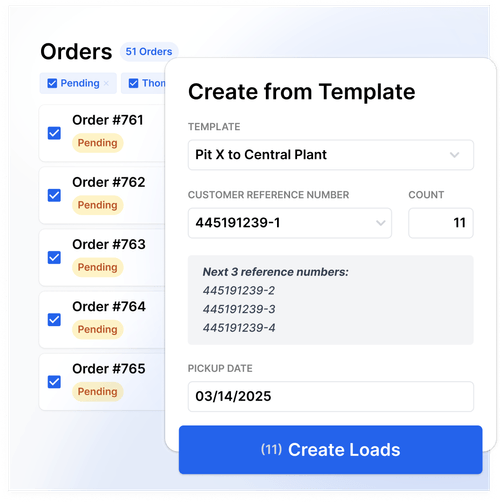
Customer rate schedules are also stored in Toro. When Braxton builds a load, he applies the appropriate schedule, and Toro calculates the fuel surcharge automatically.
"Before, I would have to look back at what I quoted them last time, copy and paste that down to the next order, and manually calculate the fuel surcharge over and over. Now the rate schedules are already in Toro. When I build the load, I apply the rate schedule, and it automatically calculates for me."
— Braxton Crapo, Operations Manager
Once applied, the rate stays attached to the load through dispatch and invoicing. Billing starts with information dispatch has already entered, rather than requiring the office to recreate the order in another system.
Other key load details, like site-specific instructions, are handled the same way. Crapo can attach them to the delivery location itself in Toro, so a rural yard's entrance or loading procedure gets included automatically on every load headed there, without a dispatcher retyping it.
Commodities are handled much differently because some loads that look identical actually have different equipment requirements. Crapo hauls both seed and commercial potatoes, sometimes of the same variety, and once a trailer starts hauling seed, it's washed and kept dedicated to seed for the season.
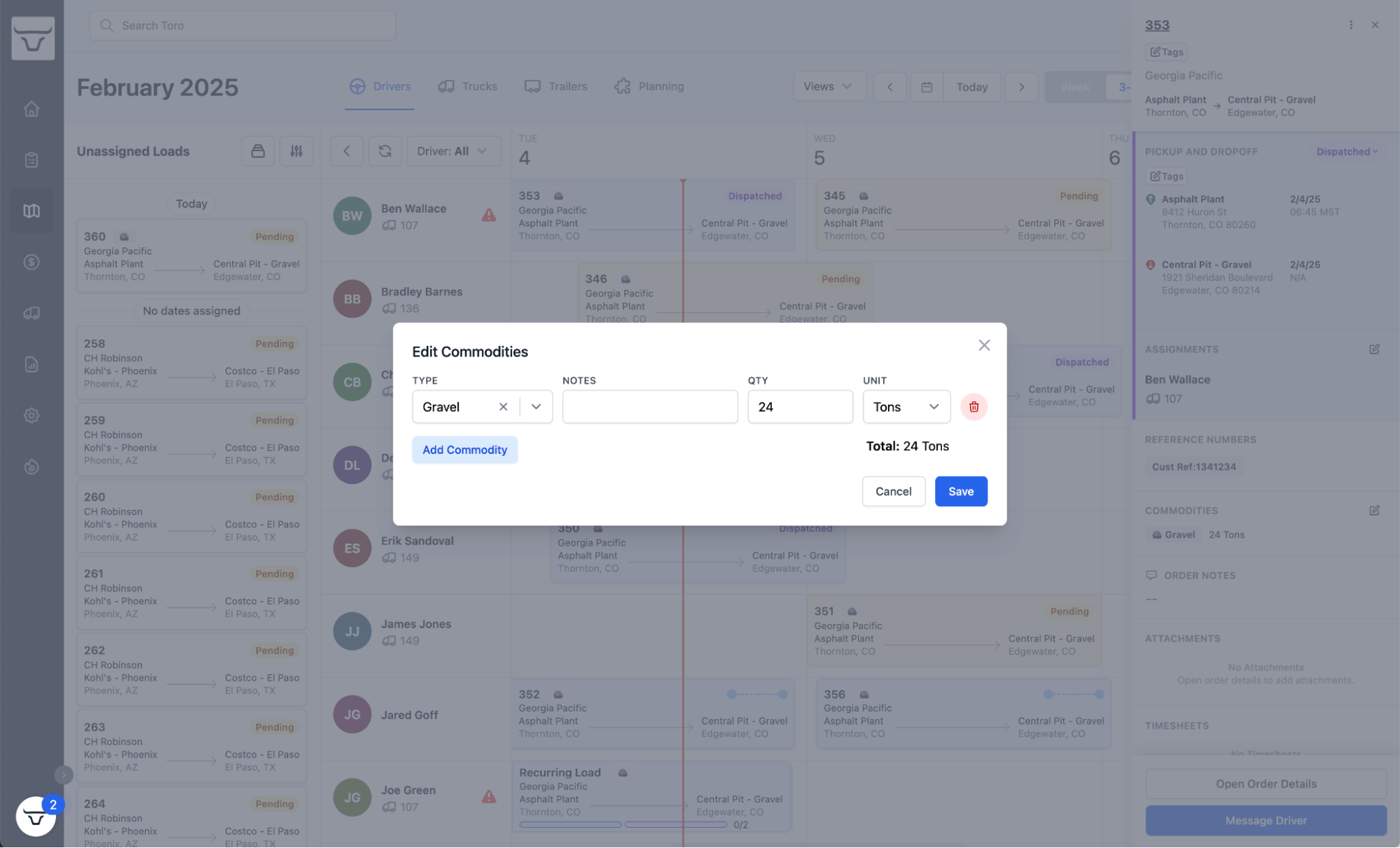
Commodity classifications in Toro keep the two separate on the unassigned list, and they let Braxton compare seed volume season over season to estimate how much dedicated trailer capacity Crapo will need.
Drivers upload tickets straight from the cab
A load can't be billed without its scale ticket, and for years collecting tickets was the slowest part of the whole operation. Each one was kept in an envelope in a truck until the driver's next trip to the office, which could be up to two weeks after the work was done.
Now it arrives before the driver leaves the delivery site. After a delivery, the driver opens the link in the text message from the dispatcher, photographs the scale ticket, and submits it. Toro automatically attaches the document to the correct load, so nobody has to match paperwork or manually chase down specific load details.

Drivers repeat this process for every load they haul, creating a centralized system where everyone in the organization can access key documents. This means back-office teams always have the details they need for invoicing, payroll, and reporting.
Back-office teams can invoice a load the day it gets delivered
Amy Angel, who handles invoicing and driver pay for Crapo's fleet, starts her day by checking what came in. She can see which completed loads have their required paperwork and which are still missing documents. So, if a driver completes five deliveries and uploads tickets for four, she can follow up on the fifth that day instead of discovering the gap at the end of a billing cycle.
"If those drivers upload tickets in the moment, I could bill a load that day that got delivered that day. That really helps us get our invoices out to customers and speed up the payment process." — Amy Angel, Invoicing

The invoices themselves take less work too. Toro prepopulates invoice numbers and other load information Amy previously would have entered by hand, so her job changes from recreating each order to reviewing it.
"Toro will pick up on invoice numbers and certain parts of the invoice that can be filled out before I see it," Amy says. "That takes seconds to review, as opposed to going in and filling the whole thing out from scratch."
This is how Crapo handles some of their biggest customers. For a high-volume account like Mountain West, Amy may combine around 50 deliveries on a single invoice, and Toro's group audit feature lets her review all the associated loads and tickets in one place before sending.

Otherwise, this would have meant downloading 50 sets of tickets one at a time, checking each against its load, and rebuilding all of it into a single invoice by hand. When a customer needs documentation outside an invoice, she can also send the supporting PDFs directly from Toro, and Crapo uses the same load information for driver pay.
None of it ties her to a filing cabinet anymore, either.
"I can take my laptop and be in Florida on the beach doing my job. I can be sitting at the airport doing my job. I can pull Toro up and do my job from anywhere." — Amy Angel, Invoicing
Results: Fewer unbilled loads and 10 to 15 hours saved per week
Crapo has been working with Toro for a few years now, long enough to see exactly what's changed across dispatch, billing, and the day-to-day workload. Three results stand out:
- Fewer unbilled loads. When Crapo migrated to Toro, roughly 3,000 delivered loads were waiting to be invoiced. The company now keeps that number below 500 most of the time. Clearing a backlog is a one-time project, but holding the number down while drivers complete new loads every single day means the process finally keeps pace with the fleet.
- Faster invoicing. Tickets that once took one to two weeks to reach the office can now be uploaded the moment a load is delivered—and when drivers submit promptly, Crapo can invoice the same day. The company hasn't formally measured the change in time to payment, but Braxton estimates the full dispatch-to-payment cycle now moves 30 to 60 days faster than it did.
- Less administrative work. Braxton estimates Toro saves him 10 to 15 hours a week. Five to six of those hours used to go to collecting, copying, and filing tickets; another four to five went to moving information between spreadsheets; and the rest disappeared with the rate lookups and manual fuel surcharge calculations that no longer happen.
Beyond just the numbers, Crapo has also noticed that fewer loads slip through the cracks, and any dispatcher can answer a customer's question without tracking down whoever built the load. For Braxton, the biggest change is having room to think past the current day's work.
"When you are so entrenched in the day-to-day of just trying to survive through the loads and dispatches, it's hard to even look up and see what might be coming down the road,” he says. “Toro has given us the opportunity to decrease some of our workload, focus on other things that really needed to happen, and continue growing our business."
Why Crapo considers Toro an operational partner
The first TMS Crapo bought created more work than it eliminated, and once the sale closed, the company was on its own with it. Toro does things much differently.
When Crapo's rural delivery sites made pins hard to place accurately, Braxton asked whether Toro could add satellite imagery to its maps. The Toro team was able to ship a new update within a few weeks.
"The thing that shocked me the most was the people. They were open to helping us solve little nuances that we needed in our system that maybe they hadn't seen in other fleets, and they worked with us constantly for a long time." — David Crapo, President
Braxton sees it the same way, and for him it's the difference between buying software and gaining a partner.
"It feels more like a partnership working with Toro than just us paying for a subscription. They always answer the phone, they answer the questions we have, and they listen to the suggestions we have."
– Braxton Crapo, Operations Manager
If you operate a bulk, agricultural, or short-haul fleet and want dispatch, driver paperwork, rates, and invoicing in one connected system, schedule a free demo with the Toro TMS team today.