.png)


When a truck makes several deliveries in a day, the back office has to keep up with the admin related to every one of them.
Each load produces ticket information that needs to be checked and used for billing and driver pay. And when staff handles those details on paper and in spreadsheets, the same information can pass through several people before the work is finished.
Dispatch also has its own repeated tasks. Drivers call to request additional loads, while changes to delivery instructions mean manually contacting everyone affected. Those calls arrive alongside new customer orders, leaving the team less time to plan the next assignment.
Like many bulk haulers, Mike’s Trucking was managing both of these problems. The family-owned Ohio hauler had grown to 55 trucks, with the business receiving roughly 500–800 load tickets in a day, according to its operations team. Staff could handle the same ticket four or five times across dispatch, billing, and other office tasks. Preparing driver pay also meant entering each driver’s tonnages and rates into Excel.
The company needed a way to keep those details organized and reduce the work required to process each load, which led the team to learn more about Toro TMS, our trucking management software built specifically for bulk haulers.
In this article, we share how Mike’s Trucking used Toro TMS to bring dispatch and billing into one system, reduce the calls needed to manage repeat loads, and save hours of manual office work each day.
If you’re a bulk hauler looking for a better way to manage dispatch and back-office tasks, book a demo with us to see how Toro TMS can help.
Mike’s Trucking at a glance
- Location: West Jefferson, Ohio, near Columbus
- Operation: Family-owned hauling company with roughly four decades in business
- Fleet: 55 trucks
- Commodities and services: Sand, gravel, other aggregates, and cement powders, plus van and flatbed hauling
- Ticket volume: Approximately 500–800 load tickets per day
- Previous process: Paper tickets, handwritten dispatch notes, Excel for driver pay, and individual texts to drivers
- Primary challenge: Handling the same tickets four or five times across office tasks, with repeated manual entry and routine calls to add loads
- Results with Toro: Multiple hours saved daily on manual data entry, fewer calls to dispatch for repeat loads, and faster billing with ticket photos and load details available in one system
For Mike’s Trucking, dispatch and ticket processing meant handling the same information repeatedly
Like any aggregate hauler, Mike’s Trucking coordinates deliveries that change throughout the day. New customer orders come in while trucks are already loading or delivering, and dispatch has to work those requests into the existing schedule.
Before Toro, keeping up with that work involved several challenges:
- Matching materials and equipment to each delivery. The team may handle 13–15 material types in a day, according to lead dispatcher Larry Bobo. Dispatch has to account for customer requirements, equipment access at delivery sites, and quarry closing times.
- Keeping the dispatch schedule current manually. Staff wrote orders on notebook paper before transferring them to a dispatch spreadsheet. Each new request or change required another update—and communicating that change with drivers.
- Handling driver communication one call or text at a time. When instructions changed, staff texted each affected driver individually. Drivers needing additional loads had to call the office so dispatch could enter them.
- Processing the same tickets repeatedly. Founder Mike Sr. describes handling tickets four or five times across dispatch, payroll, customer billing, and quarry payments. Preparing driver pay also required entering each driver’s tonnages and rates into Excel.
- Tracking down errors. Mike Jr., who works in operations and dispatch, described how a mistake could take half the day to track down, adding more follow-up to an already busy workload.
Office manager (and Mike Sr.’s daughter), Maria, described the repetitive entry involved in preparing driver pay:
“I would be on an Excel sheet entering each tonnage, each rate, every single time.”
With hundreds of tickets to process alongside incoming orders and driver calls, Mike’s Trucking began looking for a system that could reduce manual work across dispatch and ticket processing.
How Mike’s Trucking found the right system to move away from spreadsheets
Mike’s Trucking knew its paperwork process needed to change. The harder part was replacing a familiar way of working while keeping the operation running.
To kick off its research into possible solutions, the company identified what it needed from a new system and compared options. Lisa helped research systems alongside Mike Jr. and Maria, and Toro stood out for its willingness to work directly with the team on problems they were trying to solve.
While there was some nervousness about leaving Excel, the company had an internal advocate in its lead dispatcher, Larry. With experience using other transportation management systems, Larry encouraged the team to stay with the process and give it time to become familiar.
So, Mike’s Trucking introduced Toro in stages, starting with ticket management tools and adding payroll later. Building jobs in the system initially added work for dispatch—but once those jobs were set up, assigning trucks became easier than ever.
The office continued checking tickets manually as confidence grew. Drivers also needed time to learn how to photograph their paperwork clearly. According to Maria, even drivers who had been with the company for more than 20 years adapted to the process.
As staff encountered problems, they raised them with Toro. That feedback helped improve how the team captured tickets and handled repeat loads.
When asked how the onboarding and support teams helped with his concerns, Mike Jr.’s answer was simple: “They answered the phones.”
How Mike’s Trucking keeps daily loads moving with Toro
Toro TMS is a cloud-based TMS software built for dry and liquid bulk haulers running high volumes of short, repeat loads.
For Mike’s Trucking, Toro gives dispatch and office staff a shared place to manage loads and access the details needed for billing and driver pay. It allows staff to reuse job information and help with assignments when dispatch is busy, while drivers can receive instructions and submit ticket photos through their phones.
The following workflows show how the team uses Toro to reduce manual entry and routine dispatch calls.
A shared dispatch board helps the office plan and assign loads together
One of the key features Mike’s Trucking uses is Toro’s shared dispatch board. It gives dispatch and office staff a central place to see incoming orders and manage assignments, allowing more of the team to help when calls pile up.

New orders directly appear on the board as staff enter them. Lead dispatcher Larry can plan around existing work and assign a load to a driver before sending the assignment.
Staff can also enter future orders, such as a customer’s request for tomorrow’s deliveries. Although the team still sometimes uses its daily call sheet, those orders can be recorded directly in Toro.
When Larry is busy handling calls, a customer service colleague can dispatch a load using the templates and loads already set up.
“Not only can they take the order, they can take that dispatch and run it all the way through,” Larry explained.
That happens daily, especially during busy afternoons when customer requests and driver calls arrive together. The person who takes an order can also assign and dispatch the load, so routine requests can move forward while Larry handles other calls.
Read more: Aggregate dispatch software: 5 top options for bulk haulers
Job instructions and group messages keep drivers informed
Mike’s drivers receive the information they need for an assignment through Toro, including location links and purchase order numbers. Delivery memos can explain where to enter a site or which areas to use when unloading.

Chuck, who has driven for Mike’s for more than 20 years, describes how that information helps on the road:
“I particularly like the GPS links that take us to where we’re going, where we’re dumping and everything. It makes it easier to keep track of everything and keep track of our loads.”
When plans change, the office can message an individual driver, a selected group, or the entire fleet. The team also uses these communication tools with owner-operators.
Larry gives the example of eight drivers working the same lane. If the delivery instructions change, the office can send a message to that group together, replacing the separate texts previously sent to each driver.
Delivery and read status help dispatch check whether messages have reached drivers. Customer service colleagues can also send updates when dispatch is busy, so communicating a change does not depend on one person being free.
Read more: Truck driver management system: 6 tools for better scheduling and communication
Drivers adjust repeat loads without calling for another dispatch
For Mike’s Trucking, the number of loads a driver needs to complete can change during the day. Previously, to add another batch, a driver had to call the office and ask dispatch to update the number of loads for that job in the system. As Mike Sr. explained:
“Sometimes they just dispatch five loads to the truck. Sometimes the guy might need ten. Instead of calling back in the office for the dispatchers to put another five loads on the computer, [Toro] designed a plus button so drivers can add to it themselves.”
Drivers can also reduce the number of loads if they do not complete the original assignment. That removes a routine reason to call dispatch. As a result, staff no longer have to enter another batch simply because a driver needs to complete the sixth or seventh trip on the same job.
Read more: Dump truck software: 5 top choices for specialist software
Templates and ticket photos reduce the work of preparing bills and driver pay
The Mike’s Trucking office can now reuse information already entered for a job. Customer and job templates keep recurring details available, reducing the need to enter them again for repeat work.
“With Toro, we definitely do have a lot more accuracy since we have templates that we can now set up from the initial start of our order. So when a customer calls in, we can immediately go to Toro, know that that template’s there and we can reuse it so that way we know everything’s always consistent with all of our customers.” — Maria, Office Manager
That changes how staff prepare orders for billing. They can review the available information alongside a photo of the driver’s ticket, check that the details are accurate, and move the order through the billing process.
Drivers submit those photos through the text message-based workflow. Early in the rollout, some images were difficult to use, so the team asked Toro for help. Mike Jr. says Toro added a camera framing box to guide drivers when photographing their tickets.
Clearer photos made it easier for the office to review the paperwork. Staff still perform accuracy checks, but they can do so with the ticket and associated information available in one place.
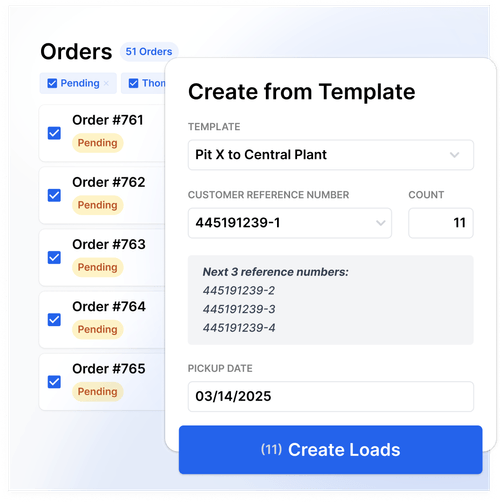
The office shares the auditing work. Once an order is ready, staff can email the invoice to the customer and track that it has been invoiced and sent. The company also uses Toro in its payroll preparation, with Maria preparing that information during the week and emailing it to individual drivers.
The same access helps when customers have billing questions. Staff can retrieve the order and discuss the details without first tracking down the paper ticket or asking someone else for the information.
“With Toro, the spots that feel more streamlined are from dispatching to the billing. It’s definitely smoother that way. We’re not jumping from point to point or person to person with paperwork.” — Maria, Office Manager
Less daily data entry and fewer routine dispatch calls
Mike’s Trucking spends less time manually entering load information. Maria estimates that Toro saves “a couple hours a day” compared with the previous process of entering each driver’s tonnages and rates into Excel.
The repetitive work of entering individual tonnages and rates has been reduced, freeing up time for other office responsibilities. The benefits of using Toro also show up in how the team handles a busy day:
- Fewer calls to add repeat loads. Drivers can adjust the number of loads on their job in Toro, reducing the need to call dispatch to have staff enter each change.
- More help during dispatch peaks. Customer service colleagues can send assignments and messages while dispatch handles other calls.
- Easier billing follow-up. Office staff can retrieve the order information when customers have questions, with the supporting details available for review.
These changes make it easier for the Mike’s Trucking team to keep work moving from dispatch through billing. Staff can access the information they need in Toro, reducing the time spent passing paperwork between people and re-entering load details.
Mike’s Trucking and Toro TMS: A partnership that gives the team confidence to do more
Mike’s Trucking now wants to expand its use of Toro and take more administrative work off the team’s hands. That confidence developed gradually, particularly for founder Mike Sr., who initially resisted the investment.
“I didn’t want to do it. But now I’m wanting to take this thing farther.”
Ongoing support is a large part of the confidence Mike’s team now feels. Larry says the team gets quick responses when questions arise, whether they contact the help desk by message or phone.
“One of the biggest things I like is the fact that Toro responds almost instantly.”
For Mike’s Trucking, that support is a reason to stay. Other software providers have approached the company about switching, but Mike Sr. says the service from Toro keeps him committed:
“As long as I get the service I get with Toro, as long as people take care of us, I have no desire to leave Toro.”
If your office spends hours entering load details or handling repeat dispatch calls, schedule a demo with Toro TMS to see how your team could manage that work in one system.