


For fleets hauling materials for mining and construction customers, a day’s work can involve several deliveries per truck, with assignments changing while drivers are already on the road. Throughout the day, customers may increase the number of loads they need, or a truck may break down, leaving dispatch to find another vehicle to complete the remaining deliveries.
Typically, haulers would manage these changes manually — for instance, by using phone calls and spreadsheets. But calling each affected driver to explain their next assignment takes a lot of time away from other dispatch responsibilities. Plus, every completed load has to be recorded and it produces paperwork that has to reach the office and be checked before the customer can be billed.
C&W Global was managing both challenges across approximately 160 trucks and 1,600–1,800 loads each week. The family-owned Florida company hauls rock, sand, and other bulk materials locally and across the Southeast.
Before Toro, dispatcher Freddie was fielding 150–200 calls a day, while paperwork from other terminals reached the billing office in weekly batches. Scanning those documents alone took Stephanie, who handles accounts receivable and billing, approximately six hours each week.
After trying other systems that didn’t fit its operations, C&W chose Toro TMS, our trucking management software built specifically for bulk haulers.
In this article, we share how C&W uses Toro to coordinate up to 1,800 weekly loads with fewer dispatch calls and turn driver-uploaded tickets into invoices, including more than 200 created within minutes for a single customer.
C&W Global at a glance
- Location: Winter Garden, Florida, with operations across multiple locations.
- Operation: Family-owned hauling business dating to 1965.
- Fleet: Approximately 160 trucks at the time of the interview.
- Equipment and services: Dump and walking-floor hauling, with local Florida operations and over-the-road work across the Southeast.
- Materials: Rock, sand, lime rock, and other bulk materials, plus waste hauling.
- Load volume: Approximately 1,600–1,800 loads per week.
- Previous process: Phone calls, handwritten dispatch notes, spreadsheets, physical paperwork, and a legacy software system.
- Primary challenge: Keeping frequent load changes and the associated billing paperwork moving through the business.
- Results with Toro: Six hours of weekly scanning eliminated, less reliance on dispatch calls, and easier invoice preparation and corrections.
High-volume hauling put pressure on C&W’s dispatch and billing processes
C&W’s local hauling work required dispatchers to keep revising assignments throughout the day. In Freddie’s North Florida rock-and-sand operation alone, approximately 20 trucks could complete around 100–125 loads daily, depending on the routes.
Before Toro, keeping that work moving involved several challenges:
- Dispatchers had to constantly reassign trucks as customer needs changed. President Kevin Creeden described a situation in which there were 10 trucks on a job, only for the customer to need three one day, then all 10 again the next. Dispatch had to find other work for those drivers without losing the ability to cover the next day’s orders. Breakdowns created another round of adjustments, so C&W could still deliver the loads it had promised.
- They had to keep drivers informed of all changes one call at a time. Dispatchers called drivers to explain assignment changes, sometimes struggling to reach them. With Freddie fielding 150–200 calls a day, there was little time left for anything else, including the customer inquiries and quoting the dispatch team also handled.
- They couldn’t start billing until they collected and manually processed all paperwork. Hard-copy documents from North Jacksonville had to reach the Central Florida office, where staff sorted them and checked totals against invoices. They then scanned the supporting paperwork and attached it before emailing the bills. Missing documents could delay billing without the office immediately knowing what was absent.
- Office staff had to take turns completing tasks in the old software. C&W had used its previous system for more than 20 years. Whenever someone was invoicing or handling certain other tasks, Stephanie said, colleagues had to stay out of the system to avoid slowdowns or glitches. That meant the office could only get so much done at once.
Without a system to track tickets, the office couldn’t tell when paperwork for a completed load was missing.“If a driver didn’t turn in their paperwork, we wouldn’t know it,” Stephanie explained.
C&W needed a system that could keep up with frequent dispatch changes and give the office a clearer view of which loads still needed attention before billing.
Why C&W chose Toro after trying other trucking software
C&W had run the same billing software for more than 20 years, with custom modifications built up along the way. As the operation grew, Kevin said it was simply time to move to “a newer, faster, more up-to-date” system.
Finding the right fit proved harder than expected. Freddie recalls trying three other trucking software platforms, including some well-known names, but none could handle C&W’s volume of short, frequently changing loads.
Entering orders was tedious, and pulling or changing them on the fly was difficult. When the team asked whether a system could handle what they needed, Freddie said, “We got a lot of nos.”
“Over the road stuff, you might do one to two loads a week. We’re doing hundreds of loads in a day.”
All of this time spent trying different systems and looking for a new one made it clear what C&W needed. Any new software had to:
- Handle high local volume. C&W needed software that could manage hundreds of short loads a day alongside its over-the-road work, without forcing the fleet to operate like a long-haul carrier.
- Make changes fast. Dispatchers had to pull, edit, and reassign orders quickly as customer needs and truck availability shifted.
- Let the whole office work at once. After years of one-user-at-a-time limits, staff needed to work in the system simultaneously and pull the reports they needed themselves.
- Come with support that answers quickly. C&W wanted a vendor that would respond to questions and adjust the system, rather than hand over software access and move on.
C&W first heard about Toro through a cold call from our team, which led to an on-site demo. Kevin and a few staff members sat in, and by the end, he “got kind of excited” when he saw a system that could handle both local and over-the-road volume.
Instead of starting with a standard rollout, our team spent time watching how C&W actually worked before structuring the implementation.
This was a much different approach from what C&W had experienced before. Previous vendors gave the team a limited window, sometimes just three days, before the trainers moved on. One had also selected two or three staff members to serve as liaisons for the whole company, which Stephanie said “hurt the communication.” This time, Toro trained the full team directly.
We also converted and imported C&W’s existing data files, rather than requiring staff to re-enter everything by hand as past vendors had. The speed caught the team off guard. Kevin said everyone was “kind of all surprised and nervous about going so quick.”
Driver adoption took some patience. Some longtime drivers weren’t comfortable with new technology, and a few still carried flip phones. With time and walkthroughs, Freddie says most drivers became comfortable with the process. He also says uploading paperwork through Toro is simpler than using their previous photo-sharing app.
Once drivers and office staff were working in Toro, the changes showed up pretty quickly across dispatch, paperwork, and billing.
How C&W manages dispatch, load paperwork, and billing with Toro TMS
Toro TMS gives C&W’s dispatchers and billing staff a shared place to manage orders and the information associated with each load. Dispatch creates the assignment, drivers upload their paperwork, and the office reviews those details before preparing customer invoices.
This centralized system helps C&W keep information moving between its terminals and billing office throughout the week.
Here’s how C&W uses Toro to keep 1,600–1,800 weekly loads moving from dispatch through billing:
Build repeat loads from reusable templates without re-entering job details
Much of C&W’s work runs on recurring lanes, moving the same materials from the same pickup points to the same customers day after day. Rebuilding those loads from scratch would mean repeatedly entering the same pickup, delivery, and rate information.
In Toro, each lane is set up once as a template with its pickup location, delivery stop, and rate. Dispatchers then reuse that template to build each day’s assignments. When C&W adds a new customer or lane, dispatch can create a template for future assignments.

“You go in and set up a template, the pickup and the stop and the rate, and we fill it all out and it’s ready to go. If we’re doing multiples of that, it’s there for us to use as a template to set up the driver’s dispatch on a day-to-day basis.” — Freddie, Dispatcher
For trucks making several trips on the same lane, that means dispatch can prepare the work without repeatedly entering the same information. The template provides a starting point, while dispatch can still update individual orders when requirements change.
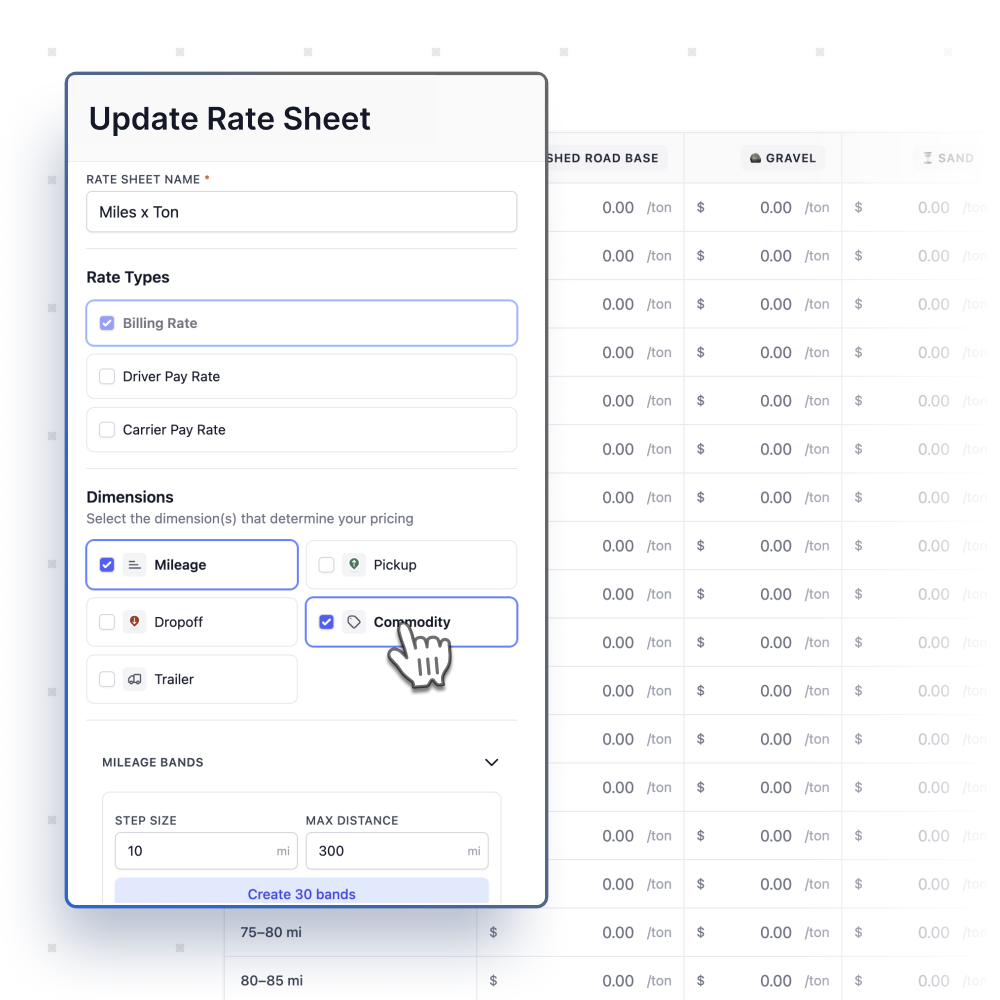
Rates are also maintained in Toro TMS. Stephanie, who handles accounts receivable and billing, explains that when pricing changes, dispatch can update the rate schedule so those changes carry through to orders. Billing staff can then review the rate alongside the load information.
Read more: Aggregate dispatch software: 5 top options for bulk haulers
Manage load assignments and driver schedules from a centralized dispatch dashboard
C&W plans the following day’s work while handling changes to loads already underway. Freddie receives customer orders during the day, prepares the next day’s dispatch, and adjusts assignments when customers change their requirements.
Toro gives him a central place to manage those orders. When a customer cancels work or a truck breaks down, he can update the affected assignments and communicate the revised plan through the system.

The same view works across C&W’s locations. Each office manages its own region, while Kevin can review the overall operation and pull reports from headquarters.
Managing that work no longer requires Freddie to remain at his desk. He regularly visits customers in North Florida and can continue working through Toro with his laptop and phone.
“Even if we’re at a customer — like I travel up to the North Florida site all the time to go visit some of my customers — I can still do my job and not have to be stuck here in the office to do it.”
Send load instructions and schedule updates straight to drivers’ phones via text message
C&W sends each driver’s full assignment for the next day in the afternoon, so drivers know where they’re going and when they need to start. For example, drivers can avoid getting up at 3 a.m. when the pickup schedule doesn't require them to leave until 6 a.m.
When plans change during the day, dispatch sends a message instead of calling. Drivers can read it when it’s safe, rather than picking up the phone behind the wheel.

Each assignment also includes the details drivers used to call about. Map links take them directly to the pit or job site, so even drivers who’ve been somewhere many times can “tap on the map and go to it rather than call us and ask us how they get there,” Freddie said.
PO numbers are also available on the order and can be updated for an individual load if they change. Kevin says that information has reduced the number of trips to the wrong location.
Fewer calls also give dispatchers more time for customers. Since C&W’s dispatchers handle quoting and inbound requests, time saved on routine driver communication goes back into serving and winning business.
Read more: How Mike's Trucking saves hours of office work every day with Toro TMS
Allow drivers to upload tickets from the road so back-office teams can access load details for daily review and billing
Instead of waiting for weekly batches of paper from other terminals, C&W’s billing team now receives tickets as drivers upload them. Staff can review the documents alongside the associated load information in Toro.

Early on, the team encountered duplicate uploads. After C&W switched from bills of lading to scale tickets, Toro began alerting drivers when they tried to upload a duplicate. Stephanie says duplicates dropped “tremendously” from there.
Four staff members review orders daily in Toro’s audit screen, checking the ticket against the order details before marking it “ready to bill.”
Staff also check pending, in-transit, and delivered orders for missing paperwork or other issues. That gives them a record of the work to check against, rather than relying only on the documents drivers have submitted.
With supporting documents available on screen, Stephanie no longer needs to scan them at a separate computer. She can spend that time reviewing orders and preparing invoices.
Read more: Trucking ticket management software: How to better manage your paper tickets
Generate customer invoices in minutes and make corrections without having to void and rebill
When it’s time to invoice, Stephanie sorts ready-to-bill orders by job or lane for customers who want their bills organized for each specific pickup and delivery location. She then creates the invoices, reviews them, and emails them directly from Toro.

That process also accommodates customers with more specific requirements. One large account needs a separate invoice for every load, adding up to more than 200 invoices each week. Stephanie can select those orders and generate the invoices together.
“[Toro] creates all those invoices within minutes, and then I hit one button and hit email, and it goes out to them. That’s how simple that is.”
Plus, other employees can keep working while those invoices are being prepared and sent. Unlike the previous system, invoicing no longer requires colleagues to wait their turn.
Corrections are easier to handle, too. Previously, an error required voiding and rebilling the invoice, which could leave the customer waiting until the following week. Stephanie can now make the correction and resend the invoice directly.
“Now, I go into the invoice, correct it, take an order off, adjust the amount, resend it to the customer right from there.”
If a correction affects driver pay, that adjustment is still handled manually the following week. The customer can receive the corrected invoice the same day.
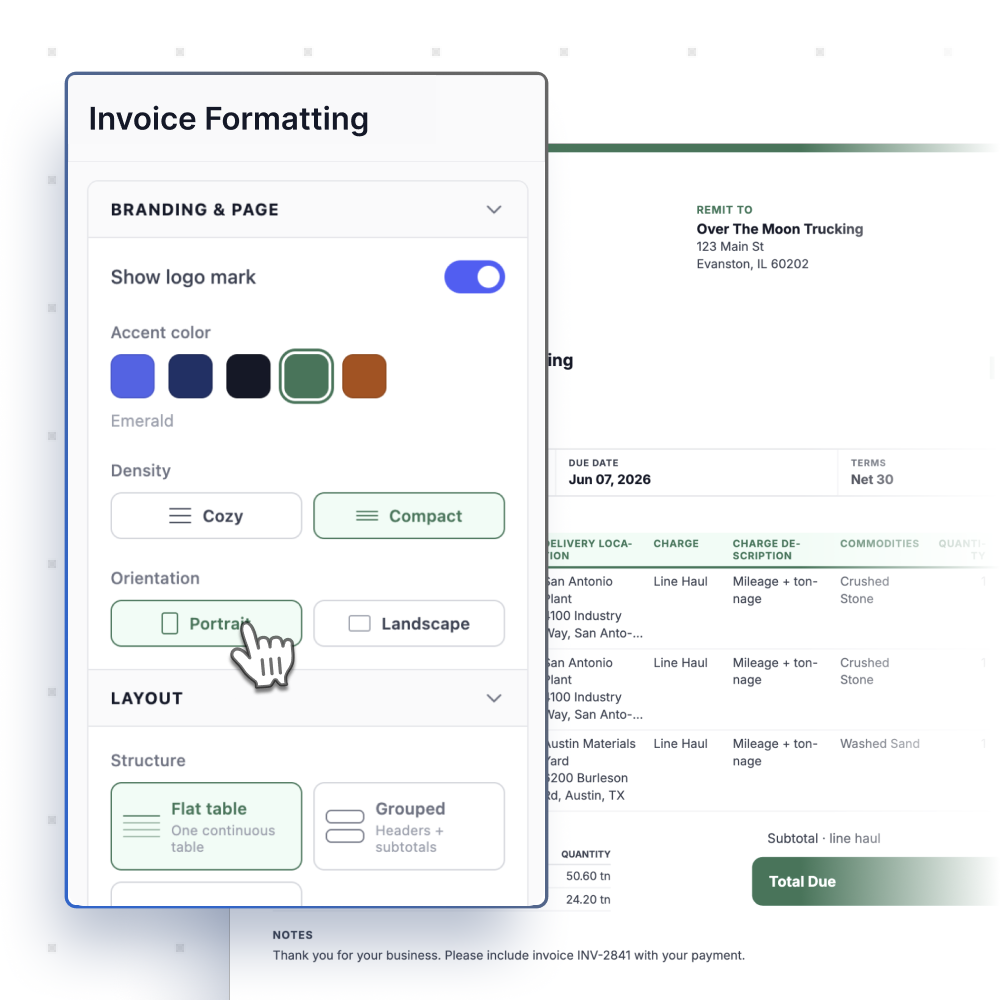
C&W can also customize invoice layouts and bill more frequently for customers who request it, while retaining weekly billing for others. On the accounts receivable side, Stephanie records incoming payments in Toro as part of her daily reconciliation work.
Read more: How Toro TMS helped Crapo LTD cut unbilled loads by 80%
Results: Six hours of weekly scanning eliminated and a more manageable billing process
Stephanie used to spend about six hours a week scanning backup paperwork at a separate computer. Now drivers upload the documents directly, and office staff check the details before invoicing.
Some of that time now goes to reviewing invoices more closely. “I’d rather spend my time on that, making sure invoices are correct,” Stephanie said. Overall, she estimates Toro has “shaved off a few hours each week,” especially in accounts receivable.
The improvements also show up in how dispatch and office staff handle their daily workload:
- Faster preparation of customer invoices. For one account requiring more than 200 separate invoices each week, Stephanie can generate the bills within minutes. C&W can meet that customer’s one-load-per-invoice requirement without creating each invoice individually.
- Quicker responses to billing questions. Invoice corrections that previously required a void and rebill can now be completed and sent back during the day. Customers no longer have to wait until the following week for those issues to be resolved.
- Fewer routine calls to dispatch. Written assignments and load instructions reduce the time Freddie spends explaining work over the phone. That gives him more time for customer conversations and quoting alongside his dispatch responsibilities.
- More flexibility for office staff. Staff can continue reviewing orders and handling other tasks while invoices are being prepared. The team no longer needs to work around one person occupying the old system.
For Stephanie, the change is also about where she spends her time. With scanning off her plate, she now handles almost half of C&W’s weekly invoicing, work she says suits her far better.
“I needed something to supplement all that scanning. I like to be busy and have a full plate… I just gravitated to the system, and I ended up really loving it, and when you love it, you’re good at it.”
Why C&W values Toro TMS as an ongoing partner
C&W built its reputation on following through, whether that means covering a customer’s full order or finding work for drivers when plans change. Kevin says Toro has met the same standard.
Support has continued beyond implementation. With the previous software vendor, C&W’s team never knew when they would hear back after asking for help. Stephanie now gets prompt responses by email, while Freddie can reach someone by phone when he wants to talk through a problem.
Freddie also appreciates the team’s willingness to find solutions to C&W’s specific needs.
“In Toro’s situation, 99 times out of 100, they’ve had an answer for us and it’s been a quick fix for whatever we’ve needed.”
Kevin sees a longer-term benefit in being able to stay involved without being in the office. As he gradually steps back from daily operations, he can still access reports and check on the business remotely while his son, Kyle, helps lead the company.
After trying other systems, Stephanie’s advice for haulers still managing their work manually is straightforward:
“I would say do it. I’d say stop and do Toro. It’s taken us a long time to get here.”
If your fleet hauls for mining or construction customers, schedule a demo to see how Toro TMS helps you manage frequent loads and simplify billing.

