.png)



If you're running a tanker trucking fleet, the right software can reduce the time your team spends manually building loads, give dispatchers real-time visibility into their fleet, and help you stay ahead of rack departure windows and customer station outages.
However, most trucking software wasn't built with tanker operations in mind. Compartment assignments, product compatibility, wash scheduling, and hazmat compliance are tanker-specific details that generic TMS platforms just weren't designed to handle.
For a platform to genuinely support tanker operations, it needs to:
- Capture all load details tied to a tanker delivery in one place, including gallons hauled, delivery quantities per compartment, BOL numbers, seal photos, and wash tickets, so that information flows from dispatch through invoicing without manual re-entry.
- Build and dispatch tanker loads in a single system, without switching tools or rebuilding the same loads from scratch every day.
- Track driver locations and load status in real time so dispatchers know where every truck is throughout the day.
- Keep track of compliance documents specific to tanker operations, including hazmat endorsements, tanker certifications, and medcards, and alert your team before anything expires.
- Generate invoices, driver settlements, fuel surcharges, and IFTA reports automatically using data that's already in the system.
- Analyze fleet performance with reporting that breaks down revenue, costs, and profitability by truck or route.
In this guide, we cover the five best tanker trucking software options for liquid bulk haulers, along with their key features.
We start with Toro TMS, our own trucking management software built specifically for bulk haulers.
We explain how Toro TMS helps tanker fleets:
- Build and dispatch loads faster using templates and a single-screen dispatch board
- Capture tanker documentation at the point of delivery and connect it directly to invoicing, driver pay, and compliance
- Track driver locations and stop activity to see which trucks are waiting at the rack, unloading at the receiver, or available for their next load
Schedule a free demo to see how Toro TMS handles dispatch, documentation, and back-office management for tanker trucking operations.
1. Toro TMS: All-in-one tanker trucking software for liquid bulk haulers

Toro TMS is built for high-volume dry and liquid bulk haulers, including tanker fleets moving petroleum products, chemicals, food-grade liquids, and other bulk commodities.
For most tanker fleets, managing that volume efficiently comes down to a few recurring challenges:
- Keeping track of which trucks are clean, what they last carried, and whether they're compatible with the next product
- Capturing load-specific documentation (BOLs, seal photos, delivery tickets, and wash tickets) before drivers move to their next stop
- Managing compartment assignments, product codes, and compliance records during a full day of high-volume dispatch
Many of the legacy TMS and fleet management tools used by tanker fleets were built for general trucking and adapted over time to handle liquid bulk. They can manage loads and track drivers pretty well, but they weren't designed for the specific data and documentation generated by tanker operations every day.
That forces dispatchers to manually fill gaps in their process, and back-office teams regularly need to re-enter information that should have flowed automatically from dispatch.
With Toro TMS, on the other hand, a dispatcher builds a tanker load once, and everything that follows runs from that same record. Drivers receive their instructions by text, documents are returned digitally from the delivery site, and billing and driver pay are calculated automatically from the completed load.
Below, we share how Toro TMS allows tanker fleets to:
- Build and dispatch tanker loads instantly using reusable templates
- See every driver and truck status from one dispatch screen
- Send load instructions directly to drivers by text and collect BOLs, seal photos, and delivery tickets from their phone at the point of delivery
- Generate invoices and driver settlements automatically once a load is complete
- Create advanced fleet profitability and performance reports to see exactly where your operation is making and losing money
Create recurring tanker loads instantly with reusable job templates
Tanker fleets typically handle a high volume of repeat loads. For instance, chemical carriers make the same plant-to-distribution runs multiple times a week, food-grade haulers return to the same dairy facilities on a fixed schedule, and petroleum fleets top off the same stations from the same racks day after day.
Rebuilding those loads from scratch every shift means dispatchers perform slow, repetitive work every day. It also creates room for error, such as adding the wrong compartment setup, incorrect product grade, or omitting a delivery instruction that causes a problem at the site.
Toro lets dispatchers save any load as a reusable template so recurring tanker work can be created and sent to drivers in a few clicks. Every detail your drivers and back-office team need is stored in the template and flows automatically to the load the moment it's created.
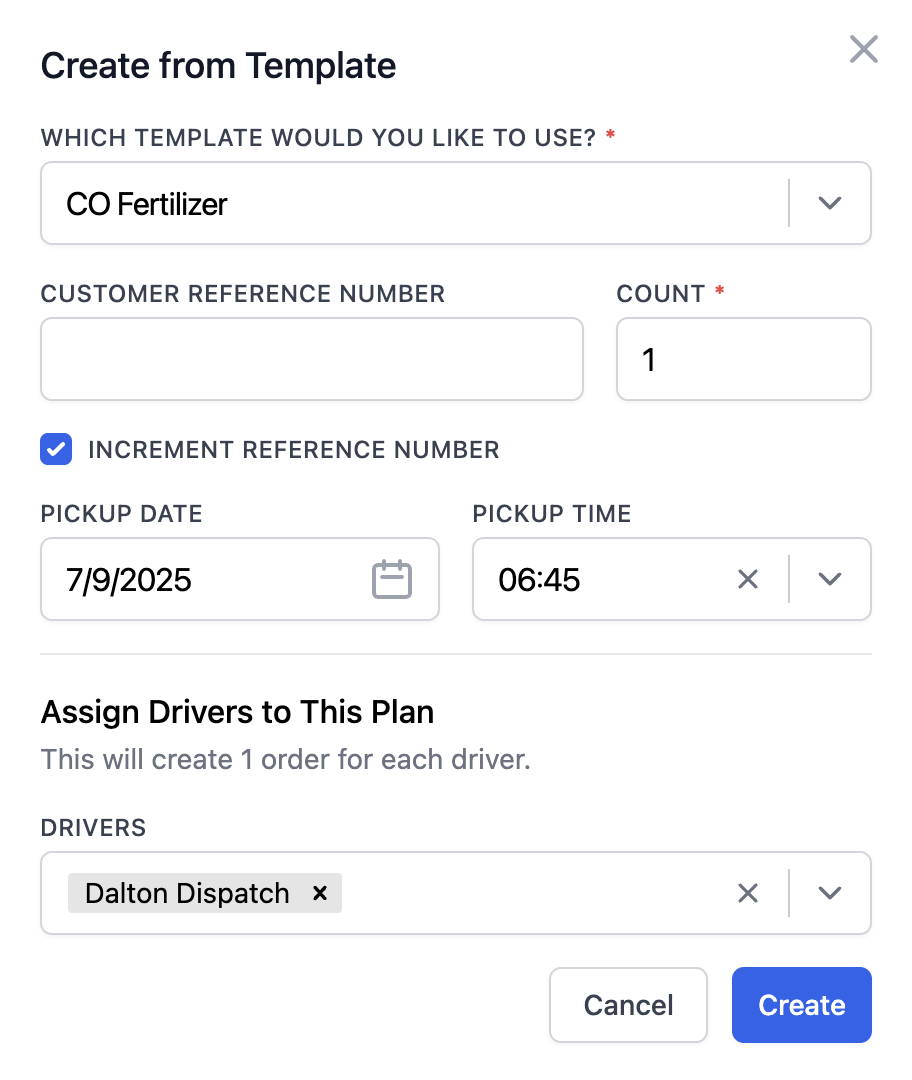
Templates can include:
- Customer names and addresses
- Client billing details and rate agreements, including fuel surcharge structures
- Loading terminal or rack, with preferred pickup windows and any site-specific access codes
- Product type, grade, and compartment layouts
- Site restrictions, such as pump requirements, hose specifications, or unloading procedures
- Detention thresholds and documentation requirements

Applying this consistency across repeat loads is important in tanker fleet operations because a missed product note or an incorrect compartment assignment can result in a contaminated load, a failed delivery, or a compliance issue at the site.
When that information lives in a template (rather than a dispatcher's memory), it shows up on every load automatically. Once dispatch creates a load from a template, all of that information flows to the driver, billing, payroll, and reporting without anyone re-entering it.
This reduces the time dispatchers spend rebuilding the same loads over and over, allowing them to focus more on managing daily operations.
Manage all tanker loads, drivers, and equipment from a centralized dispatching dashboard
Tanker dispatching is harder to manage than standard freight because load statuses change more frequently, and the stakes are higher for hazardous or chemical loads.
For example, a chemical hauler sent to the wrong facility with the wrong product configuration can result in a rejected load, a required washout, and a compliance incident.
Toro's dispatch board gives tanker dispatchers a single screen to manage the full day, including active loads, driver availability, real-time truck locations, and what's coming next on the schedule. There's no need to bounce back and forth between multiple systems or make status-check calls to drivers.

With Toro's dispatching screen, you can:
- Assign tanker loads using a drag-and-drop board that shows which drivers are available, which trucks are loaded, which are waiting at the rack, and which are finishing an unload. This ensures every new assignment goes to the right driver and equipment without back-and-forth.
- Monitor every active load in real time, including rack departures, in-transit positions, and delivery confirmations, so dispatchers can identify delays before they result in customer outages or missed delivery windows.
- Track real-time driver and truck locations through direct ELD integrations, so dispatch always knows where every truck is relative to terminals, wash bays, and delivery sites.
- Document driver detention as it happens, capturing on-site wait times accurately so your team has the data it needs to support detention claims without relying on driver recollection after the fact.

Not only does Toro's dispatch screen centralize everything for your team, but it's built to be picked up quickly by non-technical staff.
Dispatchers who have never used a TMS before can learn the system immediately, and because load data is entered once at dispatch, it flows automatically to drivers, billing, payroll, and reporting.
Read more: How to choose a dispatch software for trucking your teams will actually use
Send load instructions to drivers by text and allow digital documentation uploads at the point of delivery
Tanker trucking companies generate more load-level documentation than most freight types. It's common for a single delivery to require a BOL, seal photos before and after loading, a delivery ticket, compartment confirmation, and hazmat paperwork.
If you decide to handle this manually, you'll be relying on drivers to remember what to submit, when to submit it, and where to send it. But when drivers are already moving to their next rack pickup or washout, they can often forget about paperwork. The result is billing teams waiting on documents, invoices that can't go out, and compliance records with missing information.
Toro TMS solves this by allowing drivers to receive load details and upload documentation via text message without downloading an app or remembering any login credentials.

Once dispatch assigns a load, drivers receive a text message that includes:
- Pickup and delivery addresses
- Load details, including product type, quantities, and any special handling requirements
- Site access instructions, check-in procedures, and delivery time windows
- Hazmat placarding requirements or product handling notes
- Customer-specific notes relevant to that delivery
The text message drivers receive also includes a secure link for uploading documents, including BOLs, seal images, delivery confirmations, and wash tickets.

Once paperwork is uploaded, Toro automatically attaches every document to the correct load record. This gives dispatchers a real-time view of which loads are fully documented, allows billing teams to invoice without waiting on paperwork, and ensures compliance records are accurate and ready when a customer or auditor requests them.
Read more: Trucking ticket management software: How to better manage your paper tickets
Reduce the time your team spends on billing, payroll, IFTA, and compliance by up to 70%
After delivering loads, back-office tasks like payroll, invoicing, IFTA reporting, and compliance documentation all need to be handled. But when you're running multiple loads per truck per day, this can become overwhelming if everything needs to be done manually.
Toro eliminates that backlog by connecting dispatch data directly to billing, driver pay, and tax reporting. When a load closes in Toro, everything the back office needs is already in the system.

With Toro, tanker fleets can:
- Send invoices the moment a delivery is confirmed. When a driver submits their BOLs, seal photos, and delivery tickets from the road, Toro generates the invoice automatically using verified load data. This includes details like gallons delivered, compartment arrangements, fuel surcharges, and recorded detention charges. Billing teams can send invoices to customers in a few clicks without rebuilding them from scratch.
- Calculate driver pay without manual reconciliation. Toro tracks how each driver is paid (per mile, per load, per hour, or per gallon) in individual driver profiles and applies it automatically as soon as a load closes. Rack wait time, detention, drop pay, and any deductions are factored in automatically, so settlements are ready without the need for manual calculations.

- Keep hazmat and compliance records organized and audit-ready. Hazmat records, wash tickets, seal photos, and delivery confirmations are tied to the correct load record the moment a driver submits them. This makes it so that when a customer disputes a delivery or a DOT auditor requests additional information, you can easily pull up the correct files to verify.
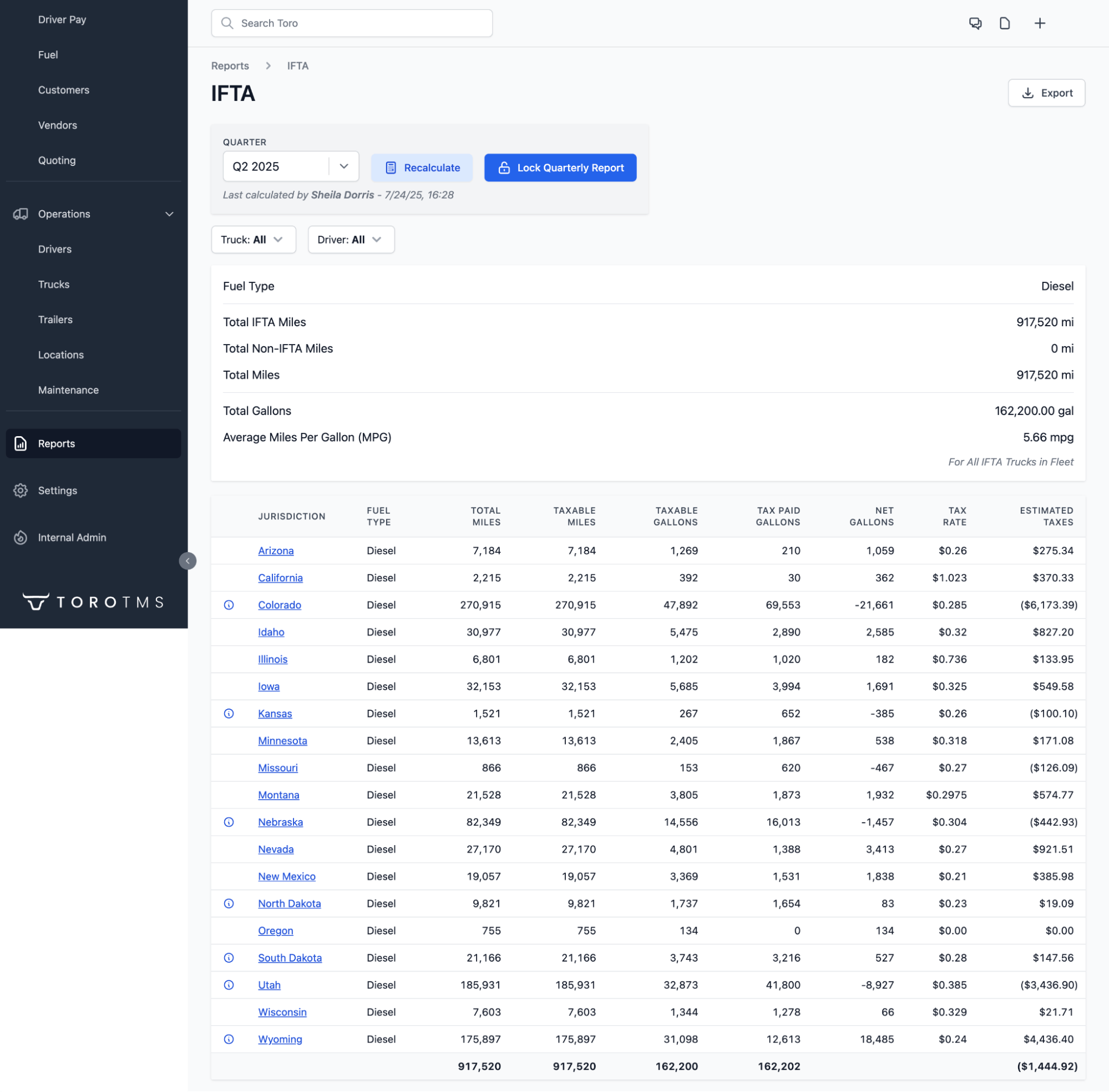
- Generate IFTA reports using real ELD and GPS data. Toro pulls jurisdictional miles directly from your ELD integrations and pairs them with fuel transaction data to calculate what each truck owes by state.
- Sync invoices, settlements, and expenses to QuickBooks automatically. Invoices, driver settlements, and expense records are automatically imported into QuickBooks when a load closes. There's no need for any exports or manual data entry to balance accounts.
Learn more: Trucking accounting software: 5 best options to streamline back-office tasks
Use real-time reporting tools to determine job profitability, costs, and overall fleet efficiency
When running a tanker fleet, there are dozens of variables that affect the cost of every load. Rack wait times, washout costs, deadhead miles between terminals and delivery sites, and compartment utilization all change daily and impact route profitability.
Without visibility into those numbers, high-cost routes and underperforming equipment can go unnoticed.
Toro's built-in reporting makes all of this data visible as it happens. You can easily view real-time dashboards that show how your fleet is performing at any point in the day.
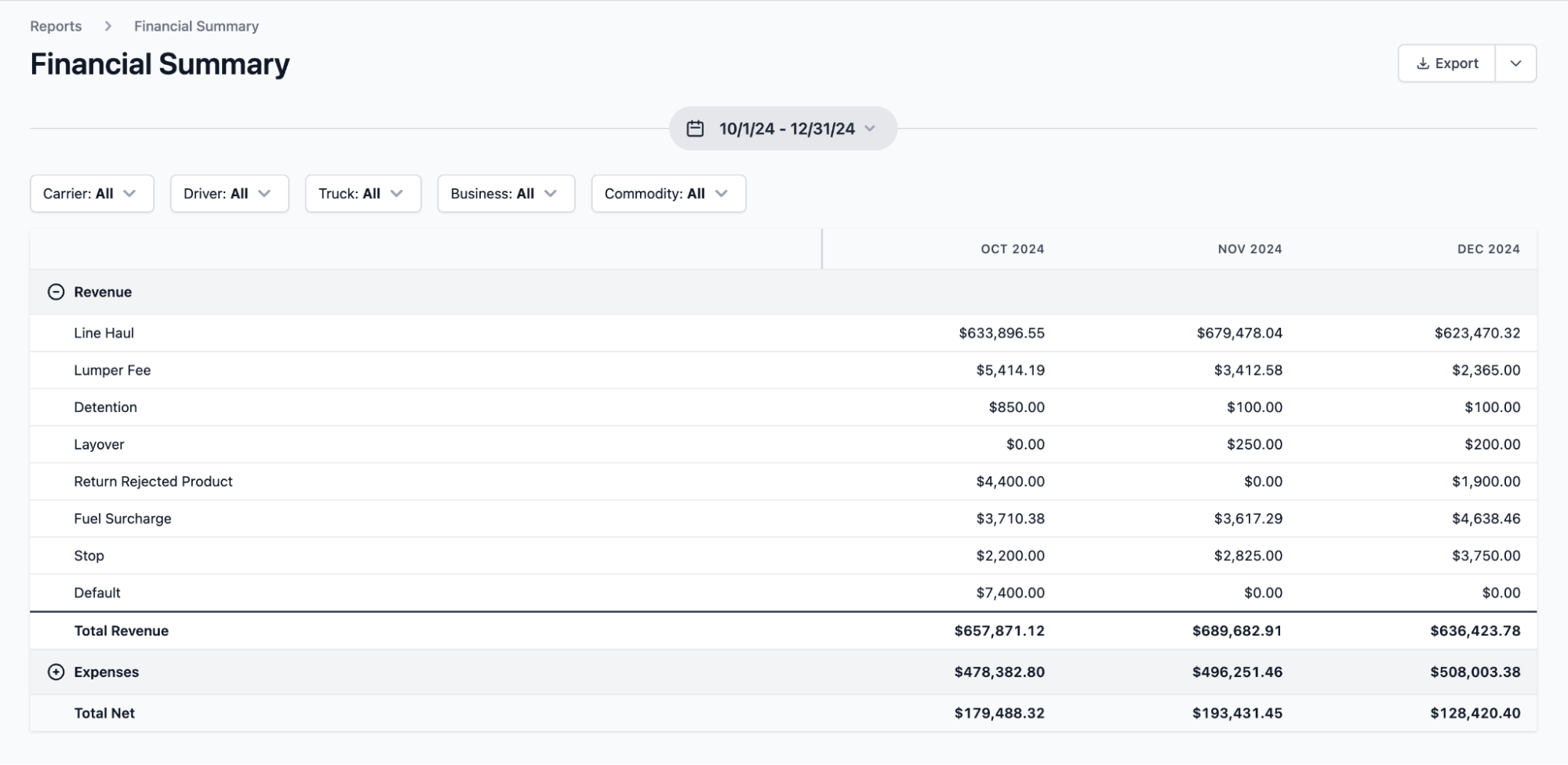
Toro's reporting tools enable you to:
- Monitor driver output and equipment utilization across your fleet. Track completed loads, miles run, and compartment utilization by driver or truck to spot where inefficiencies are occurring. That could be a specific piece of equipment underperforming or a driver consistently running slower on a lane than the rest of the fleet.
- Track profitability by customer, product, or route. Identify which lanes generate strong returns and which are quietly losing margin due to long rack dwell times, frequent washout requirements, or high deadhead miles between stops.

- Review detention by terminal and receiver. See which sites are consistently holding drivers longest, how that wait time is reducing loads completed per shift, and whether the detention being logged in the system is actually making it onto customer invoices.
- Generate financial summaries at any point in the billing cycle. Pull up-to-date reports on revenue, expenses, and net profitability by truck, customer, or time period without waiting for end-of-month reconciliations to understand how the business is actually performing.
Further reading: Fuel hauling software: 5 best options for petroleum and bulk fuel fleets
Make sure your team adopts the software with in-person onboarding and dedicated customer support
Switching software is disruptive for any trucking operation, but it's especially difficult for tanker fleets where dispatchers manage tight rack windows, and drivers run multiple loads per shift.
Most TMS providers handle onboarding by sending over login credentials and a library of help articles. From there, you're left to figure everything out on your own while still managing your daily operations.
Toro aims to make onboarding as seamless as possible by providing personalized in-person support.
Our team travels to your facility and works directly with dispatchers, drivers, accounting staff, and managers to configure workflows that align with how your trucking business operates. Each role is trained on the specific tasks they handle daily, so your team spends less time figuring out the software and more time using it to streamline operations.
Toro's customer support team is also available from 9 a.m. to 9 p.m. ET and responds to new requests within 30 minutes.
Ready to simplify how your tanker fleet handles dispatch, documentation, and back-office work? Schedule a free demo with our team.
4 Additional tanker trucking software options
Below, we cover four additional tanker trucking software solutions that liquid bulk haulers commonly evaluate. We'll explore key features, pricing, what each one does well, and who each platform is best suited for.
1. Axon Software

Axon Software is a TMS built for specialized trucking operations, including oilfield trucking, freight hauling, and tanker and liquid fleets.
The platform also handles the financial side of the operation well, with invoicing, driver settlements, payroll, and general ledger in one platform.
Key Axon Software features include:
- Fully integrated trucking accounting with general ledger and accounts payable
- Driver settlements with flexible pay structures
- IFTA reporting and fuel tax management
- Equipment profitability tracking by truck or trailer
- Dispatch and load management with driver communication tools
- Driver management and route optimization
Axon pricing is custom only. Interested users must contact the sales team directly for a quote based on fleet size.
2. TrueTMS
TrueTMS is an AI-powered transportation management system with a dedicated TrueLiquid extension that's built specifically for tanker fleets hauling fuel, chemicals, and food-grade liquids.
The platform covers load and route planning, compartment assignments, digital document capture, fuel hauler sourcing, demand forecasting, automated detention tracking, and ELD integrations.
Key TrueTMS features include:
- Interactive trailer diagrams for compartment-level load planning and product assignment
- TrueCast demand forecasting using live or historical tank-level readings
- TrueSource automated supplier sourcing for fuel haulers
- Automated detention time tracking and billing at each stop
- Digital document management via a customizable driver mobile app
- Fleet maintenance tracking and service interval management
TrueTMS plans are available via a monthly subscription. All pricing is custom only, based on fleet size, number of users, and feature requirements.
3. McLeod Software
McLeod Software is a TMS built for enterprise trucking fleets that functions as a fully integrated operations platform. It can support multiple freight types, including tankers and bulk haulers.
The platform offers excellent customization that’s primarily useful for enterprise fleets, so smaller tanker trucking companies will find the tool too complex for their needs.
Key McLeod Software features include:
- Dispatch and load management with driver mobile app
- Document capture and storage via the DocumentPower module
- Automated billing and collections
- Driver qualification and compliance file management
- Business intelligence dashboards and reporting tools
- Routing and load optimization for private fleet networks
- EDI integrations with shippers and customers
McLeod Software pricing is custom only for enterprise teams based on company size, integrations, and requested features. Due to implementation costs, pricing typically starts at $100,000+, with ongoing licensing and customer support fees.
Read more: McLeod Software competitors: 7 alternatives for trucking companies
4. PakEnergy TMS

PakEnergy is a TMS built for tanker trucking haulers in the energy sector, including crude oil carriers, water haulers, refined product fleets, and finished fuel distributors.
It offers dispatch, load management, electronic field ticketing, driver settlements, invoicing, compliance management, and business intelligence reporting.
Key PakEnergy TMS features include:
- Drag-and-drop trucking dispatch board with real-time driver availability and hours of service (HOS) visibility
- Electronic field ticketing with digital ticket capture and validation
- Fuel management optimization and consumption tracking
- Automated invoicing and driver settlements
- GPS tracking and ELD integrations with Geotab, Samsara, and other major providers
- Business intelligence dashboards and customizable reporting
PakEnergy pricing is custom and estimated at around $1,750 per user per month. Personalized quotes are required based on your fleet size and requirements.
Streamline your tanker trucking operations with Toro TMS
Most trucking software can manage loads, but very few can handle the pace and specificity that tanker fleets deal with every shift.
Toro TMS was built for liquid bulk haulers who run high volumes of daily tanker loads and need a single system that handles dispatch, documentation, billing, driver pay, and fleet reporting.
With Toro, you can:
- Build recurring tanker loads instantly from reusable templates
- Manage drivers, schedules, routes, and equipment from one centralized dispatch screen
- Let drivers receive load instructions by text and submit BOLs, seal photos, and wash tickets from their phone at the point of delivery
- Generate invoices and calculate driver pay automatically
- Track profitability, detention, and fleet performance by truck, route, and customer with built-in reporting
Schedule a demo to see how Toro TMS helps tanker fleets operate more efficiently.