.png)


Many trucking companies benefit from using a trucking quote template to create quotes quickly and consistently without building a format from scratch.
A well-structured trucking quote template helps:
- Present pricing clearly and professionally to customers
- Respond quickly when customers request pricing or are comparing providers
- Ensure all relevant charges are consistently included in every quote
To support that, we’ve created a free trucking quote template you can download and use. We also include a tool to calculate estimates, so you can share accurate quotes based on actual costs.
Some carriers refer to this kind of document as a freight quote, but ours is built specifically for trucking operations. That’s why we’ve included a breakdown of the key fields that typically appear in a trucking rate quote—details like pickup and delivery locations, rate structure, fuel surcharges, and any accessorial charges tied to the job.
While a professional estimate sheet can improve your chances of winning the job, the real work starts afterward. As more quotes turn into jobs, companies often need better ways to organize and manage the growing workload.
In our experience, keeping operations organized as jobs ramp up requires a dedicated system.
Toro TMS is a trucking management software that helps companies keep dispatch, load information, and billing organized as jobs progress. Instead of tracking these details across separate spreadsheets and documents, teams can manage everything in one easy-to-use system.
In this guide, we share our free template and provide an example so you can see exactly how to use it. Then we show how Toro TMS helps companies stay organized and run smoothly as more quotes turn into active jobs and the business grows.
Book a demo to see how Toro TMS can help your trucking company as volume grows.
Free trucking quote template
This editable trucking quote template helps your operation create clear, consistent quotes for customers without having to build a format from scratch. It includes the fields typically needed to price a haul—from shipment details and base rate structure to fuel surcharges, detention, and other accessorial charges common in trucking.
Download our free trucking quote template here.
The template has space for your company name and contact details, so you can customize it for your operation before sending it to customers.
The pricing section includes several line items that may or may not apply to every job. If a charge doesn't apply, just leave it blank and it won't be included in the total. Simply fill in the yellow fields, and the totals calculate automatically.
To make your own copy in Google Sheets, click "File" → "Make a copy" from the document menu. If you'd prefer to use it in Microsoft Excel, go to "File" → "Download", then select Microsoft Excel (.xlsx) to save it to your computer.
Here’s an example of a completed price quote:
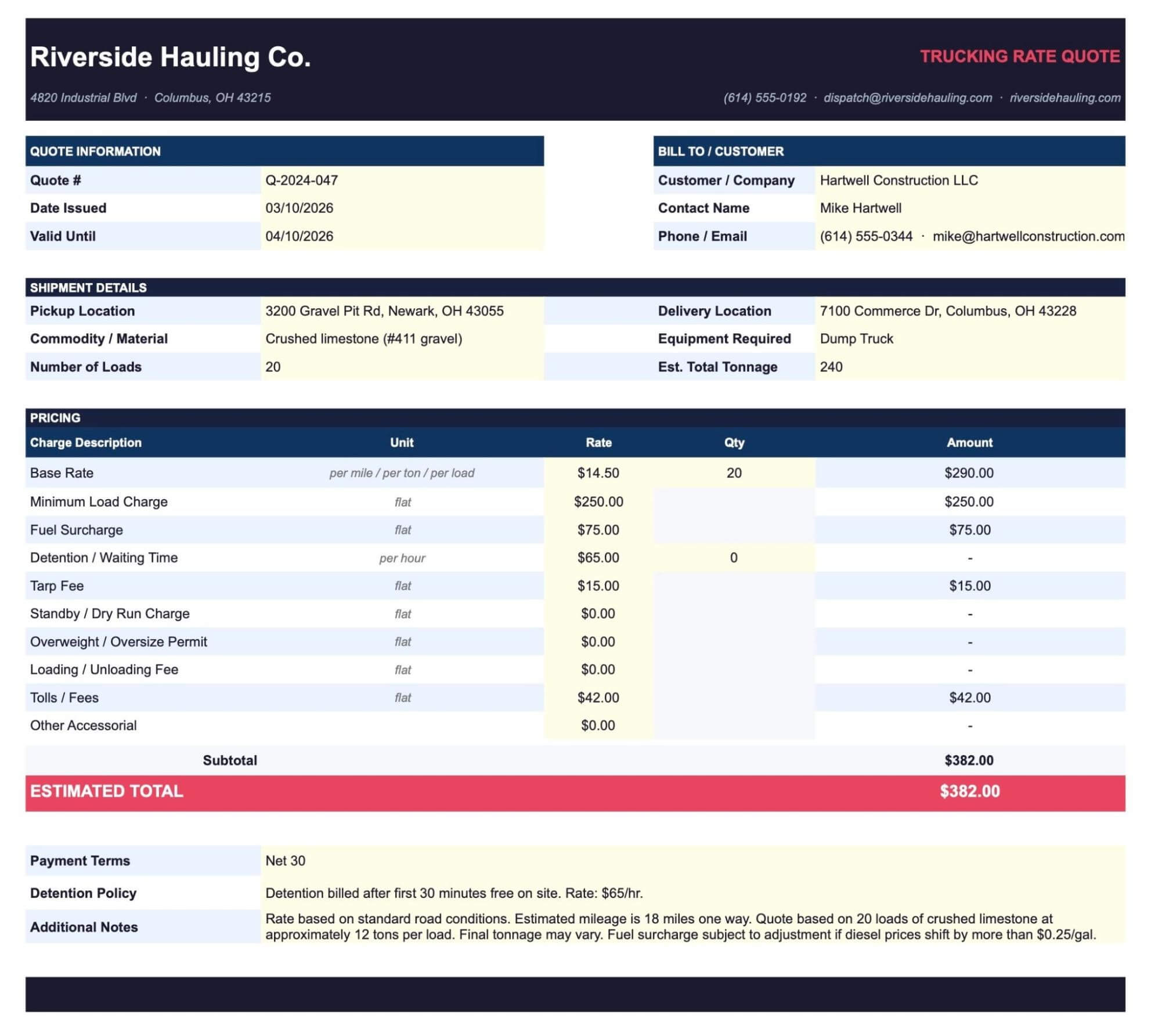
The example above shows a completed quote with all the key details filled in, including the company name and contact information at the top, client name and billing details in the header, and payment terms clearly noted at the bottom.
Additional free quote calculator to help you estimate margins and decide which jobs are worth taking
Knowing how to price a load is one thing. Knowing whether it's actually worth taking is another. Fuel costs, mileage, driver pay, and time on the road all affect whether a job is profitable, and it's not always easy to calculate that on the fly.
Toro TMS offers a free quote calculator that helps carriers estimate margins and profitability on incoming orders before committing to a price. You can use it to run the numbers on any job, compare different rate scenarios, and make more informed decisions about which work to take on and what to charge for it.

Accurate estimates can help you win more jobs—but you’ll need robust systems in place as you grow
Having a reliable system for quoting makes it easier to respond to customers quickly, present pricing professionally, and stay consistent across every job. Over time, that can translate into more work, which means more to manage.
For many trucking companies, that's when day-to-day management becomes harder to keep up with:
- Dispatch gets more complex. With more loads coming in, dispatching drivers and keeping job details organized manually takes significantly more time than it used to.
- Keeping drivers informed requires more effort. Drivers need the right job details before they head out—and sometimes things change mid-run. When you're coordinating several loads at once, getting accurate information to each driver quickly isn't always easy.
- Invoicing slows down. To bill a customer, you need accurate load information—what was hauled, how much, and at what rate. When that information isn't in one place, your back office has to track it down before sending an invoice.
- Driver pay becomes more complex. Working out settlements from manual records gets time-consuming as the number of loads and drivers grows. With different pay structures in play, the risk of errors also increases.
These are the kinds of challenges that come with a busier operation—challenges a quoting template alone can't solve. That's why many trucking companies start looking for a dedicated system to keep everything organized as volume picks up.
Toro TMS: A system to keep your operation organized as your quotes turn into work
As the volume of jobs you win grows, you’ll need a system in place to stay on top of your loads and customers.
Toro TMS is a trucking management software built specifically for bulk haulers. Rather than tracking load details, driver communication, invoicing, and driver pay across separate tools and documents, Toro brings everything into one easy-to-use system.
Companies using Toro have cut back-office administrative work by up to 70% and saved several hours every day—time that can go toward growing the business instead of managing administrative tasks.
In the rest of this article, we show how Toro TMS helps you stay organized, save time on admin, and grow your business without adding extra team members. We’ll specifically cover how it helps you:
- Dispatch and assign loads from a single dashboard, with reusable templates for repeat jobs and load details that automatically carry through to the rest of the operation from the moment they're entered.
- Keep drivers informed in real time, making it easy to share job details quickly and without any coordination hassle.
- Generate invoices, driver pay, and tax reports automatically from load data, reducing the manual work involved in back-office admin after every job.
- Track business performance over time with built-in reporting tools, giving you the visibility needed to run a more profitable operation.
Assign loads and keep all job details organized from a single dashboard
For trucking companies managing jobs manually, dispatch is usually where the most time is wasted.
Dispatchers end up re-entering the same customer details, locations, and job information—especially for repeat customers and recurring routes. Because load information isn't stored in one place, it has to be re-entered at every stage of the job. That repeat work takes time and increases the risk of mistakes.
Toro TMS addresses this with a dispatch dashboard that gives your team everything they need in one place. Dispatchers can see driver availability, active jobs, and load assignments at a glance, without juggling multiple tools and systems.

From a single dashboard, dispatchers can:
- Schedule and reassign jobs throughout the day using a drag-and-drop calendar, making it easy to adjust when plans change.
- Create reusable load templates for repeat jobs, so the same customer details, locations, rates, and equipment requirements don't have to be re-entered each time. Rate schedules and fuel surcharge agreements can also be stored in the system and applied automatically to the right customer.
- See which drivers are available without checking multiple systems or making calls, so loads can be matched to the right driver quickly.
- Make edits throughout the day as things change. Updated quantities, revised rates, or new job site instructions carry through to billing and driver pay without re-entry.
- Monitor which loads are active, completed, or running behind, so dispatch always has a clear picture of where things stand across the operation.
All of this happens in one system, so load details entered at dispatch automatically carry through to invoicing and driver pay. This means the same information doesn't have to be entered repeatedly across different tools.
Read more: How to choose a dispatch software your teams will actually use
Get job details to drivers instantly, without phone calls or back-and-forth
For companies coordinating hauling jobs manually, there's often no clear process for making sure every driver has what they need. When something changes once a driver is already on the road, it adds another layer of coordination on top of an already busy day.
Toro TMS makes it easy to get information to drivers instantly. As soon as a load is dispatched, drivers receive all the job details they need via text message—just a simple text to their phone, using a process they're already comfortable with. With no new system to learn, drivers tend to adopt it quickly and without pushback.

Each text message includes everything the driver needs for the job:
- Pickup and delivery locations, including any site-specific instructions
- Job details such as material type, quantities, and equipment requirements
- Rate information and any relevant notes from dispatch
- A secure link to submit load confirmations and supporting documents directly from the field (like BOLs and scale tickets).
When drivers use that link to submit load documents, they are automatically attached to the correct job in the system, giving the back office immediate visibility into completed loads and keeping records organized without any extra follow-up.
If anything changes mid-run, drivers receive updated information immediately, without dispatch having to track them down by phone. Dispatchers can also schedule text messages in advance when building out the day's loads, so drivers automatically receive their job details as routes are assigned.
What's more, Toro includes GPS and ELD integrations, so dispatchers can see exactly where each truck is at any point during the day without making a single call.
Read more: Truck driver management system: 6 tools for better scheduling and communication
Reduce back-office admin work by up to 70%—from invoicing and driver pay to IFTA reporting
Trucking companies that handle their back-office work manually often have to pull information from multiple places to generate estimates and invoices, calculate driver pay, and prepare quarterly IFTA reports. As job volume increases, that time adds up quickly.
With Toro TMS, load details entered at dispatch flow automatically through the entire system, so the back office has everything they need without hunting anything down or re-entering data.
Here's what that looks like in practice:
- Invoices are generated directly from completed load data. Customer details, job locations, rates, and any edits made during the day are already in the system—so there's nothing to look up or fill in manually before sending a bill.
- Driver settlements are calculated from the same load data. Whether drivers are paid by the load, the ton, or the mile, Toro calculates what each driver is owed accurately and consistently, without working through manual records at the end of every pay period.
- Mileage is tracked automatically via ELD integrations, so when it's time to file quarterly IFTA reports, the data is already there. Instead of cross-referencing spreadsheets and gathering receipts, your back office can submit reports without the usual hours of manual preparation.
- All of this connects directly to QuickBooks, keeping your accounting in sync without any additional data entry.
For back-office teams, the result is up to a 70% reduction in routine admin work.

Make smarter business decisions with real-time reporting across your entire operation
Getting a clear picture of how the business is performing often means pulling numbers together from separate systems at the end of the month—a tedious and potentially error-prone process.
Toro TMS gives you real-time visibility into your operation, with reporting tools built directly into the same system your team already works in every day. Because all load data flows through one platform, reports are always based on complete, up-to-date information.

With Toro's reporting tools, you can track:
- Load volume and revenue by customer, driver, route, or time period, so you know which jobs and customers drive the most income.
- Driver performance and activity, including loads completed, miles driven, time on the road, and wait time at job sites—useful for identifying your most productive drivers and spotting efficiency trends.
- Job and route profitability, so you can see which runs generate the strongest margins and where there may be room to adjust pricing or scheduling.
- Business performance over time, giving you the data needed to understand month-over-month trends and make informed decisions about pricing and when to take on more work.
This level of visibility makes it easier to run a profitable operation.
Read more: What's the best software for local trucking businesses? (Top 7 tools)
Easy to get up and running, with hands-on support from day one
Getting started with new software can feel like a big undertaking, especially if your team has been managing things manually for a long time.
We built Toro TMS to be genuinely easy to use. It's straightforward enough that team members with little to no software experience can get comfortable with it quickly.
Instead of sending a training manual and leaving you to figure it out, we send a team to your office to get everything set up and walk your team through the platform. It's the kind of hands-on support that makes the transition much smoother.
Once you're up and running, Toro TMS guarantees a response to any support request within 30 minutes during business hours.
A trucking quote template helps you win the work—Toro TMS helps you manage it
A trucking quote template is one of the simplest ways to present pricing clearly and respond to customers consistently. But as those quotes turn into jobs, having a reliable system to manage everything that comes next makes a real difference in how smoothly the operation runs.
Toro TMS is built specifically for bulk haulers and gives you everything you need to stay organized as job volume grows. With our software, you can:
- Dispatch loads quickly from a single dashboard, with reusable templates that eliminate repeated data entry.
- Keep drivers informed in real time, making it easy to share job details without phone calls or missed messages that slow things down.
- Cut back-office admin work significantly by automatically generating invoices, driver settlements, and tax reports directly from completed load data.
- Track business performance with built-in reporting tools that give you a clear picture of how the operation is running—and the insights needed to make it more profitable.
Ready to see how Toro TMS can streamline your small business as more quotes turn into work? Book a demo to learn more.