.png)



If you’re looking for a trucking management software (TMS) for construction hauling, a generic TMS typically won’t be able to handle the high volume of short-cycle loads your fleet completes each day. Most systems are built for long-haul freight, meaning they struggle to manage the constant job-site changes and the amount of documentation construction work generates.
Instead, if you’re a hauler carrying construction materials, or you’re a construction company with a hauling arm, you need a system that allows you to:
- Build and dispatch dozens of daily loads per truck. Your software should make it simple for dispatchers to create loads and assign drivers in one centralized screen. Plus, the system should allow dispatchers to make quick changes to routes or jobs throughout the day without having to switch tools or call drivers directly to confirm.
- Collect relevant load and customer data once to reduce repetitive data entry. Generic tools typically don’t offer construction-specific data fields like material types, job codes, and required truck setups (tri-axle, end dump, belly dump, etc.). A construction-focused TMS captures this information once at dispatch so your back-office teams can use it downstream without having to retype details.
- Track drivers and active loads in real time to avoid delays. In construction hauling, it’s common for trucks to get stuck at the quarry or backed up at job-site entrances, which slows down the entire cycle. A system with real-time tracking provides dispatchers with instant visibility into these delays, so they can reroute trucks or adjust assignments before the schedule falls behind.
- Collect scale tickets, BOLs, and delivery records digitally. Construction fleets complete so many short-cycle deliveries each day that drivers generate a constant flow of tickets and documentation. Relying on physical paperwork forces drivers to keep track of everything and turn it in at the end of their shift. This can slow billing teams and delay tasks like processing driver settlements and reconciling tickets for accounting. The best TMS for construction teams captures these documents digitally as soon as a load is completed, keeping records organized and giving dispatch and back-office teams immediate access for invoicing, payroll, and other downstream work.
In this article, we review six TMS options for construction fleets—starting with Toro TMS, our software built for bulk material haulers and construction companies.
Looking for a TMS built specifically for construction fleets? Book a personalized demo with Toro TMS to learn more.
1. Toro TMS: The best TMS for construction bulk hauling

Toro TMS is built specifically for construction and aggregate fleets that move high volumes of material between quarries, plants, and job sites.
In construction operations, a single truck might complete 12–20 loads per day, and a dispatcher might coordinate 20–50 trucks across several jobs at once. This creates significant administrative work, such as creating new loads, tracking quantities, updating drivers, handling paper haul sheets, validating tickets, and entering data for billing and hourly payroll.
Toro TMS is designed to handle the high volume of daily repeat loads that short-haul construction work requires. Dispatchers can build daily plans in minutes, drivers can receive instructions by text and upload tickets without downloading an app, and the back office can automatically generate invoices and payroll directly from completed load data. Everything happens in one system, so there's no need for spreadsheets or repeat data entry.
Below, we’ll show you how Toro helps construction and aggregate haulers:
- Create loads faster with pre-built templates that match your recurring routes and jobs.
- Assign loads, track drivers, and monitor delivery statuses in a single dispatcher dashboard.
- Send job instructions and updates directly to drivers’ phones via text message.
- Collect digital scale tickets and documents instantly from drivers for faster billing and payroll.
- Automate invoicing and driver pay calculations directly from completed loads.
- Use reporting to view truck utilization and analyze profitability to understand your operational efficiency.
Create recurring loads faster with pre-built job and order templates that eliminate repeat entry
Construction and aggregate haulers run extremely repetitive work. That could include various jobs like hauling stone from a quarry to a subdivision all week, moving sand to a concrete plant every morning, running constant cycles to support a paving crew, or supplying fill dirt to an earthwork project.
Because these jobs recur frequently, dispatchers often need to retype the same customer details, job sites, material types, and rates dozens of times—even for repeat jobs.
Toro removes that repetitive administrative work by using job and order templates built for construction workflows. Dispatchers can generate the exact job setup they need in just a few clicks—instead of rebuilding every repeat load from scratch.

With templates, you can save key job information such as:
- Pickup and drop-off locations
- Material type and specs (sand, gravel, 57 stone, riprap, fill dirt, millings, topsoil, etc.)
- Customer details (project names, PO numbers, etc.)
- Billing rates (per ton, per load, or hourly)
- Required truck count or preferred equipment types (belly dump, end dump, tri-axle, pup trailer, etc.)
- Staging details and delivery sequence instructions (“Truck every 10 minutes”)
- Access notes, gate codes, delivery windows, restricted hours, or safety requirements
- Any site-specific constraints (such as one-way traffic, soft ground, PPE rules, or scale procedures)
Once a template is created, dispatchers can reuse it throughout the project. All the correct details populate instantly, which speeds up load creation and keeps information consistent across the entire organization.
Read more: How to choose a dispatch software for trucking your teams will actually use
Assign loads, track drivers, and monitor job progress in a centralized dispatcher dashboard
One of the most common challenges of managing a construction fleet is that load information and dispatch schedules are scattered across different tools.
For some jobs, key details may be left in a dispatcher's email inbox, while another job could have been scheduled over the phone. This only increases the risk of missed instructions, incorrect site details, and trucks arriving unprepared for the work ahead.
Toro consolidates everything into a single dashboard, giving dispatchers complete visibility into every active job and driver statuses. Updates occur in real time, and you can make adjustments with the easy-to-use drag-and-drop interface.

Toro's dashboard allows you to:
- Assign loads with a drag-and-drop dispatch board. View all active trucks and drivers alongside your queue of unassigned loads, then drop each load onto the right driver’s schedule without switching screens.
- Choose the right truck for each job-site requirement. View your fleet by equipment type (belly dumps, end dumps, tri-axles, pups, etc.) and assign vehicles based on what the site actually needs. For example, a tight residential entrance might require a smaller setup, while a quarry haul may call for a higher-capacity unit.
- Update job details in real time the moment conditions change. If a contractor switches delivery locations or if a job site opens a second entrance, dispatch can adjust the load instantly. Drivers get the update by text right away with new instructions, and the back office team receives the correct details for billing later.
- Monitor every load with live updates. See which hauls are moving on time and where potential delays might occur. If a truck is stuck waiting to load or backed up at a job-site entrance, GPS updates alert dispatchers immediately so they can adjust assignments as needed.
Toro simplifies the entire dispatching process for construction fleets and supports the job-based workflows these operations rely on.
When dispatchers can see each job’s activity and progress in one dashboard, planning tomorrow’s work becomes easier, and the team spends far less time on manual tasks.
Plus, back-office teams have a centralized system that allows them to access key load details and documentation for payroll, invoicing, and other accounting tasks.
Read more: 5 construction dispatch software tools for transport and jobsite management
Capture tickets and documentation digitally and send job updates instantly to drivers via text message
Construction hauling creates a steady stream of paperwork, including quarry scale tickets, weight slips, handwritten job notes, and delivery confirmations.
If you wait for drivers to turn in these physical tickets at the end of each shift or the end of the week, your back-office teams are left waiting for documentation that could’ve been captured hours or days earlier.
Toro TMS removes these delays from your workflow by allowing drivers to receive job details and upload tickets from their phones through a simple text message—no app, logins, or passwords required.

When dispatch assigns a load, the driver receives a text with everything needed for that trip, including:
- Pickup and delivery locations
- Material type
- Job or project reference numbers
- Site instructions, such as specific entrance points, dump locations, or equipment notes
The message also includes a secure upload link that drivers can use to take a photo of their scale ticket or job slip before leaving the job site. This keeps documentation tied to the correct load, prevents missing or unreadable tickets from slowing down billing, and makes ticket management easier for the whole team.
As soon as the ticket is uploaded, Toro scans the document and extracts key information, and then attaches it directly to the load. This gives dispatch and the back office immediate visibility into completed work while also speeding up invoicing and additional back-office tasks.

Read more: Dump truck software: 5 top choices for specialist software
Reduce the amount of time your back-office team spends on invoicing and driver pay
Billing and payroll can quickly overwhelm construction hauling teams, especially when every job generates a mix of paper haul sheets, scale tickets, handwritten notes, and different pay structures.
The manual workload increases only when dispatch data is incomplete (e.g., missing job codes, incorrect material types, or inconsistent ticket details), forcing back-office teams to track down key information or missing documents to process invoices and payroll accurately at the end of the week.
Toro TMS solves this by carrying accurate job and load details from dispatch through billing and payroll. Once a load is created, the system tracks all the information needed so invoices and driver settlements can be generated instantly.

Toro applies the correct billable items for each load, including:
- Material type (sand, gravel, 57 stone, fill dirt, millings, etc.)
- Pricing method (per ton, per load, hourly, or blended)
- Fuel and surcharge adjustments
- Billable wait time or site delays
- Extra job charges tied to specific projects
- Customer, project, or job code requirements
As all this information is captured accurately, back-office teams don't need to spend extra time reconciling driver notes with scale tickets or correcting mismatched job data. The system also lets you create invoices in bulk and export or sync them directly to QuickBooks.
Toro takes a similar approach to payroll. The software automatically calculates driver pay upon completion of loads, using load data and driver details.
These calculations are possible because Toro stores each driver’s pay structure, deductions, and allowances inside a dedicated driver profile and links that profile directly to every completed load.

Once a job is finished and the documentation is submitted, Toro automatically determines what each driver is owed based on the information saved in their profile. The system also applies bonuses, deductions, fuel advances, equipment charges, and other adjustments in real time, so settlements are accurate without any manual work.
After all calculations are finished, Toro generates PDF payroll summaries for driver approval, or they can be downloaded and exported into payroll systems like ADP or QuickBooks Payroll.

Read more: Trucking payroll software: 5 options for effortless driver pay
Get real-time visibility into your construction business with advanced reporting
Toro TMS provides construction and aggregate haulers with a comprehensive reporting suite that reveals key insights into your business, including job-site productivity, truck utilization, driver profitability, and more.

With all key details in one place, you can:
- Break down revenue and costs by job, customer, and material type: See exactly how much you earned hauling materials like sand or 57 stone to a specific subdivision, and compare that to what it cost you in fuel, labor, and equipment time.
- Review labor costs and compare hourly vs. load-based pay: Understand whether your hourly drivers on a short-cycle subdivision job cost more than your load-paid drivers running longer trips from the quarry. For example, Toro can show you when overtime on a 2–3 minute haul cycle is cutting into margins while a load-based driver on a 25-minute stretch is still profitable.
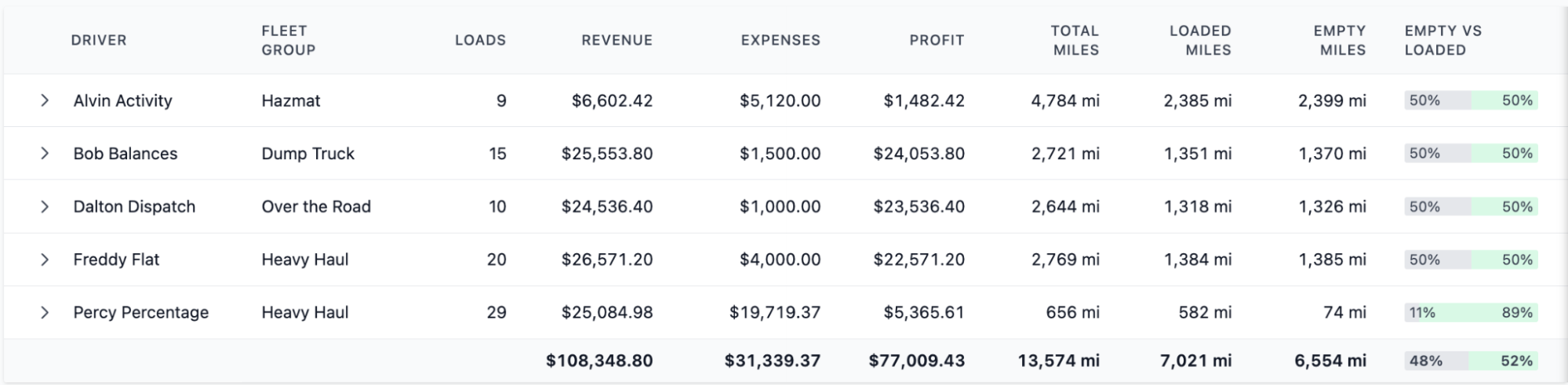
- Track truck utilization, loaded/empty miles, and haul volumes: Identify which trucks spent most of the day moving material and which ones burned hours running empty between job sites or waiting at the quarry. Toro’s reporting can show patterns like trucks that hauled 18 loads while others only completed 7, or units that racked up unnecessary empty miles because they were routed back to the wrong pit or job site.
- Use historical haul data to improve future job planning: Review past production rates to understand how many trucks you actually needed on similar jobs. You can look back at key data points like average tons delivered per hour, cycle times from specific quarries, or how long certain job sites typically take to unload to set realistic truck counts for new bids or scheduling.
Read more: Top 7 building materials transport management software
Improve team efficiency with hands-on onboarding and construction-focused training
Adopting new software can be challenging for many trucking companies, especially in the construction industry. This is primarily due to the constantly changing job sites, truck counts, tight delivery windows, and complexity of the overall dispatching process.
Most platforms provide you with login info, a few tutorial videos, and then expect your team to figure everything out on their own. This usually slows down adoption for your team and leads to more errors and wasted hours figuring out how to execute the simplest tasks during the busiest parts of the day.
Toro takes the opposite approach by providing in-person onboarding and tailored training for every department, including dispatch, drivers, accounting, and even subhauler coordinators if you use them.
Each training session focuses on the workflows your team actually uses, like building daily plans, managing job-based loads, uploading tickets, and handling payroll for hourly drivers.
Toro is designed to be easy to learn, and our support team is always available when questions come up. You’ll receive fast responses (usually within 30 minutes between 9 AM and 9 PM ET), so you’re never stuck waiting for help during a live job or active haul.
Want to learn how a construction TMS can increase your operational efficiency? Schedule a demo with Toro today.
2. Axon Software: TMS with fully integrated accounting system

Axon Software is a TMS solution for specialized fleets, including commercial construction and aggregate dispatchers. The platform offers a built-in accounting module that allows fleets to manage dispatching, invoicing, payroll, AP/AR, and financial reporting in a single platform.
Key Axon Software features include:
- Integrated accounting tools
- Equipment and asset tracking
- Customizable order fields
- Document management
- IFTA and fuel tax calculations
Read more: Hauling software: 5 specialist tools for your trucking operations
3. BeyondTrucks: Automated workflows & extensive TMS integrations

BeyondTrucks is a TMS with automation features for teams to centralize data from multiple systems.
While not built specifically for construction projects, its workflow automations and integrations can support aggregate operations that rely on multiple apps.
Key BeyondTrucks features include:
- Automated workflows for billing and settlements
- Deep integrations with ERPs, accounting platforms, and WMS systems
- Centralized data hub for dispatching and trucking operations
- Configurable order fields tailored for job-based hauling work
- Driver interface for photo uploads and real-time job updates
Read more: 6 best landscape supplies transport management software for bulk material logistics
4. Trimble TMW: Real-time fleet visibility & integrated safety and compliance tools

TMW.Suite from Trimble is a full-scale transportation management system that gives fleets end-to-end control over key tasks like order entry, dispatching, route planning, and compliance.
Construction fleets can benefit from various document management, compliance, and project management tools, along with real-time fleet visibility.
Trimble TMW key features include:
- Real-time fleet and truck tracking for active loads and job-site status
- Integrated safety and compliance tools, including ELD, DVIR, and asset maintenance
- Customizable order and job fields
- Advanced analytics dashboards to gauge fleet efficiency and monitor your bottom line
Read more: Top 5 load management software for trucking companies
5. Command Alkon: Plant integrations, material ticketing & load tracking
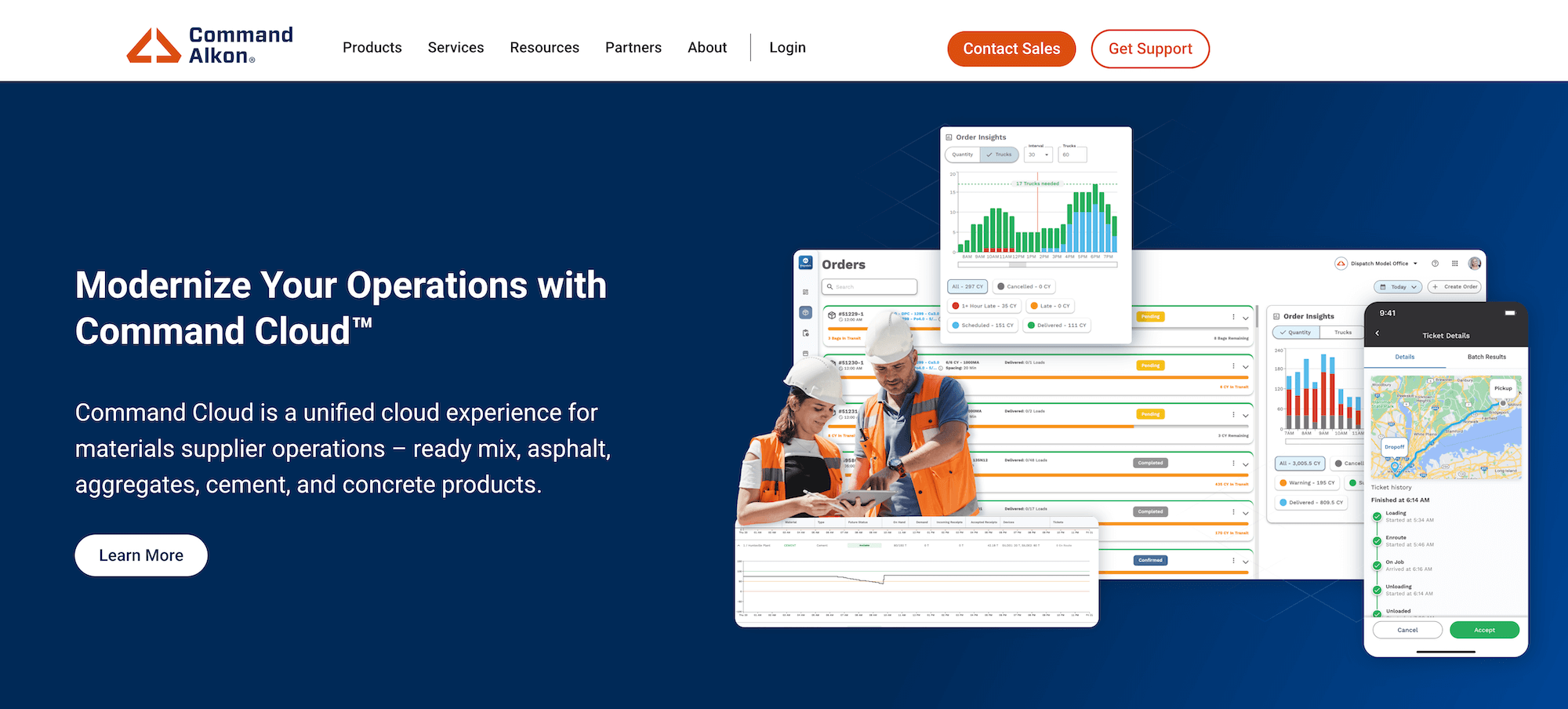
Command Alkon is built for producers, haulers, and contractors who move aggregate, asphalt, cement, and other bulk construction materials.
The platform offers various trucking capabilities along with tight integration with plants, scales, weigh systems, and construction equipment.
Key features include:
- Plant-to-truck integrations for real-time load status
- Digital ticketing with automated scale-slip capture
- End-to-end material delivery tracking
- Material and mix-design accuracy checks
- Reporting for DOT, job verification, and production analysis
Read more: Ready mix dispatch software: 5 best choices for concrete transportation
6. TruckIT: E-ticketing & job-site management

TruckIT is a digital platform designed specifically for construction, hauling, and material logistics with a suite for e-ticketing, mobile dispatch, and real-time job tracking.
Key TruckIT features include:
- Digital ticket capture and uploads
- Mobile driver and field app
- Automated dispatch workflows, including AI-driven assignment and load routing
- Project-level tracking for materials moved
- Integrations with scale systems, ERP back-offices, and reporting modules
Read more: Top 5 construction & demolition waste collection software
Simplify Construction Hauling with Toro TMS
Coordinating short-haul cycles, managing high-volume daily deliveries, and keeping track of paperwork shouldn’t slow your team down.
Toro TMS gives construction fleets a system designed to optimize the fast-paced, high-volume workflows typical of construction hauling.
With Toro, you can:
- Build and dispatch repeat daily loads in seconds using saved templates.
- Capture scale tickets, BOLs, and delivery records digitally as soon as a load is completed.
- Automate invoicing, driver settlements, and payroll using accurate, real-time data.
- Give dispatchers and back-office teams one shared view of every load, document, and payout.
Ready to streamline and grow your construction trucking operations? Book a demo with Toro TMS to learn more.