.png)


If you look for a TRUX Now review online, you’ll typically find either feedback from haulers using the Trux Drive app to find work or businesses using Trux to coordinate trucks and material deliveries.
But for bulk fleet owners, these reviews leave some important questions unanswered. They may help you understand how drivers find jobs and track earnings, for instance. But they won’t necessarily show you how Trux performs other key tasks in your workflow, such as handling loads, connecting scale tickets to customer invoices, or calculating driver pay under different rate agreements.
To help you evaluate those workflows, we’ve examined Trux’s documentation alongside customer reviews. This guide covers:
- Trux’s features and pricing, including what’s free and what requires a quote
- Customer feedback, and what these insights mean for a bulk hauling operation
- Four Trux alternatives, depending on your fleet and the work you need to manage
We’re the team behind Toro TMS, a software built for dry and liquid bulk haulers. Toro is one of the alternatives below, alongside other trucking management software options serving different operational needs.
Trux: Features, reviews, and pricing

Trux is a dump truck logistics platform from a Massachusetts-based company that launched its hauler app in 2015. It started as a marketplace connecting dump truck owners with local contractors and material producers, then added a subscription software platform for dispatching and managing trucks in 2021.
It serves material producers, contractors, fleet owners, brokers, and owner-operators. You'll notice that the commonality is construction site work like aggregate, asphalt, dirt, and demolition hauling, where a truck punches in at a job and cycles between plant and site for a shift.
Businesses can use Trux to find trucks or hauling jobs through its marketplace, or to dispatch and manage their own fleet and regular subcontractors.
If your fleet already has steady work from its own customers, finding jobs through a marketplace may be less of a priority. Instead, you’ll likely want to see how Trux’s management tools help you handle that existing work, including how completed loads and scale tickets connect to customer billing and driver pay.
Trux Now key features
Trux offers several products, including:
- Trux Find, the marketplace, where contractors and material producers post hauling jobs and verified haulers claim them. Trux pays the haulers and sends the customer one consolidated invoice.
- Trux Manage, a dispatch and scheduling platform for a company's own trucks and regular subcontracted haulers, with assignment confirmation, GPS tracking, and in-app messaging.
- Trux Deliver, plant and delivery logistics for material producers, with real-time visibility into trucks at the plant, load stacking, and reassignment.
- Trux Delivery Tracker, a customer-facing portal for tracking loads from plant to job site, viewing ETAs and cycle times, and downloading e-tickets.
- Trux Drive, the hauler mobile app (this is the app that was called TRUX Now) for finding and accepting jobs, punching in and out, uploading load slips, and viewing earnings.
Across the platform, the features include:
- Digital dispatching with automatic job updates and route changes sent to haulers
- Digital punch-in and punch-out to replace handwritten timesheets
- Photo uploads of paper load slips from the driver's phone, plus e-ticketing from scale integrations
- Real-time GPS tracking of haulers from punch-in to punch-out
- Automatic shift fee and hauling cost calculation, with dispute management
- Freight rates that can mix pay units (per load, per ton, per hour) between the hauler rate and customer rate
- Fuel surcharge adjustments applied as a percentage of hauler pay
- Weekly ACH payments to haulers for marketplace work
- Earnings and payment history filtered by week, job, or driver
- Hauler verification, including insurance certificates and USDOT and MC numbers
- Export of trucking data for reconciliation
Much of the platform centers on moving construction materials between plants and job sites. For a fleet owner, the next step is to see how those delivery records connect to the office work you need to complete afterward, particularly customer billing and employee driver pay.
Trux Now reviews
Trux likely has a much larger pool of mobile-app feedback than business software reviews due to the fact that its app serves both independent haulers finding marketplace work and drivers receiving fleet assignments. Trux Manage, the paid management platform, serves a much narrower audience of businesses coordinating those trucks.
Apple’s App Store shows approximately 2,700 ratings with a 4.8 out of 5 average. Google Play shows a 4.1 average from more than 600 reviews. Meanwhile, Capterra’s listing shows 4.8 out of 5 from just five reviews.
These user reviews cover different experiences. App reviews mostly describe using Trux to find and complete hauling work. The Capterra reviews offer more insight into scheduling and office workflows.
Since several reviews describe older versions, their criticisms are useful points to investigate rather than proof that the same issues remain today.
Positive feedback of Trux highlights:
- Scheduling trucks is straightforward, including from the field. Engineer Aaron F. wrote on Capterra, “You can schedule at the office or the mobile app.” He also praised the calendar for helping his team plan ahead and check previous assignments.
- The hauler network helps businesses find trucks when they need them. Dispatcher Mike G. described a “Huge network of independent truckers” and said Trux had generally met his trucking needs. On the hauler side, an App Store reviewer in December 2024 praised how easy it was to find loads and track hours.
- Completed loads and earnings are easy to review. An App Store reviewer wrote, “I really like as soon as I complete the load it gives me the $$$ amount of how much I made.” The same reviewer appreciated being able to check ticket photos and punch times alongside those earnings.
Negative feedback of Trux raises a few potential concerns:
- Billing and hauler pay need better visibility. Senior billing specialist Meghan B. wrote in a Capterra review, “I wish there was a better way to get an overview of a customer for billing purposes.” Dispatcher Mike also mentioned wanting to see the trucker’s actual pay on the same screen where he assigned rates.
- Existing orders can be difficult to change. Operations manager Lincoln D. listed “making changes to a[n] order already placed” as a drawback in a review on Capterra. When a customer changes the day’s requirements, dispatch needs to update assignments quickly. During a demo, ask to see how those changes reach drivers.
- The app can be challenging to navigate. Engineer Aaron F. called the mobile app “a bit challenging to navigate at first." Meghan B also described the software as having “a bit out of date feeling.”
- Available jobs depend on your area. Lincoln D.’s April 2021 Capterra review praised the service but wished it covered more locations. Another reviewer reported seeing no available jobs after several weeks on the app.
For fleet owners, these reviews leave some questions unanswered. Before choosing Trux, ask for a demonstration using your own workflow, from assigning several loads to a truck to collecting tickets, billing customers, and calculating driver pay.
Trux Now pricing
The app, Trux Drive, is advertised as free, but that doesn’t mean the entire Trux platform is free. The broader software requires a pricing inquiry. Trux has a pricing calculator, but it requests your information rather than displaying an open rate card.
Trux Materials, the company’s software for managing material deliveries, lists marketplace access and implementation as add-ons. Converting paper tickets into digital records is also an add-on. Trux Pay is included with Marketplace but costs extra when used to pay other third-party haulers.
If you’re interested in Trux, first ask for an itemized quote showing the products included, any integration or setup charges, and the cost of payment services. Confirm the billing basis and contract terms rather than assuming pricing scales by truck or office user.
Is Trux a good fit for your hauling operation?
Trux is worth considering if you run dump trucks or coordinate construction hauling. Whether it fits your business depends on where you need help:
- You want additional work for your trucks. Trux’s marketplace lets you find and accept hauling jobs, with weekly payments for completed marketplace work. Check whether suitable jobs are available near you and whether the rates cover your costs, including travel to the job.
- You need to coordinate trucks for construction projects. Trux supports dispatching owned and subcontracted trucks, tracking deliveries, and collecting digital tickets. That makes it relevant for contractors and material producers managing truck availability and material flow between plants and job sites.
- You need to manage a bulk fleet’s back office. Look more closely at how Trux would handle your customer accounts and employee driver pay. Paying a subcontracted hauler for marketplace work is a different workflow from calculating wages for your own drivers or billing customers under separate rate agreements.
Ask to see a full day’s work move from dispatch through billing and driver pay, using your actual commodities and rate agreements. That will help you identify which tasks Trux handles and which would still require spreadsheets or separate software.
Top 4 Trux alternatives to consider
Trux may fit your construction hauling needs, but it’s worth evaluating different TMSs if you need more support managing your fleet and back office.
Below, we compare four alternatives for different hauling operations, including Toro TMS for bulk haulers, Dump Truck Dispatcher for dispatch and maintenance tracking, TruckLogics for owner-operators and small fleets, and TruckIT for digital ticketing on DOT projects.
1. Toro TMS: Top TMS built for dry and liquid bulk haulers

For bulk fleets managing their own customers and drivers, Toro TMS brings repeat-load dispatch, ticket collection by text, and flexible billing and driver-pay calculations into one system, helping your office process more work without repeat data entry.
We built Toro for fleets hauling building materials, aggregate, grain, feed, fuel, and other bulk commodities. When a truck completes several loads for different customers, your team needs to keep each delivery’s paperwork and rate agreements organized, even as assignments change.
Every load record connects dispatch to the work that follows. Drivers receive instructions and upload tickets through a secure link, with no app to install. The office uses those records to bill customers and calculate driver earnings under their respective rates. Built-in reports help owners see how that work contributes to profitability.
We also designed Toro with ease of use in mind. Our team trains your staff in person during onboarding, with US-based support available afterward to help resolve questions and keep daily work moving.
Toro TMS reviews
Toro maintains a 5 out of 5 rating on Capterra across 23 reviews and a 4.9 out of 5 rating on G2 across an additional 47 reviews.
Feedback from office staff and managers highlights three benefits:
- Everyday tasks are easier to learn and complete. Billing specialist Sara P. wrote, “Toro has definitely made putting in loads and doing my job much easier compared to our old program we used.”
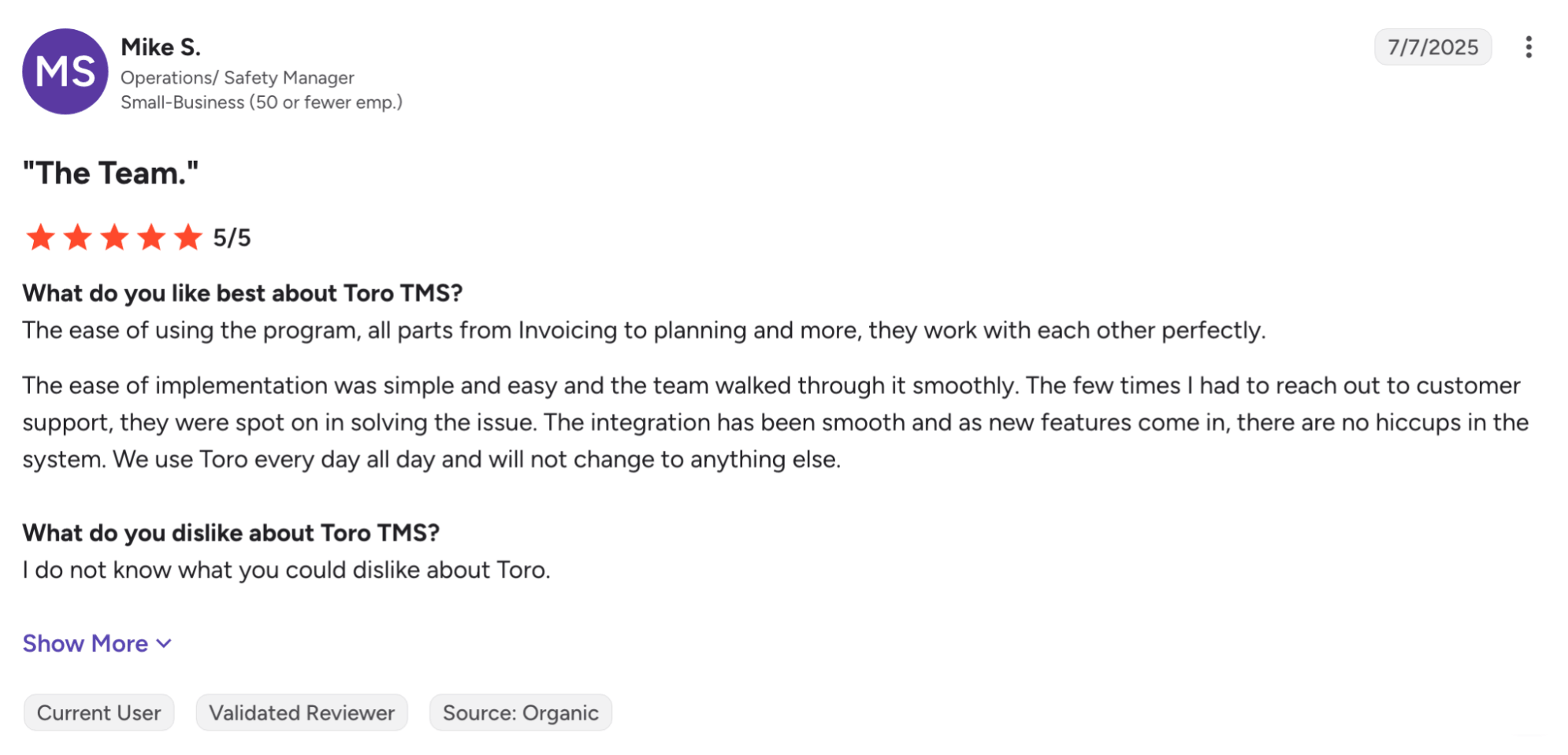
- Support helps teams through setup and daily questions. Operations and safety manager Mike S. described a smooth implementation and praised the team’s help afterward: “The few times I had to reach out to customer support, they were spot on in solving the issue.”
- Billing and payroll take less time. Office and operations manager Kasia C. said that once paperwork is uploaded, “2 more clicks and the invoicing is done.” She added that payroll “now takes 2 hours, at most, where it used to take most of my Monday.”
Livingston Trucking, an 85-truck carrier in Texas, was managing hundreds of weekly loads with manual paperwork and duplicate data entry. After adopting Toro, its dispatchers saved an average of three hours a day entering loads for the following week.
Office manager Dani explained:
“With our old system, we were constantly double-entering information and clicking through different screens to find what we needed. Now with Toro, everything is easier to see, easier to use, and it keeps the whole team aligned.”
Here’s exactly how Toro TMS works.
Plan repeat loads and adjust dispatch throughout the day
In bulk hauling, a single truck may complete a dozen loads in a day, often running the same routes for the same customers. Entering each assignment from scratch adds unnecessary work before the first truck leaves, and a delay on one trip can affect several loads scheduled after it.
Toro brings repeat load planning and live scheduling into one dispatch board. Your team can build the day’s work from saved templates, see each driver’s assignments, and move loads as availability changes.

From the dashboard, you can:
- Create recurring loads from reusable job templates. Customer details, locations, commodity, rates, and equipment requirements carry into new orders, so dispatch doesn’t have to recreate yesterday’s work.
- Assign work with a drag-and-drop schedule. View available drivers and unassigned loads, then match jobs to the right truck and trailer.
- Monitor trucks and loads in real time. ELD integrations with providers such as Samsara, Geotab, and Motive help you identify delays and assess their effect on upcoming assignments.

- Capture driver detention and wait time at each site. Toro records arrival and departure times, giving your office timestamped documentation to support detention charges and account for delays when scheduling the next loads.
Changes stay connected to the load record, giving billing and payroll the updated information without a separate handoff from dispatch.
Read more: Dump truck software: 5 top choices for specialist software
Collect scale tickets by text without a driver app
Trux Drive asks drivers to manage assignments and upload paper tickets through an app. Some reviewers describe difficulty navigating it or frustration with its location permissions.
In our experience, drivers prefer to receive load instructions by text rather than download another app and remember a login.
That’s why Toro sends assignments and a secure paperwork link directly to their phones, so they can view load details and submit tickets without installing anything. From dispatch to delivery, the process is straightforward.

Here's what it looks like:
- You text drivers the details for each load. Include pickup and delivery locations, commodity, tonnage, and site instructions. You can schedule texts in advance so tomorrow’s assignments go out at the right time.
- You receive ticket photos linked to the correct load. Drivers open the secure link to upload scale tickets, BOLs, and delivery confirmations. Toro reads the key details and attaches the documents to the load record, reducing manual entry for your office.
- You find paperwork without having to manually search for it later. Tickets and messages are organized by load, customer, and date, so you can quickly retrieve supporting documents for billing or a customer question.
As drivers submit paperwork, your office can review completed loads and prepare invoices while trucks are still out working.
Read more: Trucking ticket management software: How to better manage your paper tickets
Create customer invoices & calculate driver pay from completed loads
A delivered load typically will tell you what the customer owes and what the driver earns. If you bill by the ton but pay your driver hourly, your office needs the correct quantities and hours without piecing them together from separate records.
Toro uses the load details entered at dispatch and the tickets submitted by drivers to handle both. Customer billing and driver pay follow their own stored rules, with the supporting paperwork attached to the load.

With Toro, you can:
- Build invoices from completed work. Use the customer details, delivered quantities, and tickets already on file to prepare invoices in a few clicks.
- Apply agreed customer rates automatically. Stored rates and fuel surcharge agreements carry into repeat work, reducing the need to look up terms for each invoice.
- Calculate pay using each driver’s profile. Set hourly, per-ton, per-load, per-mile, or mixed pay rules, including recurring deductions. Toro uses those rules to calculate earnings from completed work.
- Transfer invoices and settlements to QuickBooks. Connect to QuickBooks Online or Desktop, so your accounting team can use the billing and pay records without entering them again.
- Use ELD mileage for IFTA reporting. Bring mileage into Toro with miles tracked by state and truck, reducing the need to maintain separate logs.
Further reading: Free trucking invoice template (+ how to automate your billing)
See how your operation is performing with advanced reports
When every truck is booked and on the road constantly, it’s easy to assume the business is doing well. But a customer sending you steady work could also be holding drivers at the unloading site long enough to eat into your margin.
Toro connects your dispatch and financial data so you can see how the work affects profitability. Reports update as information is recorded, giving you a way to check performance throughout the week without assembling a separate spreadsheet.
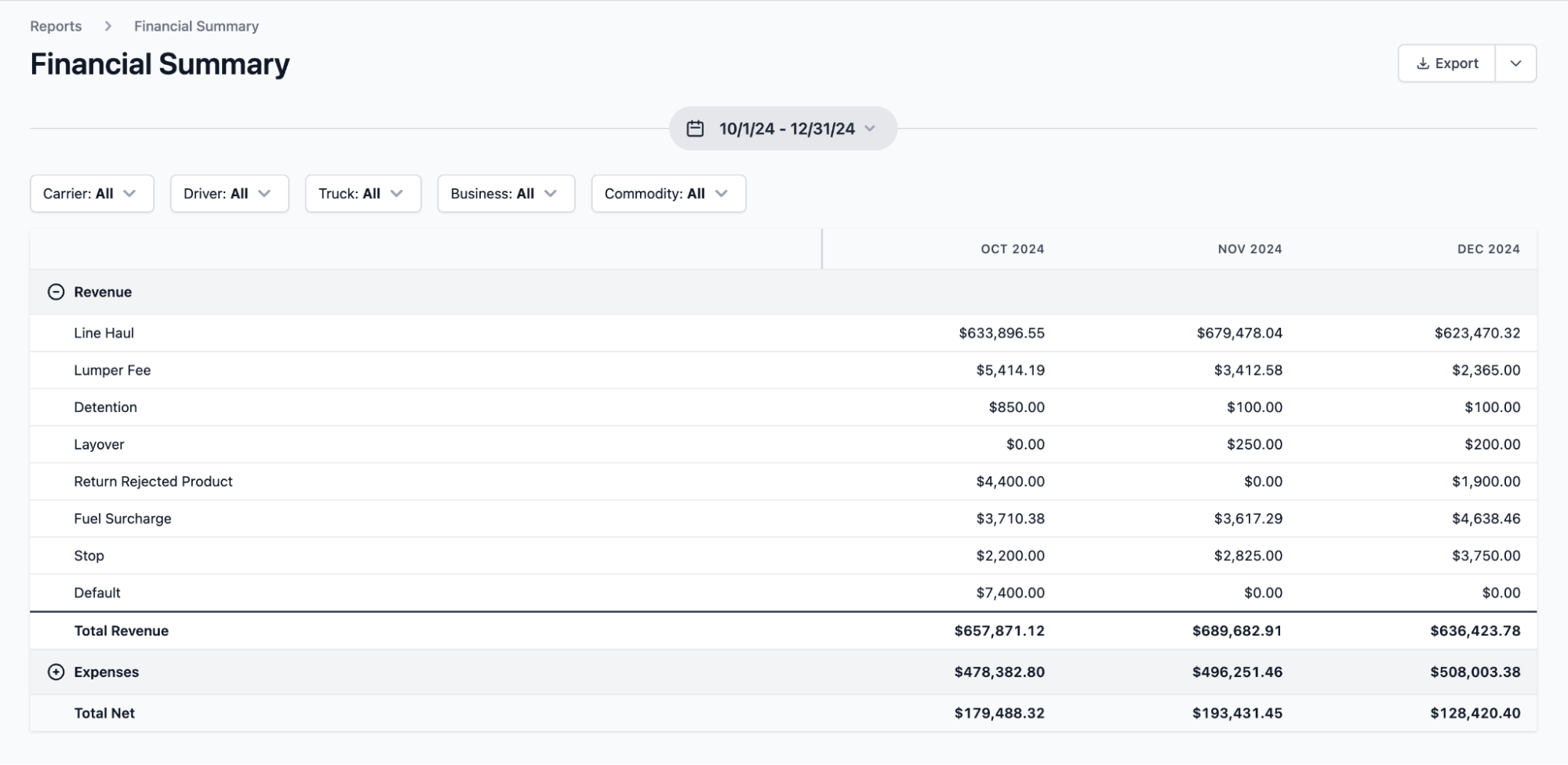
With Toro’s reporting tools, you can:
- Compare profitability by truck, customer, route, or commodity. Identify which accounts deliver strong margins and which may need a rate adjustment.
- Find recurring delays at customer locations. Review driver hours and detention to spot sites where waiting time reduces the number of loads trucks can complete.
- Track financial performance over time. Check revenue and expenses as work is recorded, and compare results across busy and quieter periods.
Read more: Aggregate dispatch software: 5 top options for bulk haulers
Get your team up and running right away with in-person onboarding
Your trucks still need assignments while your office learns a new system. A change in software shouldn’t leave one dispatcher handling the day’s work while everyone else struggles to figure out how it works.
Toro sends a team member to your office to train each department in person. Dispatchers learn how to manage their schedules, while accounting staff learn the billing and driver-pay workflows they’ll use every week. Teams are typically fully operational within two to three weeks.
For instance, Peter Trucking moved its 90-plus-truck operation from Google Sheets and manual QuickBooks entries to Toro. Their office administrator, Sarah, said, “Toro helped us move everything over without shutting down operations. We were still fully functional during the transition.”
Once you’re live, you can reach US-based support staffed by full-time Toro employees. The team responds within 30 minutes during business hours, from 9 a.m. to 9 p.m. ET, so a question about an invoice or dispatch change doesn’t have to hold up the rest of your day.
Toro TMS pricing
Toro TMS is priced as a monthly subscription based on how many trucks you run and which capabilities you need, so you'll need to talk to a member of the Toro team.
There are no annual contracts, no maintenance fees, and no implementation charge for the in-person onboarding. You pay month to month and can leave at any time.
Looking for a Trux alternative for your bulk fleet? Book a demo to see how Toro connects dispatch and scale tickets to customer invoicing and driver pay.
2. Dump Truck Dispatcher: Dispatch software with maintenance tracking

Dump Truck Dispatcher offers truck scheduling, customer invoicing, and vehicle maintenance tracking. Dispatchers can see which trucks are due for service or out of service, helping them factor maintenance into assignment planning.
However, many features are limited across plans. Basic plans exclude subcontractor management, while driver pay and accounting integration require Pro. The advertised starting price therefore won’t cover a fleet that needs those functions.
Key features
- Vehicle maintenance reminders and service-cost tracking
- Visual truck scheduling with order duplication and rescheduling
- Driver app for viewing assignments and acknowledging dispatches
- Ticket management and batch invoice creation
- Subcontractor portal for job requests and assignments on Standard and Pro
- Driver pay and subcontractor pay statements on Pro
Pricing starts at $100 per month for Basic, covering up to five trucks. Standard costs $25 per truck per month, and Pro costs $35 per truck per month, both with a 10-truck minimum. All plans require annual prepayment, which puts the minimum Pro subscription at $4,200 upfront per year.
3. TruckLogics: A TMS for owner-operators and small fleets

TruckLogics helps owner-operators and small fleets manage loads and the administrative work that comes with them. Dispatchers can organize assignments, while drivers use the mobile app to access trip details and upload documents.
Smaller trucking companies will get the most value from TruckLogics because it combines fleet management with invoicing and expense tracking, making it easier for a small office team or owner-operator to run the business.
Key features
- Load creation and dispatch scheduling for full-truckload and LTL freight
- Customer invoicing, income and expense tracking, and driver settlements
- Mobile access to assignments, document uploads, and driver updates
- IFTA reports using mileage and fuel data from dispatches or connected ELDs
- Truck maintenance scheduling with reminders
- QuickBooks integration for transferring invoices
TruckLogics pricing starts at $39.95 per month for one or two trucks. Those with larger fleets pay more, and businesses running 25 or more trucks need a quote. A 7-day free trial is also available.
Read more: 13 best software for small trucking companies
4. TruckIT: Digital ticketing for DOT projects

TruckIT provides dispatch and digital ticketing software, including tools for projects where Department of Transportation (DOT) inspectors and contractors need access to delivery records. Its project tools let field inspectors review digital tickets and verify material deliveries.
The platform’s AirTicket system creates electronic bills of lading at the scalehouse and shares ticket data with participating project teams. However, connecting those tickets to your existing billing and payroll systems may require additional integration work.
Key features
- Electronic bills of lading generated through AirTicket
- OCR processing for printed and handwritten tickets
- Shared delivery records for project teams and DOT inspectors
- Delivery verification with timestamps and digital signatures
- Ticket reporting and bulk reconciliation
- Connections to scalehouse systems and accounting or ERP software
TruckIT offers custom plans only. Request a demo and quote based on the tools and integrations your operation needs.
Toro TMS: A Trux alternative for bulk haulers
If you’re considering Trux for your bulk fleet, look at how well it supports the work your office handles every day. Dispatching trucks is one part of that, but your team also needs to collect each load’s paperwork, bill customers at the agreed rate, and calculate driver pay.
Toro TMS brings that work together for dry and liquid bulk haulers. Drivers receive instructions and submit tickets through a link sent by text. Your office then uses the completed-load records for billing and payroll, without entering the same information again.
With Toro TMS, you can:
- Create repeat loads from saved templates and adjust driver assignments as the day changes.
- Collect scale tickets and delivery documents by text, with no app for drivers to install.
- Apply separate customer billing and driver pay rates, including per-ton, hourly, per-load, and mixed arrangements.
- Compare profitability across customers and trucks to see where delays or operating costs reduce your margins.
- Get your team started with in-person training and ongoing customer support tailored to your operation.
Book a demo today to see how Toro handles your bulk hauling operation from daily dispatch through invoicing and driver pay.