.png)



If you’re researching TMS integrations, you’ll know that running a trucking company takes more than a transportation management system. Most fleets also rely on an ELD for compliance and truck tracking, fuel cards for purchases at the pump, and accounting software to manage billing tasks, among other tools.
When using multiple tools in parallel, though, the main challenge is that they don’t typically share data with one another automatically. This forces your team to handle more tasks manually, like re-entering load details, downloading reports from separate portals, and rebuilding numbers in spreadsheets that another system already captured. That increases the risk of mistakes—and costs your team time.
That’s precisely why the TMS you use needs to be integrated with your other tools. But it’s important to be aware that not every TMS integration is actually worth having. In our experience, the integrations that matter most will do two things:
- Fit your type of trucking business. For instance, freight brokers are more likely to need a CRM or an enterprise resource planning (ERP) system to manage shipper relationships, while 3PL providers will want a warehouse management system (WMS) connected alongside their TMS. Typically, though, bulk haulers—who work with more local routes and repeat customers—would never open tools like that and would benefit more from integrations for dispatching, documents, or mileage tracking instead.
Volume matters here too. A heavy hauler moving one permitted load at a time doesn't generate much repeat data entry in the first place, so the payoff is small. A bulk hauler running 10 to 15 loads per truck per day keys in the same details over and over, so the same integration saves real hours. - Actually reduce work instead of relocating it. Two TMSs can both say they "integrate with QuickBooks." But one might map every charge to the right account and sync both ways on its own, while the other might just push a one-way export that someone still has to open up and clean. As such, it’s worth avoiding shallow integrations that just move the manual work somewhere else. Integrations worth having are two-way, so they remove the work entirely.
In this article, we walk through the five integrations that matter most for a bulk hauling operation, and we’ll cover what separates an integration that saves time from one that probably doesn’t.
Then, we'll introduce Toro TMS, our trucking management software, and show how it handles each of these integrations natively.
Teams who use Toro TMS with integrations report saving up to 70% of the time they spend on daily tasks, like:
- Manually checking truck locations or tracking mileage for IFTA
- Sending load details to drivers or collecting job tickets
- Generating driver pay from completed loads, hours, and detention time
- Entering invoice and payroll details into QuickBooks
Schedule a demo today to learn how Toro centralizes your trucking operations into one system.
5 TMS integrations you actually need as a bulk hauler
A TMS handles the core tasks of running a trucking company, like creating and dispatching loads, assigning drivers, billing customers, keeping track of customer details, and reporting on how the business is performing. But it can't capture everything on its own, so it typically depends on data from other tools to keep the whole operation in one place.
If you consider the two tests above, these are the must-have integrations for bulk haulers:
- Electronic logging device (ELD): Your ELD provider (such as Samsara, Motive, or Omnitracs) tracks live truck locations, mileage, and driver hours of service (HOS). Integrated with your TMS, that data feeds the dispatch board directly, so dispatchers see where trucks are and who has hours left without switching to a separate portal.
Bulk haulers run enough daily loads that a weak ELD integration costs them again and again. If it doesn’t work well, the same trip data needs to be entered once at dispatch, again to update the load if something changes, then again at IFTA reporting, invoicing, and payroll.
So, an ELD integration should do more than just drop a location pin on a map. An actually valuable one will pull HOS, mileage, and arrival and departure timestamps into the same records that dispatch and billing already use, so detention gets captured and miles are ready for IFTA without anyone re-keying them.
- Ticket and document management: A TMS that collects scale tickets, BOLs, and delivery confirmations digitally and attaches them to the right load keeps billing from waiting on paperwork riding around in the cab. Bulk haulers get the most value from this integration because of the volume of paperwork they collect every day.
The version that actually works runs over text message rather than a driver app. Drivers are far more likely to snap a photo and send it than to log into an app between loads. As such, text-based capture gets the tickets in digitally, while an app-based one quietly fails as drivers stop using it.
Better still is a system that reads each slip and writes the quantities, ticket numbers, and timestamps to the load record itself, instead of parking a photo someone has to open and transcribe by hand. - Accounting software integration: Loads get billed in your TMS, but the books tend to live in QuickBooks. An integration syncs invoices and settlements between the two, so nobody types the same numbers twice, and the two systems never drift apart.
An integration isn’t worth it if it just hands you a one-way CSV export that your bookkeeper still has to categorize line by line. The most useful TMS integrations can map every charge type to the matching QuickBooks item and general ledger account, so you can sync with one click and close your books without recategorizing or entering data manually again. - Payroll and driver settlement integration: Driver pay depends on completed loads, hours, and detention time. When that data flows into settlements automatically, your team no longer has to rebuild every driver's week in a spreadsheet, and fewer pay disputes occur as a result.
There are two parts to this. In reality, your TMS itself should calculate the settlement since it already has the loads and hours in the system. The payroll run itself—meaning the deposits and the W-2 taxes—is where you genuinely integrate out to an outside processor like ADP. The process should be native where it can be and integrated only where it has to be. - Fuel card integration: Fuel cards like WEX and Comdata record every purchase by truck, gallons, and state, but that data stays in the provider's portal. With the right integration, those transactions pull into the TMS automatically, so you can view per-truck fuel costs and jurisdiction data for IFTA. You should also be able to match each transaction to the load the truck was running and prepopulate your state mileage and fuel totals so IFTA is ready to file at quarter close.
Connecting all of these tools yourself can be complicated, especially for smaller fleets and bulk haulers. That's why many trucking companies look for a TMS with built-in integrations, such as Toro TMS, that syncs everything and maps data where it belongs automatically.
How Toro TMS connects your entire trucking operation

Toro TMS is built for dry and liquid bulk haulers running a high volume of loads per truck per day. The system makes integrations a foundation of how the platform operates, meaning your ELD, fuel cards, and accounting software all connect directly to Toro.
This means information is entered once into the system at dispatch and flows downstream automatically. Teams can view a truck's position on the dispatch screen, track mileage that gets used for billing and IFTA, and sync completed invoices and driver settlements to their accounting system without repeat manual data entry.
With Toro, you can:
- Monitor truck locations and driver schedules using ELD data
- Dispatch loads and collect documents from drivers through text message
- Record every fuel purchase by truck, gallons, and state automatically
- Automatically calculate IFTA from fuel transactions and ELD mileage
- Create customer invoices and driver settlements from completed load data
- Generate custom reports that uncover fleet performance insights
Below, we'll walk through how each integration works inside Toro and how you can streamline your operations using our software.
Track live truck locations, driver hours, and order statuses in a centralized dashboard
Dispatch runs an entire trucking operation, but most TMSs are too difficult to use because they force dispatchers to build every load from scratch and manage schedules across separate screens.
This is especially true when the TMS doesn't offer ELD integrations, because truck positions and driver hours sit in the ELD provider's portal instead of on the dispatch board.
The result is dispatchers rebuilding the same loads from scratch, switching between screens to see where trucks are, and calling drivers just to confirm a delivery is on schedule. For bulk haulers running 10 to 15 loads per truck per day, that adds up to dozens of hours of unnecessary work.

Toro solves this by running all of dispatch from one centralized dashboard, with ELD and telematics data flowing in through native integrations with providers, including:
- Samsara
- Motive
- Omnitracs
- Geotab
All of these tools seamlessly sync data, so dispatchers can keep track of drivers and manage the entire day from a single screen. With Toro, you can:
- Create recurring loads using reusable job templates. You can build a load once, add all relevant details like the customer, sites, commodity, and rate, and save it as a template to apply whenever that work comes in again. Once a templated load is scheduled, the assigned truck, driver ETA, and live progress are tracked through the ELD integration without re-entering the same information.
- Plan the entire day's schedule at once instead of load by load. Set up all of the day's work, drag each load onto a driver's calendar with a live view of who's open and who's mid-job, and dispatch the full plan in one go. Route planning happens across the whole fleet instead of one truck at a time.
- Make load or schedule changes without manually contacting drivers. Update a delivery time, tonnage, or site instruction once in the dashboard, and the affected driver automatically gets a new text with the change. There's no need to call each driver individually with the new details.
- Monitor driver detention in real time. Toro pulls arrival and departure timestamps from the ELD at every stop and alerts dispatchers when a driver is held past your threshold. This ensures wait time is documented and billable before the truck even leaves the site.

Toro's dashboard is designed to be genuinely easy to use, so you can streamline your entire operation without managing multiple tools in different platforms. You just connect your ELD to Toro and run everything, from load creation to live tracking, in the same system your whole team works from.
Read more: How to choose a dispatch software for trucking your teams will actually use
Simplify dispatch-to-driver communication by sending load assignments and collecting documents via text message
Connecting drivers and dispatchers can solve many of the problems trucking companies face daily. That includes constant check-in calls and delayed paperwork that doesn't reach the office until days after a load closes.
The problem is that most TMS platforms are too complex or frustrating for drivers to use, requiring app downloads and logins that drivers abandon within weeks.
Toro is different because it connects drivers through text message, which is their preferred method of communication and something they already use every day. And you don't need any third-party tools or integrations to communicate with drivers or capture load documents. Everything is built directly into Toro, so there's no separate messaging tool or driver app to buy, connect, or maintain.

With Toro, dispatchers send load assignments straight to the driver's phone. Each text includes:
- Pickup and delivery locations with full address details
- Commodity type and quantities
- Delivery time windows
- Site-specific instructions like gate codes, check-in requirements, or unloading notes
Drivers submit paperwork through a secure link in the same text. Once a job is done, they tap the link, snap a photo of the scale ticket, BOL, or proof of delivery, and hit submit.
After documents are uploaded, Toro can read each slip and file it automatically. Key details like verified quantities, ticket numbers, and timestamps are extracted from the photo and written to the correct load record, so nothing gets matched to jobs by hand.

Dispatch and the back office see everything in real time. That visibility also improves the customer experience, since you can confirm a delivery or send a signed ticket while the truck is still on site instead of calling the driver to check. Load progress updates as drivers work, and documentation is ready for invoicing and settlements the moment a job closes instead of days later when paper reaches the office.
Read more: What's the best document management system for trucking? 5 options for carriers
Automatically generate invoices and driver settlements with synced load data
Billing and payroll can be the most time-consuming tasks for teams who don't use a TMS or any integrations to improve their process. That's largely because the back office waits on paper tickets, rebuilds each job from records in different portals, and then types the finished numbers into QuickBooks a second time to close the books.
Toro removes every one of those steps. Because the ELD, fuel card, and document data for each load is already in the system, invoices and settlements are generated from the load record itself, then synced straight to your accounting software.

With Toro, you can:
- Invoice customers the moment a load closes. Once a driver submits their scale ticket or delivery confirmation, Toro already has the customer, quantities, rate, and any detention tied to that job, so billing teams can send the invoice in a few clicks.
- Apply stored rates and fuel surcharges automatically. Customer agreements are saved in Toro and applied to recurring work automatically, which keeps pricing consistent across every invoice without anyone looking up terms.
- Calculate driver pay from each driver's profile. Pay rules are stored once, whether per load, per ton, per mile, hourly, or a mix, along with recurring deductions. When a job closes, Toro applies the right structure and accounts for detention and mileage, so settlements are ready without spreadsheet math.
- Sync everything to QuickBooks instantly. Invoices, settlements, and mileage data export straight to QuickBooks Online or Desktop, so nothing gets re-entered and your TMS and accounting system always match.
Read more: Trucking accounting software: 5 best options to streamline back-office tasks
Capture every fuel transaction automatically with fuel card integrations
Fuel is one of the highest costs in trucking, but for most fleets it's also the most disconnected data in the operation. Every purchase gets recorded accurately by the card provider, then sits in a separate portal until someone downloads the statements and matches transactions to trucks by hand.
Toro's fuel card integrations, including WEX, Comdata, and Relay Payments, automatically pull those transactions into the system. After importing, each purchase is allocated where it belongs across Toro's modules, from expense entries and settlement deductions to fuel tax reporting, so nothing needs to be posted twice or sorted manually.
That means you can:
- See fuel spend by truck instantly. Every transaction arrives tied to the right truck with its gallons, cost, and purchase state, so per-truck fuel costs are always current.
- Apply fuel deductions to driver settlements automatically. Fuel purchases that come out of a driver's pay flow straight into their settlement, so deductions are accurate without anyone reconciling card statements against payroll.
- Provide reporting with real expense and profitability figures. Since fuel costs are tied to specific trucks and loads, your margin reports reflect actual spend rather than fleet-wide averages.
Tying fuel to specific trucks and loads is also where the clearest cost savings show up, because you can see which routes and rates aren't covering what they burn.
This also saves a ton of time when you need to calculate IFTA. Toro combines the state-tagged fuel purchases from your card provider with the jurisdiction-by-jurisdiction miles from your ELD.
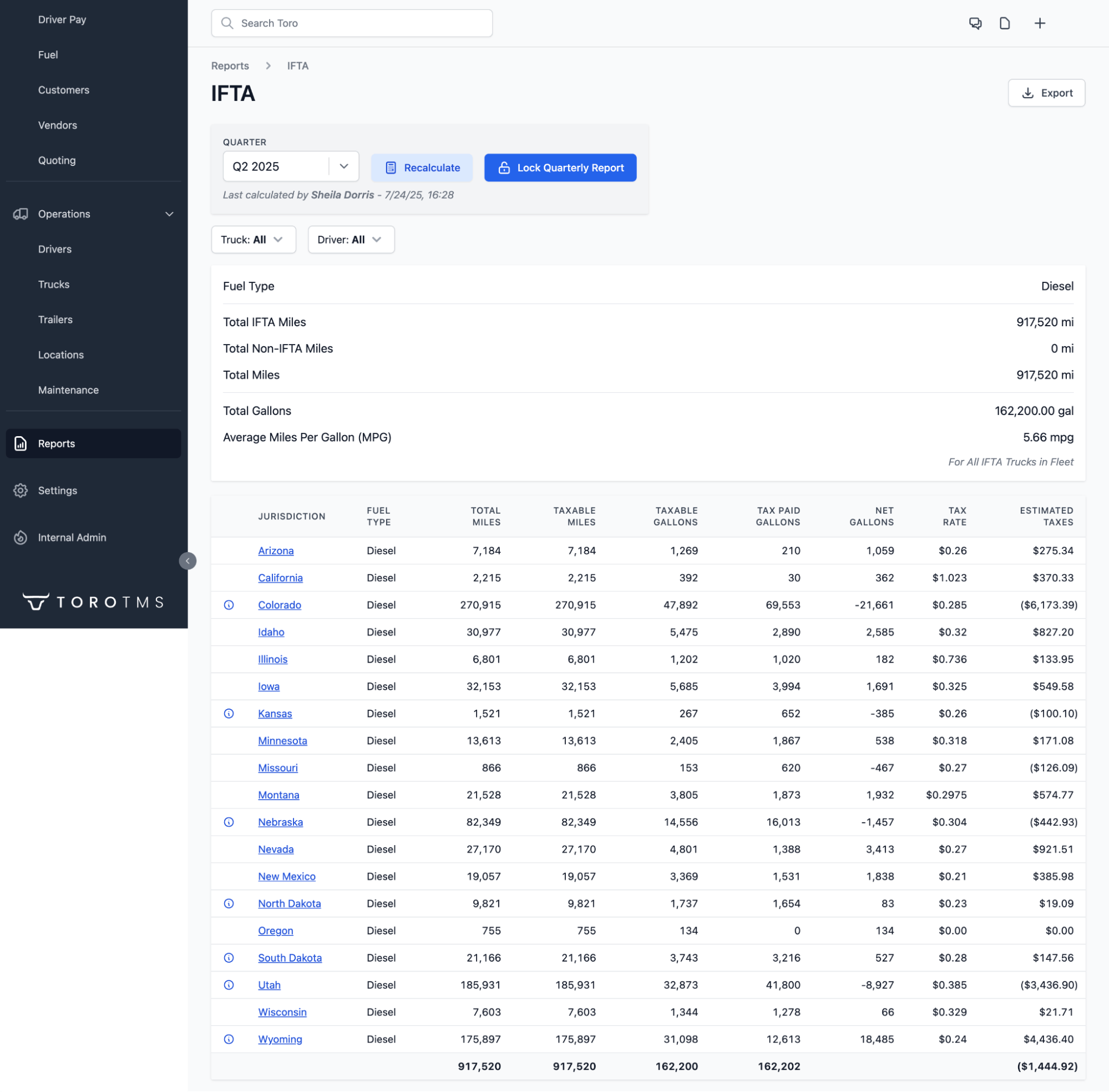
Since both flow in automatically, your IFTA calculation is prepopulated by state and by truck, and filing takes minutes. There's no need to put together old statements and mileage logs manually. Plus, every fuel receipt is stored digitally, so you keep a complete, searchable audit trail behind each filing.
Read more: IFTA mileage tracking software: 4 options and how they compare
Analyze fleet performance with advanced reports from your connected systems
Reporting and analytics are often where companies see the biggest impact of integrations. The numbers you need to measure performance, like revenue, mileage, and fuel costs, come from separate tools, so putting them together normally means hours of manual work.
Toro TMS brings all of that data into one connected system, allowing you to create advanced reports instantly instead of piecing them together at the end of every month.
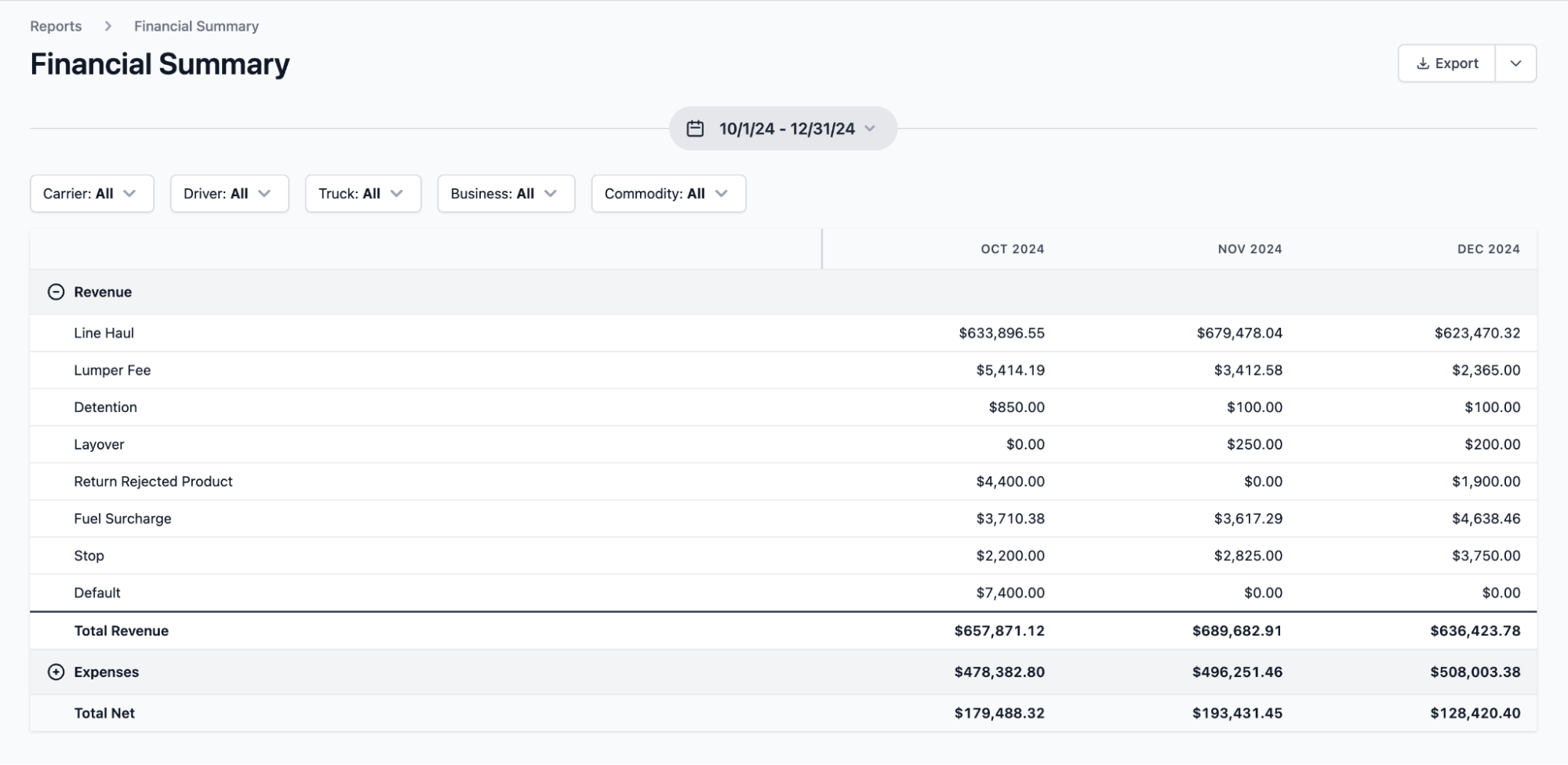
With Toro, you can:
- Compare margins for all customers, routes, and job types. Because revenue, ELD miles, and fuel spend are all connected, you can see which customers are your most and least profitable at a glance.
- Identify fuel patterns reducing your profits. With transactions tied to trucks and loads, you can catch things like a route that consistently burns more fuel than its rate supports, or a truck whose fuel spend per mile is increasing before anyone notices at the pump.
- See which drivers and job sites move the most loads per shift. Completed loads, on-duty hours, and time on site are tracked together, so you can identify your most productive drivers and flag the customers whose slow unloading costs you a run per day.
- Check performance without waiting for month-end. Reports refresh as loads close and integration data syncs, so if performance dips suddenly, you find out right away while there's still time to adjust schedules or pricing.
Get every integration set up with hands-on onboarding and dedicated support
Integrations can be a place where many TMS implementations fail. Connecting an ELD, multiple fuel card accounts, and accounting tools all involve third-party configuration that non-technical teams might not be able to figure out on their own.
Toro makes this as seamless as possible with hands-on, in-person onboarding. We'll work closely with all departments in your organization while offering personalized support so team members get trained on tasks they're responsible for.
We can connect your integrations, like your ELD, then train your dispatchers on how to use it to monitor drivers and keep track of schedules. The same goes for drivers learning to upload documentation or back-office teams who handle invoicing and payroll.
Our software is designed to be genuinely easy to use for non-technical teams, and our support team responds within 30 minutes during business hours, from 9 a.m. to 9 p.m. ET.
Curious how the integrations work on your fleet's setup? Book a demo, and we'll walk you through it.
Run your fleet from one system with the right TMS integrations
The right TMS integrations improve your operational efficiency by connecting your ELD, fuel cards, and accounting software into one system. This ensures that data is entered once and used downstream throughout your organization.
Toro TMS is built with this in mind. It includes native integrations that map data where it belongs automatically instead of leaving your team to sort it out on their own.
With Toro, you can:
- Monitor live truck locations and driver hours from your ELD in a centralized dispatch dashboard
- Send load assignments and collect scale tickets, BOLs, and delivery confirmations by text
- Capture every fuel transaction by truck, gallons, and state automatically through fuel card integrations
- Generate invoices and driver settlements automatically from completed load data
- Build advanced reports on profitability and driver productivity to uncover business insights
Book a demo to see how Toro TMS pulls your ELD data, job tickets, and accounting into one system.